
What is a “421 misdirected request” error?
The 421 status code, also known as “421 Misdirected Request,” is an HTTP status code that appears when a request is sent to a server that is unable to process a response.
Furthermore, this 421 status code indicates that the server is unable to establish a connection with the client due to network or configuration issues.
Even though the server understands the request, it refuses to process it because it lacks the capability to do so.
For instance, if a web browser requests a server to access a website, the server might respond with a range of status codes, depending on the success or failure of the request.
The 421 status code is one such code, indicating an issue that is generally temporary.
Root Causes of “421 misdirected request” error
This error can be caused by several factors:
- The request was meant for a different target resource.
- There are issues with the server configuration, problems with load balancing, misconfigurations in DNS, or failures in the proxy server.
- When multiple websites share a single SSL certificate, the browser may trigger the error due to conflicts in the virtual host entry.
- Multiple requests for multiple hosts on the same TLS connection, make renegotiation impossible.
How to fix the “421 misdirected request” error? Solutions
Here are some ways to fix this error:
Solution 1: Correcting Wildcard SSL
If many domains share a single SSL certificate, the certificate either has a wildcard name, such as *.sample.org, or carries several alternate names.
Having a unique SSL certificate for each domain can stop HTTP/2 from reusing connections.
Solution 2: Removing Faulty Code in .htaccess
If there’s any faulty code in your .htaccess file, removing it might solve the issue.
Solution 3: Clearing the Browser Cache
Sometimes, it could be a simple browser cache. The browsers can cache the 421 response. Thus it is not a bad idea to try clearing the browser cache.
If you use Google Chrome, here’s how to clear its cache:
- Click the three dots in the top-right corner of your window. You can also use the keyboard shortcut (Ctrl + H).
- Go to History.
- Click on Clear Browsing Data.
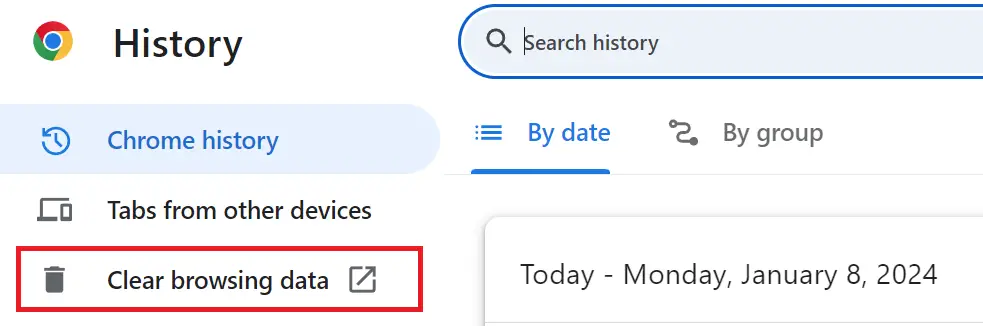
- A new window will appear. Choose the Time range, if you wish to erase all data, select All Time.
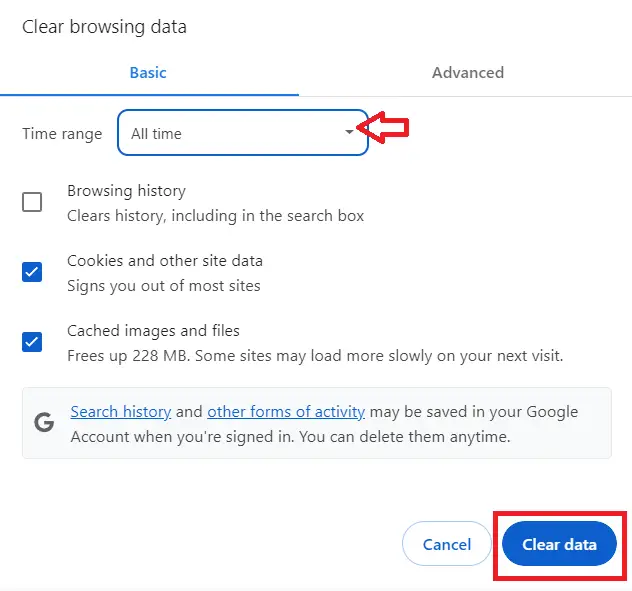
- Select what you’d like to clear- this could be browsing history, cookies, and other site data, or cached images and files.
- Then, hit the Clear Data button.
Solution 4: Verifying Server Configuration
You can also resolve this error by reviewing your request, verifying server configuration, following redirections if necessary, and seeking support when needed.
Conclusion
We have discussed the 421 status code, also known as “421 Misdirected Request,” which indicates that the server is unable to establish a connection with the client due to network or configuration issues.
By implementing the solutions provided above, you can confidently address and resolve this issue.
For further learning, you can also check the following HTTP status code:
- 414 Request URI Too Large
- 415 Unsupported Media Type
- 416 Requested Range Not Satisfiable
- 417 expectation failed
- 418 I’m a Teapot: What is the HTTP Status Code 418?
Featured guides worth reading next
Frequently Asked Questions
What does an HTTP error status code mean?
HTTP status codes communicate request outcomes. 4xx codes mean the client did something wrong (404 not found, 403 forbidden, 429 too many requests). 5xx codes mean the server did something wrong (500 internal error, 502 bad gateway, 503 unavailable, 504 timeout). The exact code tells you where to look for the fix.
How do I fix HTTP 500 Internal Server Error?
500 means the server crashed processing your request. Three places to look: (1) Server logs (Apache error log, nginx error log, your Flask/Django console). (2) Database connection or query errors. (3) Unhandled exceptions in your application code. If you see 500 in production, check application logs first; the actual error message is usually clear.
How do I fix HTTP 502 Bad Gateway?
502 means the proxy (nginx/Apache) couldn’t reach your application server (gunicorn/uvicorn/PHP-FPM). Check: (1) Is your app server running? systemctl status gunicorn. (2) Is it listening on the port nginx expects? netstat -plnt. (3) Are there OOM crashes killing the worker? dmesg | grep -i oom. Restart the app service first as the quick fix.
What is the difference between HTTP 401 and 403?
401 Unauthorized: you’re not logged in (or your auth token is missing/expired). The fix: authenticate first. 403 Forbidden: you’re logged in but don’t have permission for this resource. The fix: check user roles/permissions. Two different fix paths despite similar-sounding names.
Where can I find more HTTP error fixes?
Browse the HTTP Errors reference hub for 35+ specific status code explanations and fixes. For backend troubleshooting see the Python Tutorial or PHP Tutorial hubs.

Caren Bautista
Technical Writer at PIES IT Solution
Responsible for crafting clear, well-structured, and beginner-friendly content across the platform. Handles the writing, proofreading, and editorial review of tutorials, guides, and documentation to ensure every article is accurate, readable, and easy to follow.
Expertise: Technical Writing · Content Creation · Documentation · Editorial Writing · JavaScript · TypeScript · Python · Python Errors · HTTP Errors · MS Excel · View all posts by Caren Bautista →