
Classroom Management System Thesis Documentation Chapter 5
This Chapter of Classroom Management System Thesis Documentation Chapter 5, concludes the reports and a summary of the research is presented, and findings of the study are discussed and interpreted.
SUMMARY, CONCLUSIONS, AND RECOMMENDATIONS
The main purpose of this study was to design and develop a Classroom Management System Online System that will help the teachers to record the attendance and the academic grades of the students anytime online.
1. The Objective of the study was design and develop Classroom Management System Online that a. To record easily the attendance of the students b. To see the grades of the students online c. To easily compute the academic grades of the students.
2. The Objective was to assess the developed features and functions of the Classroom Management System Online in terms of Auditability, Accuracy, Completeness, Communication, Commonality, Conciseness, Consistency, Observability, Operability, Security, Self-Documentation, Simplicity, Software System Independence, Traceability, Training, Controllability, Data Commonality, Decomposability, Error Tolerance, Execution Efficiency, Expandability, Generality, Hardware Independence, Instrumentation, Modularity.
3. The Objective was to evaluate the Classroom Management System Online in terms of functionality, reliability, usability, efficiency, maintainability, and portability.
The study used iterative Development in developing the system Application. The proponents selected the Carlos Hilado Memorial College to evaluate the system using the ISO software Quality Model.
Conclusions
The proponents conducted an evaluation to determine the acceptability and functionality of the system. After the evaluation, the result came out to be both “”, therefore the proponents conclude that the system
1.In terms of user’s feedback, the respondents shown their positive ideas toward evaluating the developed web based for intending to the classroom despite a couple of technological limitations.
2.Based on the result gathered in the evaluation, the features of the system were all useful in managing a classroom.
3.The result of the evaluation using PPSUQ specified criteria was the basis to conclude the functionality if the system.
According to the responders users ratings to the system the system, the system was helpful in terms of barcode scanner and manageable though some of them were not really into technology but they were satisfied of the system function.
Objectives
1.To provide more efficient and productive way of scanning the barcode ID of the student.
2.To design and develop the system with barcode scanner to record the attendance of the student for securing the important data for essential purposes and save up important record of everyday attendance and to be the basis of the classroom which is given to the student.
3.To evaluate the usability of the system according to the system’s Usefulness, information qualityand interface quality.
Recommendations
Based on the information given, the things that the responders would like to add were that it could be also useful in other types of sport.
Classroom Management System Thesis Documentation Chapter 5 : References
Attendance Monitoring System for Laboratory Rooms
Castillo C. M. Casas, S. B., Ibanez, M. I., Pilongco, J. C. & Sitoy, M. C.. (2013). 503 and 601. PULSAR, 2(1).
Retrieved from http:// ejournals.ph/form/cite.php?id7246.
Board me app: A mobile application for Classroom attendance in university belt (2017)
Meldrick P. Abella, Lander M. Pecdasen, Gideon Gerald R. Fajardo, Layka G. Pascual, Marilou N. Jamis
Retrieve From https://ieeexplore.ieee.org/document/8227973
“Home-bro: Web Based Students’ Attendance monitoring System” (2019)
Mary Anne M. Sahagun and Jun P. Flores,
Retrieved From https://www.ijeat.org/wp-content/uploads/papers/v8i3S/C11130283S19.pdf
Classroom Management System Thesis Documentation Chapter 5 : Appendices (Appendix A. “Relevant Resource Code”)
Attendance Log
<?php
session_start();
include(‘functions.php’);
?>
<div class=”container”>
<?php
if(isset($_POST[‘valid’])):
if($_SESSION[‘level’] == 0){
$loadStudentLog = System::loadStudentLog($_SESSION[‘sid’]);
?>
<div class=”row” style=”margin-top:20px;”>
<?php if(!empty($loadStudentLog)): ?>
<div class=”table-designed-header”><h3>Attendance Log</h3></div>
<div class=”table-designed”>
<table class=”table table-bordered”>
<thead>
<tr>
<th>#</th>
<th>Date</th>
<th>Time</th>
<th>Remarks</th>
<th>Place</th>
</tr>
</thead>
<tbody>
<?php foreach($loadStudentLog as $key => $log): ?>
Classroom Management System Thesis Documentation Chapter 5 : (Appendix B. “Questioner”)
Experts’ Questionnaire
Name (Optional): ______________________________Date Evaluated: ______________
Direction: Please evaluate the following content to determine the acceptability of “Classroom Management System Online”. Please indicate your honest and sincere response to each statement by checking the number to the space provided.
Scale
1.0 – 2.19 – Very Useful
2.20 – 3.39 – Useful
3.40 – 4.59 – Moderately Useful
4.60 – 5.79 – Less Useful
5.80 – 7.00 – Least Useful
Table 18: Expert Questionnaire
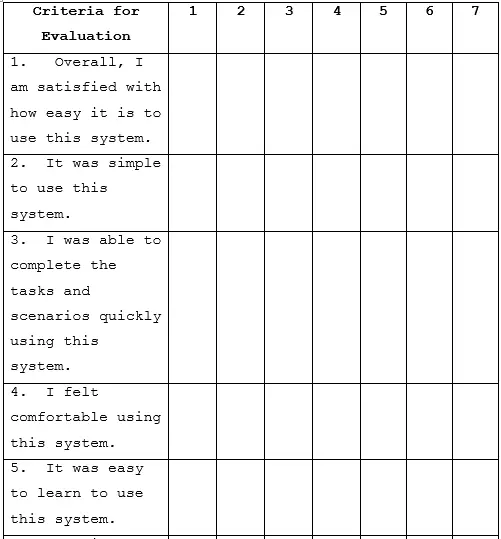

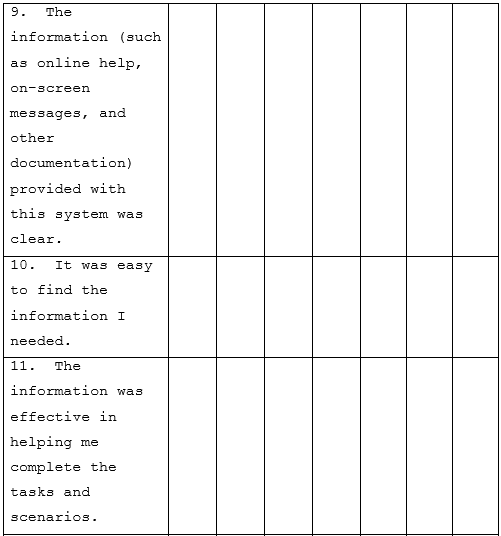
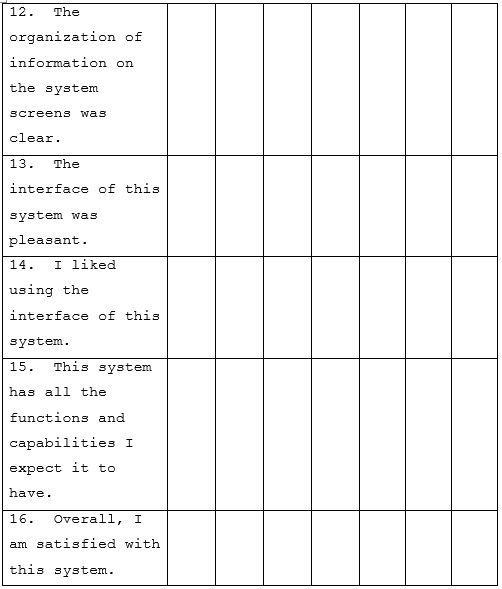
Table 17 shows the Evaluation of End User using the PSSUQ Questionnaire
End-users’ Questionnaire
Name (Optional): ______________________________Date Evaluated: ______________
Direction: Please evaluate the following content to determine the acceptability of “Classroom Management System Online”. Please indicate your honest and sincere response to each statement by checking the number to the space provided.
Scale
1.0 – 2.19 – Very Useful
2.20 – 3.39 – Useful
3.40 – 4.59 – Moderately Useful
4.60 – 5.79 – Less Useful
5.80 – 7.00 – Least Useful
Table 19: End User Questionnaire
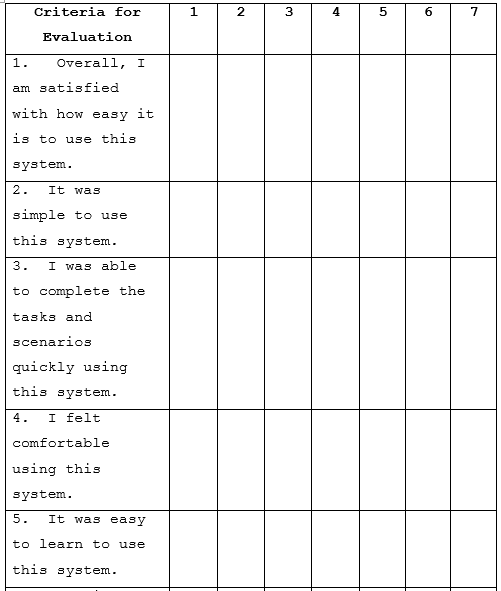
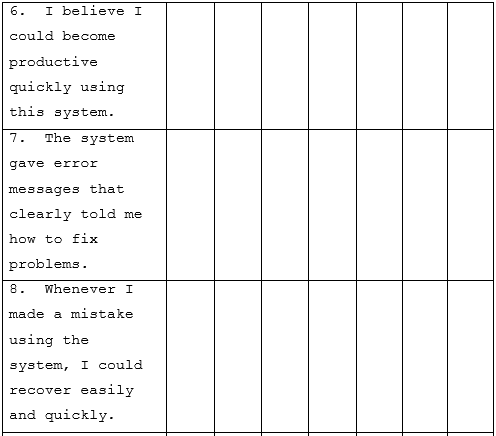
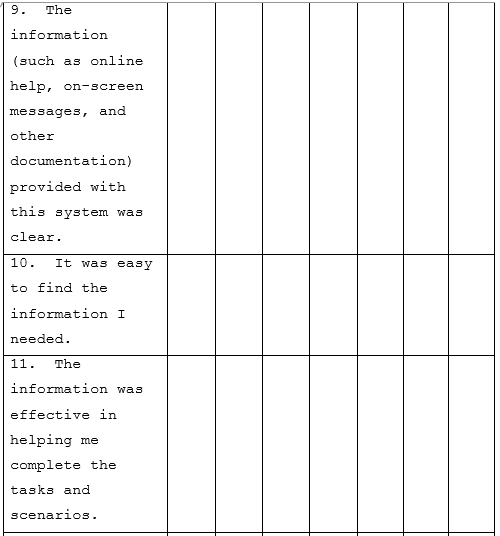
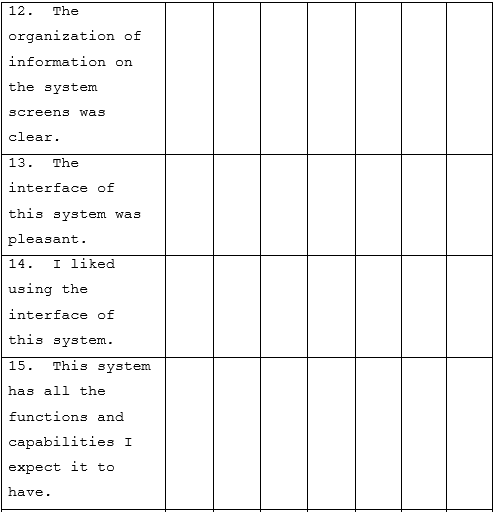
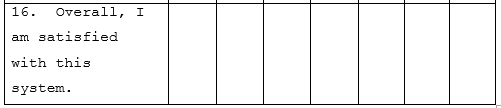
Table 19 shows the evaluation for the expert
Classroom Management System Thesis Documentation Chapter 5 : (Appendix C) “Sample Inputs“
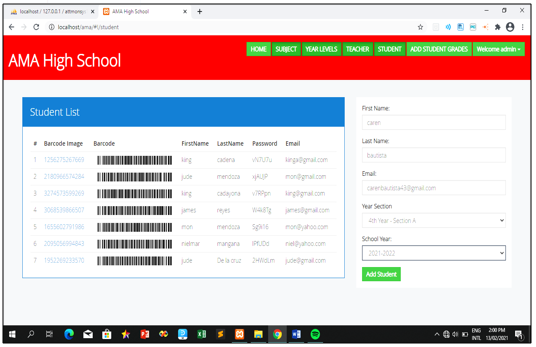
Figure 15. The Sample Input of Adding New Student.
Figure shows the sample input for adding of new student. The student information are reflected in this record.
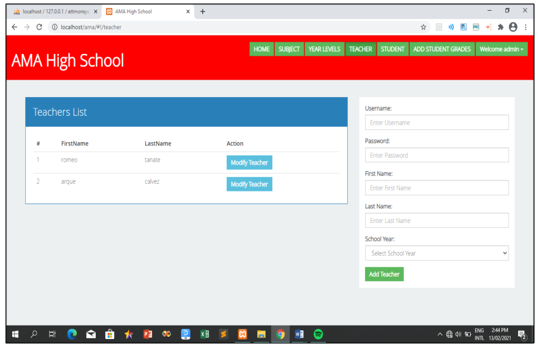
Figure 16: The Sample Input of Adding New Teacher.
Figure shows the sample input for adding of new teacher. The teacher information are reflected in this record.
Classroom Management System Thesis Documentation Chapter 5 : (Appendix D) “Sample Outputs“

Figure 17. The Sample Outputs of the List of Subjects.
Figure shows the sample output for the subject list information are reflected in this record.
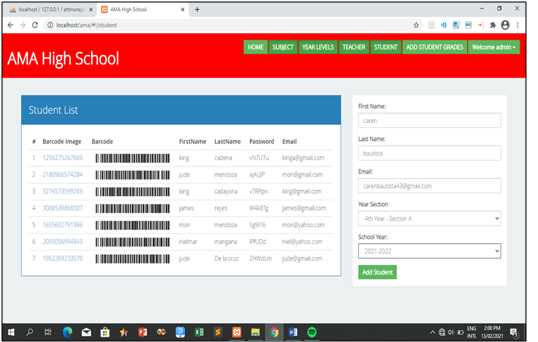
Figure 18: The Sample Outputs of the Student List.
Figure shows the sample output for the student list information are reflected in this record.
Classroom Management System Thesis Documentation Chapter 5 : (Appendix E) “Sample Reports“
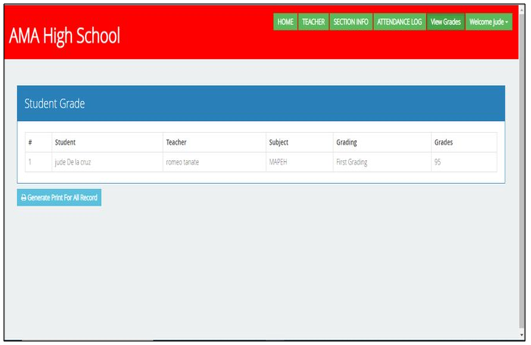
Figure 19. The Sample Reports of Student Grades.
Figure shows the sample reports for the Student Grades information are reflected in this record.
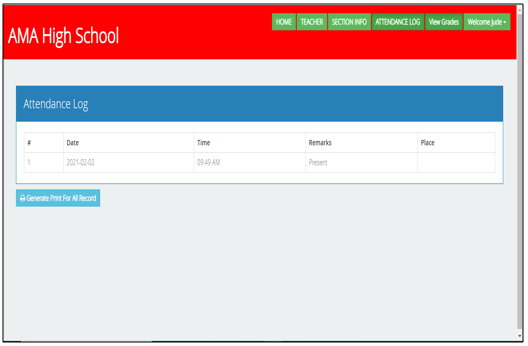
Figure 20. The Sample Reports of Attendance Log List.
Figure shows the sample Report for Attendance Log list information are reflected in this record.
Classroom Management System Thesis Documentation Chapter 5 : (Appendix F) “Users Guide“
The following figures service as the user’s guide in using the system.
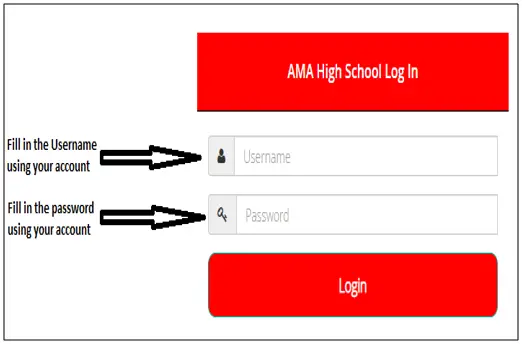
Figure 21. Guide for Log in.
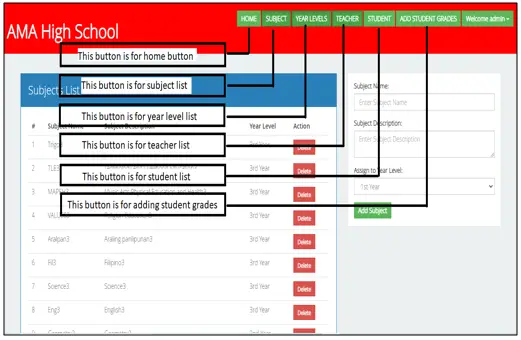
Figure 22. Guide for Main form.
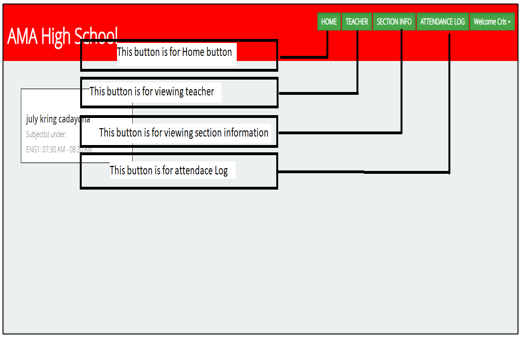
Figure 23.q guide for Student.
Related Capstone Resources
- Classroom Management System Thesis Documentation Chapter 1
- Classroom Management System Thesis Documentation Chapter 2
- Classroom Management System Thesis Documentation Chapter 3
- Classroom Management System Thesis Documentation Chapter 4
- Law Firm Management System Thesis Chapter 3
- Online Supply And Inventory System Thesis Documentation Chapter 1
- Crane Thesis Documentation Chapter 1
- Crane Thesis Documentation Chapter 3 Methodology
- Thesis Documentation Online Supply And Inventory System Chapter 3
- Crane Thesis Documentation Chapter 2 Related Literature
Inquiries
if you have any questions or suggestions about Classroom Management System Thesis Documentation Chapter 5, please let’s me know by dropping your comment below.
Capstone chapter writing checklist
Structuring a BSIT capstone chapter correctly saves rework and eases the defense. Follow this checklist for consistent quality across all 5 chapters.
- Draft the outline first. Every section header first, then fill in the content.
- Write the methodology before the introduction. Chapter 3 (methodology) forces you to think through the system; Chapter 1 becomes easier after.
- Include diagrams early. UML diagrams in Chapter 3 clarify what you’re building.
- Cite sources as you write. Do not defer citations. Use Zotero or Mendeley to track sources.
- Get adviser feedback per chapter. Do not write all 5 chapters then ask for review.
- Number figures and tables. Figure 3.1, Table 4.2, etc. Panels reference these numbers.
- Follow the school template exactly. Font, margins, spacing — do not deviate.
Common capstone mistakes to avoid
- Copying without attribution. Panels use Turnitin. Cite everything you did not write yourself.
- Over-scoping the project. A well-executed simple system beats a poorly-executed ambitious one.
- Deferring documentation. Documentation quality is a big part of the grade.
- Skipping user testing. Panels ask about user feedback. Have real data.
- Ignoring adviser feedback. Advisers know what the panel will ask.
Recommended free tools for capstone projects
- draw.io / diagrams.net. UML diagrams for Chapter 3.
- Google Docs. Collaboration + version history + adviser comments.
- Zotero or Mendeley. Reference management + auto-formatted citations.
- GitHub. Version control for the source code (also earns E-E-A-T signal on your CV).
- Grammarly. Language + tone check on the documentation.
- Turnitin. Plagiarism check before submission (some schools provide access).
- ChatGPT or Claude. For outline scaffolding — not for writing the actual content.
Where to get more capstone resources
- Capstone project ideas. Browse itsourcecode.com/topics/fyp/ for 140+ tested capstone concepts.
- Working source code. itsourcecode.com/topics/free-projects/ has 1,000+ downloadable projects.
- UML diagrams. itsourcecode.com/uml/ has 300+ free UML examples for Chapter 3.
- ER diagrams. itsourcecode.com/topics/uml/erd/ for database schemas.
Official references
Frequently asked questions
How many pages should a BSIT capstone chapter be?
Chapter 1 (Introduction) is typically 8-12 pages. Chapter 2 (RRL) is 15-25 pages. Chapter 3 (Methodology and System Design) is 15-30 pages depending on diagram count. Chapter 4 (Results) is 10-20 pages. Chapter 5 (Conclusions) is 5-10 pages. Total: 60-100 pages for the whole capstone.
What order should I write the chapters in?
Recommended order: Chapter 3 first (system design and methodology — most concrete), then Chapter 1 (introduction with the problem statement), then Chapter 2 (RRL to justify Chapter 1), then Chapter 4 (results — after implementation), then Chapter 5 (conclusions). This avoids rewrites and speeds up defense readiness.
What formatting style should I use for the capstone documentation?
Most Philippine BSIT programs require IEEE or APA 7th edition. Confirm with your adviser first. Use Times New Roman 12pt, double-spaced, 1-inch margins, and page numbers. Reference all sources properly and use consistent citation style throughout.
How many references do I need per chapter?
Chapter 1: 5-10 references. Chapter 2 (RRL): 20-40 references. Chapter 3: 10-15 references. Chapter 4-5: minimal, mostly self-referential. Recent sources (last 5 years) are strongly preferred over older ones.
What tools help write the capstone chapters?
Zotero or Mendeley for reference management, Grammarly for language check, Turnitin for plagiarism scan, Google Docs for collaboration with adviser, LaTeX (Overleaf) for advanced formatting, and ChatGPT or Claude for outline scaffolding (not for writing the actual content).

Adrian Mercurio
Full-Stack Developer at PIES IT Solution
Specializes in building complete capstone projects with full documentation. Strong background in PHP/MySQL development and database design. Has personally built and tested over 30 capstone-ready projects with ER diagrams, DFDs, and chapter-by-chapter thesis documentation.
Expertise: PHP, Laravel, Database Design, Capstone Projects, C#, C, C++, Python, AI Projects · View all posts by Adrian Mercurio →