

Search Availability Application in VB.net with Source Code
In this tutorial, I will teach you how to Search Availability Application project in VB.net. This method is very important when you create a Hotel Reservation and Management System.
This is the main feature of the system because it is where you can find the available rooms and to avoid duplication of reserved and booked rooms.
What is Visual Basic’s purpose?
The third-generation programming language was created to aid developers in the creation of Windows applications.
It has a programming environment that allows programmers to write code in.exe or executable files. They can also utilize it to create in-house front-end solutions for interacting with huge databases.
Because the language allows for continuing changes, you can keep coding and revising your work as needed.
However, there are some limits to the Microsoft Visual Basic download. If you want to make applications that take a long time to process, this software isn’t for you.
That implies you won’t be able to use VB to create games or large apps because the system’s graphic interface requires a lot of memory and space.
Furthermore, the language is limited to Microsoft and does not support other operating systems.
What are the most important characteristics of Visual Basic?
Microsoft Visual Basic for Applications Download, unlike other programming languages, allows for speedier app creation. It has string processing capabilities and is compatible with C++, MFC, and F#.
Multi-targeting and the Windows Presentation Framework are also supported by the system, allowing developers to create a variety of Windows apps, desktop tools, metro-style programs, and hardware drivers.
This Search Availability Application in VB.NET with Source Code are made by MySQL and Visual Basic 2008.
Let’s begin to create the Search Availability Application in VB.net with Source Code:
- Create a database in the MySQL and name it “roomdb“.
- Do these following codes for creating and inserting rooms in the database that you have created.
CREATE TABLE IF NOT EXISTS `tblroom` (
 `ROOMID` int(11) NOT NULL AUTO_INCREMENT,
 `ROOMNUM` int(11) NOT NULL,
 `ROOMTYPE` varchar(60) NOT NULL,
 `ROOM` varchar(30) NOT NULL,
 `NUMPERSON` int(11) NOT NULL,
 `PRICE` double NOT NULL,
 PRIMARY KEY (`ROOMID`)
) ENGINE=InnoDB DEFAULT CHARSET=latin1 AUTO_INCREMENT=21 ;


INSERT INTO `tblroom` (`ROOMID`, `ROOMNUM`, `ROOMTYPE`, `ROOM`, `NUMPERSON`, `PRICE`) VALUES
(15, 3, 'Standard', 'Standard Room', 2, 500),
(16, 2, 'Standard', 'Standard Room', 2, 500),
(17, 4, 'Single', 'Single Room', 1, 400),
(18, 5, 'Family Deluxe', 'Family Deluxe Room', 5, 1500),
(19, 25, 'Family', 'Family Room', 4, 800),
(20, 24, 'Deluxe', 'Room Deluxe', 4, 1200);
- Do these following codes for creating and inserting reserve rooms in the database that you have created.
CREATE TABLE IF NOT EXISTS `tblreservation` (
 `RESERVEID` int(11) NOT NULL AUTO_INCREMENT,
 `TRANSNUM` int(11) NOT NULL,
 `TRANSDATE` date NOT NULL,
 `ROOMID` int(11) NOT NULL,
 `ARRIVAL` datetime NOT NULL,
 `DEPARTURE` datetime NOT NULL,
 `RPRICE` double NOT NULL,
 `STATUS` varchar(11) NOT NULL,
 PRIMARY KEY (`RESERVEID`),
 KEY `ROOMID` (`ROOMID`),
 KEY `TRANSNUM` (`TRANSNUM`)
) ENGINE=InnoDB DEFAULT CHARSET=latin1 AUTO_INCREMENT=57 ;


INSERT INTO `tblreservation` (`RESERVEID`, `TRANSNUM`, `TRANSDATE`, `ROOMID`, `ARRIVAL`, `DEPARTURE`, `RPRICE`, `STATUS`) VALUES
(29, 156, '2016-03-29', 16, '2016-03-29 00:00:00', '2016-03-30 00:00:00', 500, 'BOOKED'),
(30, 157, '2016-03-29', 18, '2016-03-31 00:00:00', '2016-04-01 00:00:00', 1500, 'BOOKED'),
(31, 158, '2016-03-29', 15, '2016-03-29 00:00:00', '2016-03-30 00:00:00', 500, 'BOOKED'),
(32, 159, '2016-03-29', 18, '2016-03-29 00:00:00', '2016-03-30 00:00:00', 1500, 'BOOKED'),
(33, 160, '2016-03-29', 20, '2016-03-29 00:00:00', '2016-03-30 00:00:00', 1200, 'CHECKED-OUT'),
(34, 161, '2016-03-29', 17, '2016-03-29 00:00:00', '2016-03-30 00:00:00', 400, 'BOOKED'),
(35, 162, '2016-03-29', 19, '2016-03-29 00:00:00', '2016-03-30 00:00:00', 800, 'CHECKED-OUT'),
(36, 163, '2016-03-29', 19, '2016-03-29 00:00:00', '2016-03-30 00:00:00', 800, 'CHECKED-OUT'),
(37, 164, '2016-03-29', 15, '2016-04-02 00:00:00', '2016-04-03 00:00:00', 500, 'BOOKED'),
(38, 165, '2016-03-29', 19, '2016-03-29 00:00:00', '2016-03-30 00:00:00', 800, 'BOOKED'),
(39, 166, '2016-03-29', 20, '2016-03-29 00:00:00', '2016-03-30 00:00:00', 1200, 'RESERVED'),
(40, 167, '2016-03-29', 18, '2016-03-29 00:00:00', '2016-03-30 00:00:00', 1500, 'BOOKED'),
(41, 168, '2016-03-30', 17, '2016-03-30 00:00:00', '2016-03-31 00:00:00', 400, 'BOOKED'),
(42, 169, '2016-03-30', 15, '2016-03-30 00:00:00', '2016-03-31 00:00:00', 500, 'BOOKED'),
(43, 170, '2016-03-30', 16, '2016-03-30 00:00:00', '2016-03-31 00:00:00', 500, 'BOOKED'),
(44, 171, '2016-03-30', 20, '2016-03-30 00:00:00', '2016-03-31 00:00:00', 1200, 'RESERVED'),
(45, 172, '2016-03-30', 19, '2016-03-30 00:00:00', '2016-03-31 00:00:00', 800, 'RESERVED'),
(46, 173, '2016-03-30', 20, '2016-03-30 00:00:00', '2016-03-31 00:00:00', 1200, 'RESERVED'),
(47, 174, '2016-03-30', 19, '2016-03-30 00:00:00', '2016-03-31 00:00:00', 800, 'RESERVED'),
(48, 175, '2016-03-30', 15, '2016-04-01 00:00:00', '2016-04-04 00:00:00', 1500, 'CANCELLED'),
(49, 176, '2016-03-30', 16, '2016-03-30 00:00:00', '2016-04-01 00:00:00', 500, 'BOOKED'),
(50, 177, '2016-03-30', 17, '2016-03-31 00:00:00', '2016-04-02 00:00:00', 800, 'RESERVED'),
(51, 178, '2016-04-03', 17, '2016-04-03 00:00:00', '2016-04-04 00:00:00', 400, 'BOOKED'),
(52, 179, '2016-04-03', 18, '2016-04-03 00:00:00', '2016-04-04 00:00:00', 1500, 'RESERVED'),
(53, 180, '2016-04-08', 17, '2016-04-08 00:00:00', '2016-04-09 00:00:00', 400, 'BOOKED'),
(54, 181, '2016-04-08', 19, '2016-04-08 00:00:00', '2016-04-09 00:00:00', 800, 'BOOKED'),
(55, 182, '2016-05-04', 17, '2016-05-04 00:00:00', '2016-05-05 00:00:00', 400, 'BOOKED'),
(56, 183, '2016-05-20', 18, '2016-05-20 00:00:00', '2016-05-21 00:00:00', 1500, 'BOOKED');
- Open Visual Basic 2008 and create a new windows form application.
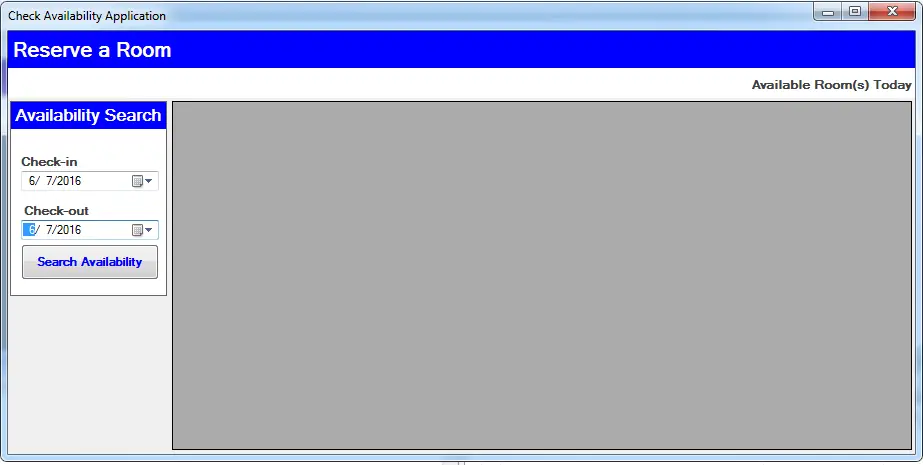
- Do the form just like as follows:
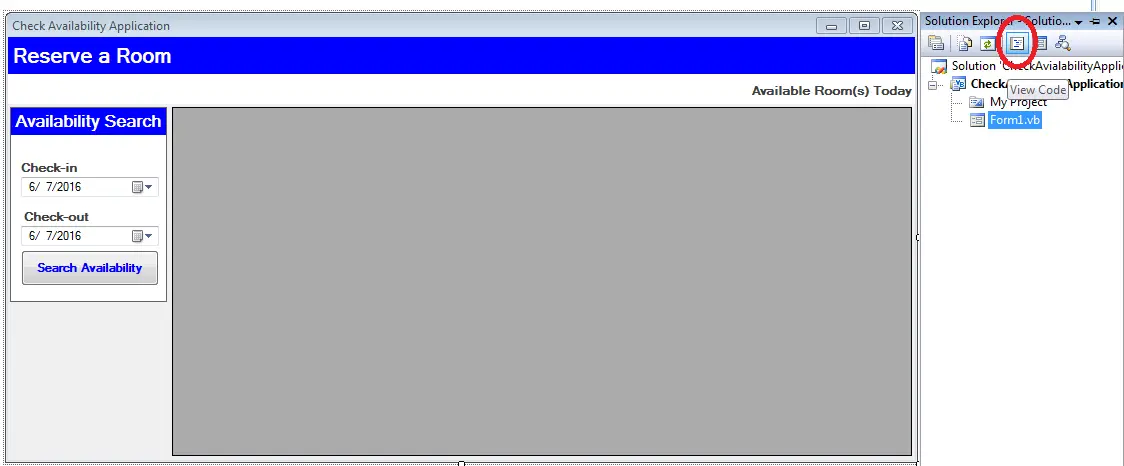
- Go to the solution explorer and click the code view.
- In the code view, declare all variables and classes that are needed. Then, create a connection between MySQL database and Visual Basic 2008.
[vbnet]

Dim sql As String
Dim cmd As MySqlCommand
Dim da As MySqlDataAdapter
Dim dt As DataTable
Dim server As String = "localhost"
Dim userid As String = "root"
Dim pass As String = ""
Dim databaseName As String = "roomdb"
Dim conString As String = "server=" & server & ";user id=" & userid & ";password=" & pass & ";database=" & databaseName
Dim con As MySqlConnection = New MySqlConnection(conString)

[/vbnet]- Create a sub procedure for retrieving data in the datagridview.
[vbnet]

Private Sub reloadDtg(ByVal sql As String, ByVal dtg As DataGridView)
Try
With cmd
.Connection = con
.CommandText = sql
End With
dt = New DataTable
da = New MySqlDataAdapter(sql, con)
da.Fill(dt)
dtg.DataSource = dt
With dtg

.Columns(0).Visible = False

End With
Catch ex As Exception
MsgBox(ex.Message & "reloadDtg")
End Try
End Sub

[/vbnet]- Create a function for converting datatimepicker to mysql dates.
[vbnet]

'method for converting datetimepicker into mysql date
Public Function MYSQLDATE(ByVal DTP As DateTimePicker, ByVal dateformat As String)
Dim sqldate As String
sqldate = Format(DTP.Value, dateformat)
Return sqldate
End Function

[/vbnet]- Create a function for checking the available rooms.
[vbnet]

'create a funtion for searching the avialable rooms in the date given
Public Function Availability_Search_reserve() As Boolean
Try
'openning connection
con.Open()

With Me
''Created a query for the availability of room
sql = "SELECT GROUP_CONCAT( `ROOMID` , '' ) FROM `tblreservation` " & _
" WHERE (('" & MYSQLDATE(.dtpCheckin, "yyyy-MM-dd") & _
"'>= DATE(`ARRIVAL`) AND '" & MYSQLDATE(.dtpCheckout, "yyyy-MM-dd") & _
"' <= DATE(`DEPARTURE`)) OR ('" & MYSQLDATE(.dtpCheckin, "yyyy-MM-dd") & _
"' >= DATE(`DEPARTURE`) AND '" & MYSQLDATE(.dtpCheckout, "yyyy-MM-dd") & _
"' <= DATE(`DEPARTURE`) ) OR (DATE(`ARRIVAL`) >='" & MYSQLDATE(.dtpCheckin, "yyyy-MM-dd") & _
"' AND DATE(`ARRIVAL`) <='" & MYSQLDATE(.dtpCheckout, "yyyy-MM-dd") & _
"')) AND NOT STATUS='CHECKED-OUT'"
'Execute the query
cmd = New MySqlCommand
With cmd
.Connection = con
.CommandText = sql
End With
'Fill data in the datatable
da = New MySqlDataAdapter
da.SelectCommand = cmd
dt = New DataTable
da.Fill(dt)
'getting the total row in the table
Dim max As Integer = dt.Rows.Count

'validate the total rows in the table
If max > 0 Then
''validating rooms
If dt.Rows(0).Item(0).ToString = "" Then
''display all rooms in the datagridview
sql = "SELECT `ROOMID`,`ROOMTYPE` as 'Type', `ROOMNUM` as 'Room No.', `ROOM` as 'Room', `NUMPERSON` as 'Person', `PRICE` as 'Price' " & _
" FROM `tblroom` "
reloadDtg(sql, .dtgList)
Else
'diplaying all available room in the datagridview
sql = "SELECT `ROOMID`,`ROOMTYPE` as 'Type', `ROOMNUM` as 'Room No.', `ROOM` as 'Room', `NUMPERSON` as 'Person', `PRICE` as 'Price' " & _
" FROM `tblroom` WHERE ROOMID NOT IN (" & dt.Rows(0).Item(0) & ")"
reloadDtg(sql, .dtgList)
End If
Else
''display all rooms in the datagridview
sql = "SELECT `ROOMID`,`ROOMTYPE` as 'Type', `ROOMNUM` as 'Room No.', `ROOM` as 'Room', `NUMPERSON` as 'Person', `PRICE` as 'Price' " & _
" FROM `tblroom"
reloadDtg(sql, .dtgList)
End If

End With
Catch ex As Exception
MsgBox(ex.Message)
Finally
con.Close()
da.Dispose()
End Try
End Function

[/vbnet]- Go back to the design view and double click a button and and the following codes in the method.
[vbnet]

Private Sub btnAvailSeach_Click(ByVal sender As System.Object, ByVal e As System.EventArgs) Handles btnAvailSeach.Click
Availability_Search_reserve()
End Sub

[/vbnet]
For all students who need programmer for your thesis system or anyone who needs a sourcecode in any programming languages. You can contact me @ :
Email – jannopalacios@gmail.com
Mobile No. – 09305235027 – tnt
Official documentation
Frequently Asked Questions
What does this VB.NET code snippet demonstrate?
Focused VB.NET WinForms code pattern: how to add, insert, save, search, display, print, connect to SQL Server, or perform a common calculation with minimum code. Drop-in pattern you can adapt for your own capstone module.
What Visual Studio and SQL Server versions does this VB.NET project require?
Most projects use VB.NET WinForms on .NET Framework 4.5+ with SQL Server 2012 Express or higher. To run: install Visual Studio 2019 / 2022 (Community is free) with the ‘Desktop development with .NET’ workload, install SQL Server Express + SSMS, open the .sln file, build, run.
How do I set up the database for this VB.NET project?
Open SQL Server Management Studio (SSMS) and connect to your SQL Server (e.g. localhost\SQLEXPRESS). Right-click Databases, choose Restore Database OR New Database then import the included .sql script. Update the connection string in App.config (or in code-behind Module) with your server name + credentials. Rebuild and run.
Can I use this VB.NET project for a BSIT capstone or thesis?
Yes, VB.NET is one of the most accepted languages by Philippine BSIT panels. Extend it: add role-based access (admin/staff/customer login redirect), Crystal Reports or RDLC reports, dashboards with Chart control, audit log, multi-branch support. Pair with Chapter 1-5 documentation matching your panel’s rubric.
Why am I getting ‘connection error’ or ‘cannot find SQL Server’?
Three common VB.NET issues: (1) Connection error: SQL Server isn’t running. Open SQL Server Configuration Manager and verify SQL Server (SQLEXPRESS) service is started. (2) Wrong server name in connection string. Try .\SQLEXPRESS, (local)\SQLEXPRESS, or your machine name. (3) Login failed: SQL Server is set to ‘Windows-only’ authentication. Switch to Mixed Mode in SSMS Server Properties, Security.
Where can I find more VB.NET projects with source code?
Browse the VB.NET Projects hub for the full library. For C# WinForms alternatives see C# Projects. For ASP.NET web alternatives see ASP.NET Projects. For BSIT capstone idea lists see 150 Best Capstone Project Ideas.
Related topic(s) that you may like:
If you have any questions or suggestions in Search Availability Application in VB.net with Source Code, please feel free to leave a comment below.
If you are going for finest contents like me,
just pay a visit this web site daily for the reason that it offers feature contents, thanks