
Conference Management System Project in Laravel with Source Code
This project makes use of the Laravel Conference Management System, which is fully functional. For their academic projects, second-year IT students will require all of the features in the Laravel project below.
The Laravel Conference Management System contains a number of tools that let project organizers keep track of the conference company’s projects.
Like the web app, this system has a well-defined concept that has been well-implemented and can be used in real-world situations.
To receive a free Conference Management System project in PHP-Laravel MySQL with source code files, scroll down to the bottom of this page and click the Download button.
| About Project | Project Details |
|---|---|
| Project Name : | Conference Management System Project in Laravel |
| Project Platform : | PHP Framework |
| Programming Language Used: | Laravel Language |
| Developer Name : | itsourcecode.com |
| IDE Tool (Recommended): | Sublime |
| Project Type : | Web Application |
| Database: | MySQL |
What is Conference Management System in Laravel?
CONFERENCES ARE AN IMPORTANT WAY FOR RESEARCHERS TO SHARE INFORMATION WITH ONE ANOTHER.
As a result, it’s no wonder that there are so many conferences nowadays. There are many different types of conferences – small and large, themed and general, with a variety of events – and they all require planning and organization.
Early planning is vital for a successful meeting, as it ensures that everything runs smoothly. To begin, the conference team must be assembled and the conference parameters – title, themes, topics, committees, dates, venue, sponsors, and so on – must be agreed upon.
About Conference Management System Laravel
A conference management system (CMS) has been designed and implemented. The proposed system includes features for conference registration, paper submission, peer review, decision-making, conference proceedings preparation, and final paper submission.
All participants in various roles such as corresponding author, reviewer, and administrator can interact using CMS. To maintain the integrity of the information in the system, security mechanisms have been incorporated (using the bcrypt function).
The system’s architecture and underlying modular structure are presented. CMS was built using HTML, CSS, JavaScript, PHP-Laravel, and MySQL, among other internet programming languages.
Dreamweaver (a web page builder) was used to create a web page, and Sessions (a short temporary file on the server) was used to create a user profile for each user’s private activity. XAMPP server was used to test CMS.
Features Available Conference Management System Laravel Framework
- Manage Conference
- Manage Users
- Add Conference Paper
- Register and Login
Conference Management System in Laravel Steps On How To Run The Project
Time needed: 5 minutes
Here’s the step’s on how to run a Conference Management System Project in Laravel
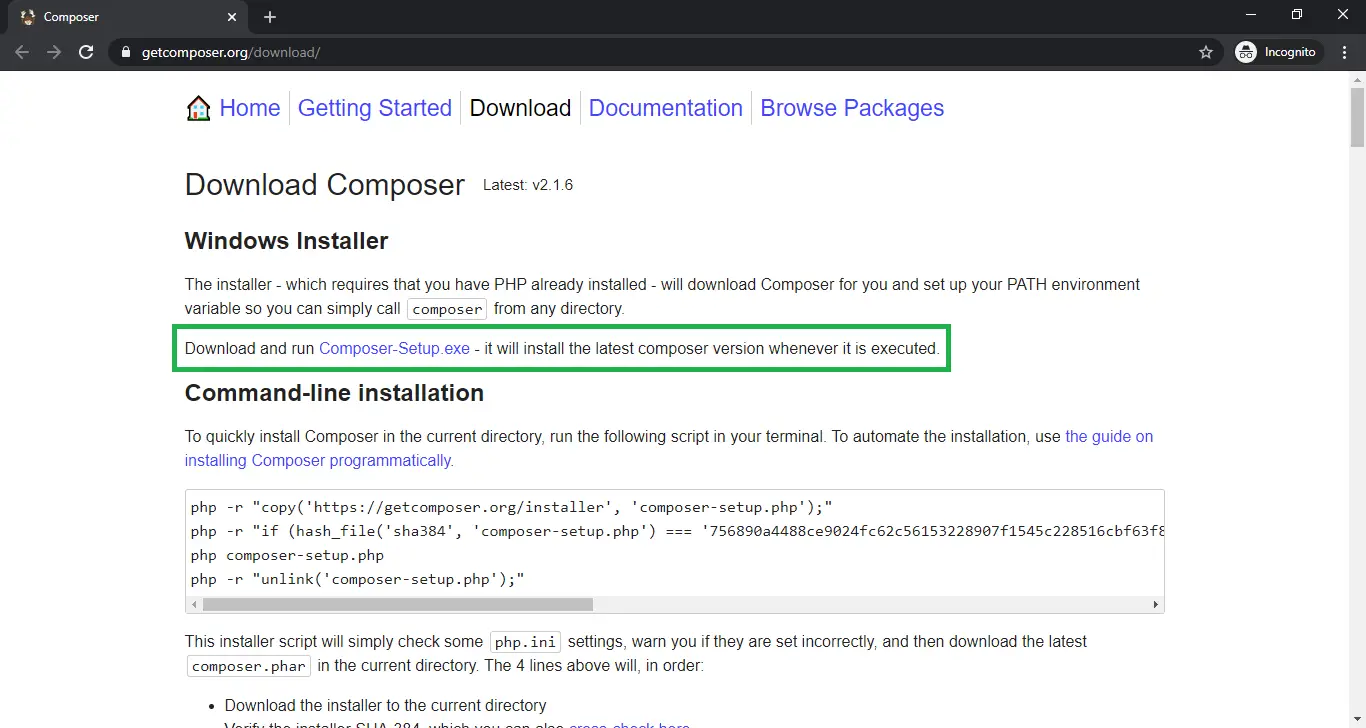
- Step 1: Installed the composer and the Laravel dependencies
First, You need to install first the Composer and the Laravel libraries.

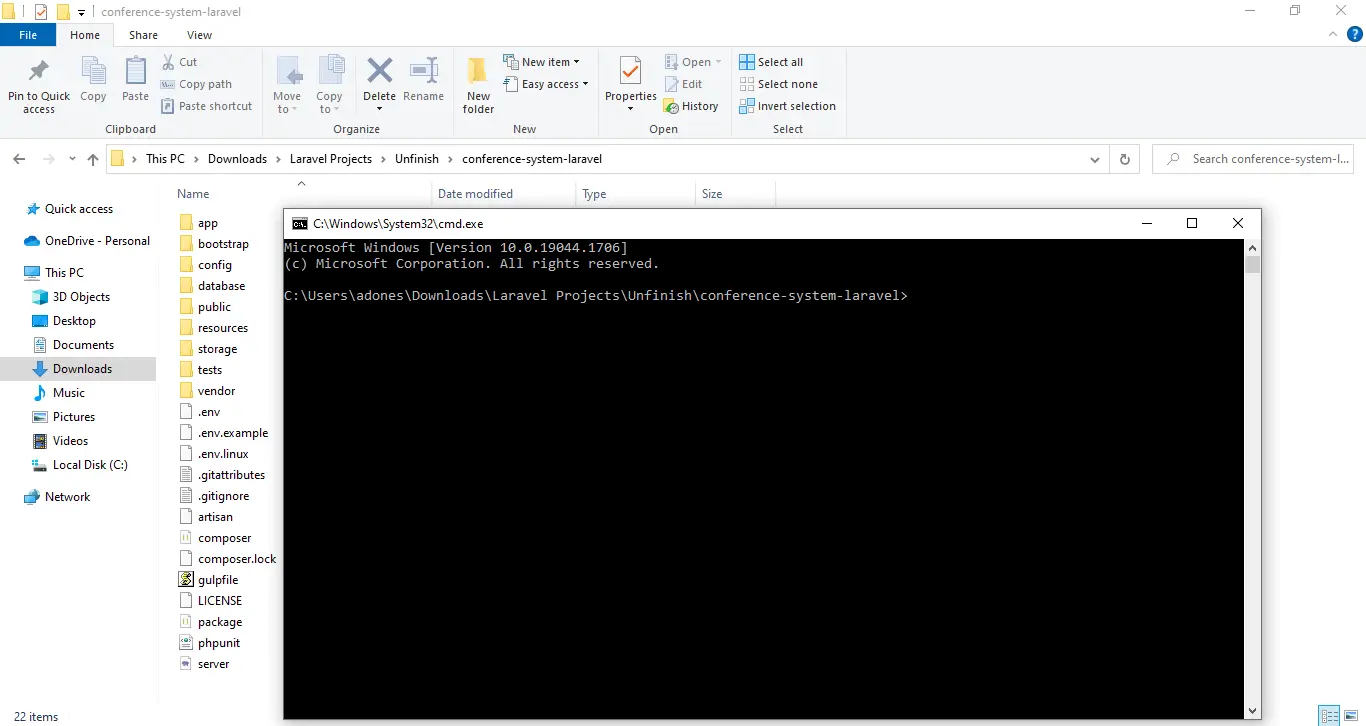
- Step 2: Open Command Prompt
Next, go to the project folder directory then type CMD to open the command prompt.

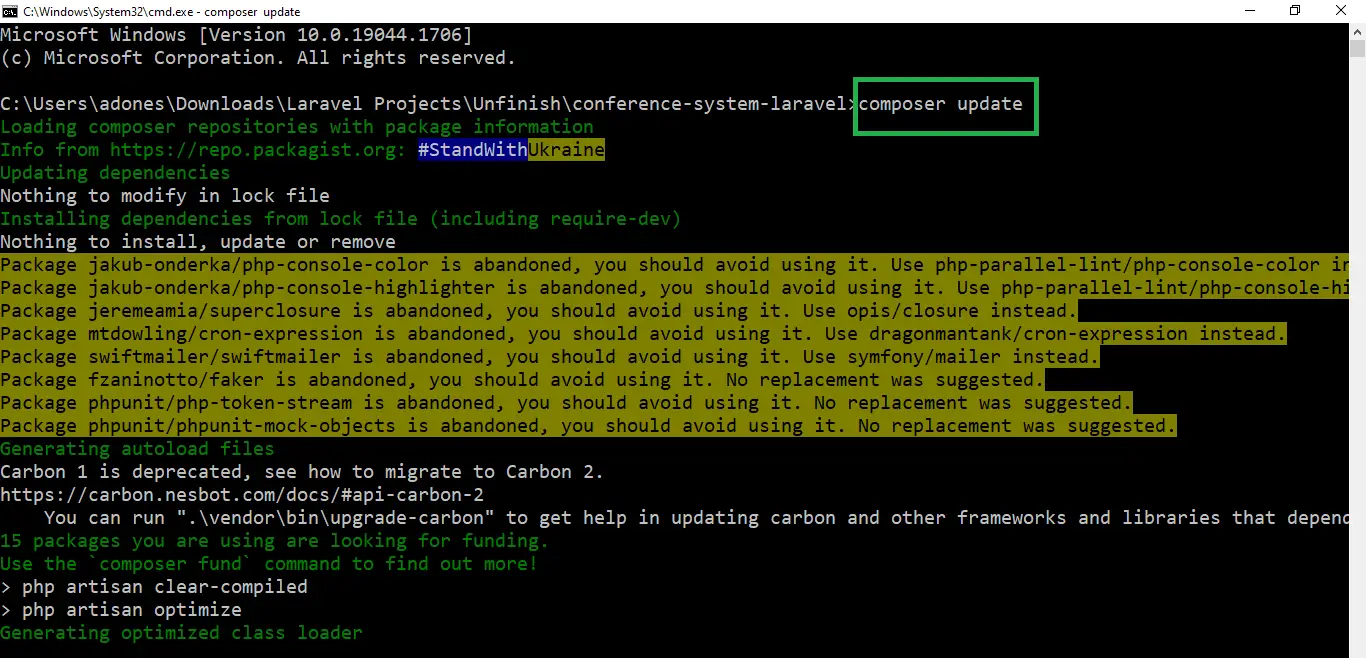
- Step 3: Composer Update
Then, After you finish to installed the composer and the Laravel. now type “composer update” in your command prompt to install the composer dependencies.

- Step 4: php artisan key:generate
After that, then type “php artisan key:generate ” in your command prompt. A command that sets the APP_KEY value in your . env file. By default, Run the following command to have the database tables migrated for you so that you can begin using the system.

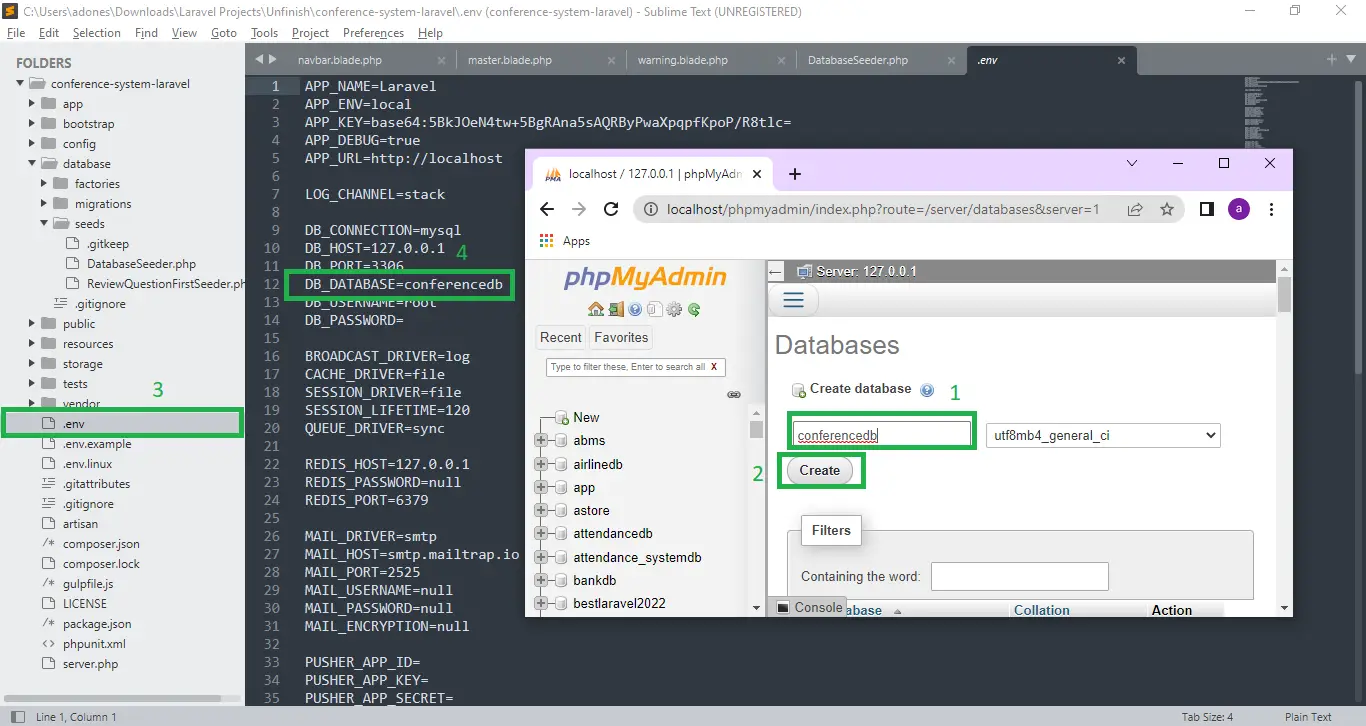
- Step 5: Create Database
After that, To install and run the application correctly. Simply go to phpmyadmin and make a new database. After that, “Be” and rename it to “.env“, then go to connection and modify the default database connection name, only database connection, database username, and password.
- Step 6: php artisan migrate
Lastly, you’ve set up the environment, you’ll need to establish a database configuration for it. Use the following command to create database tables: “php artisan migrate“.
- Step 7: php artisan db:seed
Then, type “php artisan db:seed“, The db:seed command runs the DatabaseSeeder class by default, although it can be overridden to call alternative seed classes. You can, however, use the, class option to execute a single seeder class separately: php artisan db:seed –class=UserTableSeeder.

- Step 8: php artisan serve
Lastly, type “php artisan serve” in your command prompt. The purpose of using PHP artisan serve (PHP built in server) is just for testing and easy starting your project it should not be used in real website deployment.

- Step 9: Copy “http://127.0.0.1:8000/”
Finally, In your browser, type the following code to access your project dashboard.





Download Source Code below
Summary
A conference management system (CMS) has been designed and implemented.
The proposed system includes features for conference registration, peer review, decision-making, conference proceedings preparation, and final paper submission.
CMS was built using HTML, CSS, JavaScript, PHP-Laravel, and MySQL, among other internet programming languages.
To maintain the integrity of the information in the system, security mechanisms have been incorporated (using the bcrypt function).
Anyway, if you want to level up your programming knowledge, especially Laravel PHP, try this new article I’ve made for you Awesome Laravel Projects With Source Code Free Download.
Related Articles
- Electricity Billing System Project in Java With Source Code
- Billing System Project in Django with Source Code
- Billing System In PHP With Source Code
- Market Billing System in JavaScript with Source Code
- Cafe Billing System in C# with Source Code
- School Billing System in C with Source Code
Inquiries
If you have any questions or suggestions about Conference Management System in Laravel with Source Code, please feel free to leave a comment below.
Official documentation
Frequently Asked Questions
How does this Laravel management system work?
Standard Laravel MVC pattern: routes/web.php defines endpoints, controllers handle business logic, Eloquent models map to database tables, Blade templates render the UI. CRUD on the main entity, plus reports and dashboards. Spatie Permission package commonly used for role-based access.
What Laravel and PHP versions does this project require?
Most projects in this batch run on Laravel 9 or 10 with PHP 8.1+. A few older projects need Laravel 7-8 with PHP 7.4. Check the project’s composer.json for the exact requirement. To run any of them: install Composer, run composer install, copy .env.example to .env, generate the app key with php artisan key:generate, migrate the database with php artisan migrate, then php artisan serve.
How do I set up the database for this Laravel project?
Open phpMyAdmin (or your MySQL client), create a new empty database (typical names: laravel_school, laravel_pos, etc.). Edit your .env file: set DB_DATABASE to the new database name, DB_USERNAME and DB_PASSWORD to your local MySQL credentials. Run php artisan migrate –seed to create tables and (if seeders are included) sample data.
Can I use this Laravel project for a BSIT capstone or thesis?
Yes, but extend it. A bare CRUD app is too narrow for full capstone scope. Add: user roles (Spatie Permission), reports/dashboards (Laravel Charts), PDF exports (Laravel Snappy or DomPDF), email notifications (Laravel Mail), and a real domain extension (analytics, audit log, multi-branch support). Pair with Chapter 1-5 documentation matching your panel’s rubric.
Why am I getting ‘Class not found’ or ‘No application encryption key’ errors?
Three common Laravel startup issues: (1) Run composer install to pull dependencies into vendor/. (2) Run php artisan key:generate to create the APP_KEY in .env (required for cookies, sessions, and encrypted fields). (3) Run composer dump-autoload after adding new classes manually. If migrations fail with ‘Specified key was too long’: add Schema::defaultStringLength(191) to AppServiceProvider::boot().
Where can I find more Laravel projects with source code?
Browse the Laravel Projects hub for the full library. For broader PHP capstones see PHP Projects (300+ vanilla PHP + MySQL systems). For Python full-stack alternatives see Django Projects. For BSIT-focused capstone idea lists see 150 Best Capstone Project Ideas.

Adones Evangelista
Programmer & Technical Writer at PIES IT Solution
Adones Evangelista is a programmer and writer at PIES IT Solution, author of over 900 tutorials and error-fix guides at itsourcecode.com. Specializes in JavaScript, Django, Laravel, and Python error debugging covering ValueError, TypeError, AttributeError, ModuleNotFoundError, and RuntimeError, plus C/C++ and PHP capstone projects for BSIT students.
Expertise: JavaScript · Python · Django · Laravel · Error Debugging · C/C++ · View all posts by Adones Evangelista →
hi! how I can install it directly in Cpanel? thank you
You may just watch in youtube how install it in C panel
I install it but i found some problems like when i need to login and when i click on all conference or when i want to register an account