
Download retired
The original archive for this project is no longer available for direct download. These archives were published as educational reference material and are not actively maintained. We removed the download rather than keep distributing material we no longer support.
The full tutorial, screenshots, database structure, and feature documentation on this page remain accurate as a reference for building your own version. Full editorial position at the source code disclaimer. Questions: support@itsourcecode.com.
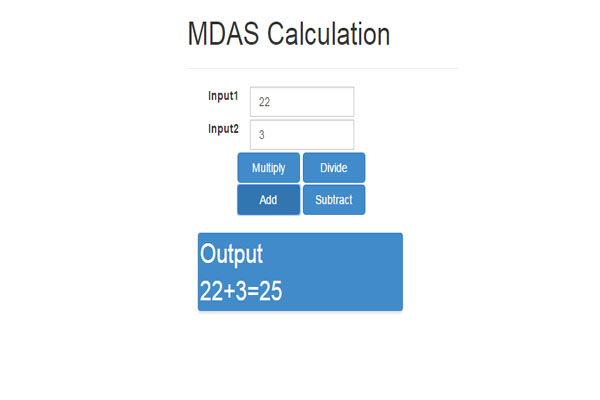
Today, I will teach you on how to create the MDAS Calculation with jQuery. This project provides the following processes such as Multiplying, Dividing, Adding and Subtracting.
It allows the users to input a number and calculate according to their desire.
Below are the step by step process that you should do.
- Create a page in name it “index.html”.
- Create a style for the layout of your design.
<!-- bootstrap plugins -->
<link href="css/bootstrap.min.css" rel="stylesheet" type="text/css">
<style type="text/css">
.container{
    width: 30%;
    padding: 10px;
  }
.container  .row{
  padding-bottom: 3px;

  }
.container  #output {
  display: none;
  background: #428bca;
  color: #fff;
  padding: 2px 0 0 2px;
  font-size:30px;
   border: 1px solid transparent;
  border-radius: 4px;
  -webkit-box-shadow: 0 1px 1px rgba(0, 0, 0, 0.099);
        box-shadow: 0 3px 3px rgba(0, 0, 0, 0.099);

  }
.container #btn {
  padding-bottom: 2px;
  }
.container #btn > button {
  width: 90px;
}
</style>- Do these following codes for the design of your page.
<div class="container">
<div class="page-header"><h1>MDAS Calculation</h1></div>
<div class="box col-md-10">
  <div class="row">
        <div class='col-sm-10'>
            <div class="form-group">
            <label class="col-md-3">Input1</label>
                <div class='input-group date col-md-9'>
                    <input type='text' class="form-control"  id="input1" />
                </div>
            </div>
        </div>
    </div>
    <div class="row">
        <div class='col-sm-10'>
            <div class="form-group">
            <label class="col-md-3">Input2</label>
                <div class='input-group date col-md-9'>
                    <input type='text' class="form-control" id="input2" />
                </div>
            </div>
        </div>
    </div>
     <div class="row">
        <div class='col-sm-10'>
            <div class="form-group pull-right">
              <div id="btn">
                <button type='submit' id="M"   class="btn btn-primary " >Multiply</button>
                <button type='submit' id="D"   class="btn btn-primary " >Divide</button>
              </div>
               <div id="btn">
                <button type='submit' id="A"  class="btn btn-primary " >Add</button>
                <button type='submit' id="S"   class="btn btn-primary " >Subtract</button>
              </div>
            </div>
        </div>
    </div>
     <div class="row">
        <div class='col-sm-12'>
            <div  id="output" class="form-group">

            </div>
        </div>
    </div>
</div>
</div>
- Create a script for the MDAS Calculation.
<!-- jQuery plugins -->
<script type="text/javascript" src="jquery/jquery.min.js"></script>
  <script type="text/javascript">
  $(document).ready( function(){

            if(n1=='' || n2==''){
              output = 'Please enter number!';
            }

           return   output;
       });
    })
  })
</script>
For all students who need programmer for your thesis system or anyone who needs a sourcecode in any programming languages. You can contact me @ :
Email – jannopalacios@gmail.com
Mobile No. – 09305235027 – tnt