
Water Refilling Station System Database Design Description
Water Refilling Station system Database Design is created using MySQL database. This project will be programmed in java that can enable the user to record things that are being purchased by the client.
The water refilling station management system in java is capable of viewing the item that is already delivered. Setting up a water refilling station whereby the station will cater to the reproduction of water through selling large and small amounts of volume.
Purpose
The purpose of this system is to help its clients for an easier and efficient management of stations without sacrificing costs or output. This system is custom made for water refilling stations only.
Basic Features
- MANAGE USERS (Add, List Update)
- DELIVERY (CONFIRM , CANCEL)
- PRODUCT (ADD , UPDATE , DELETE
Entity Relationship Diagram
Water Refilling Station System Entity Relationship Diagram shows the system entity relationships in each entity and their supposed functions in each relationship.
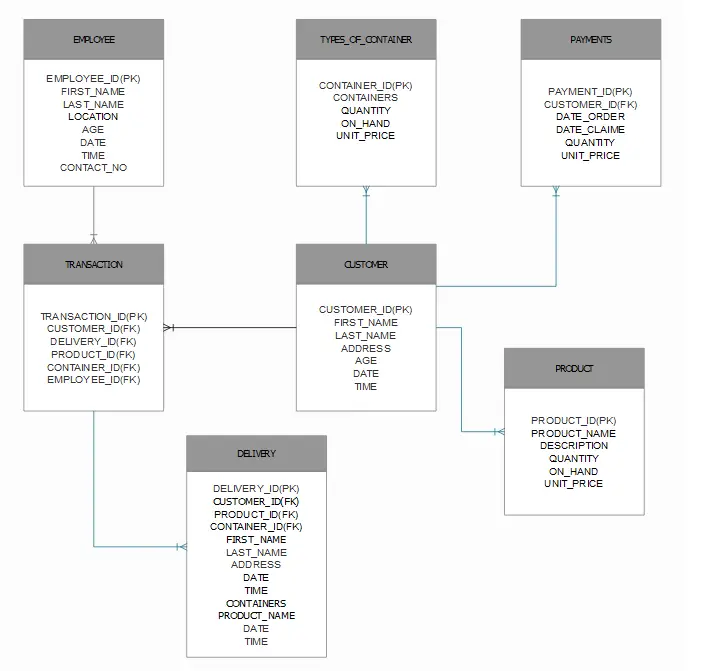
Database Dictionaries
The water refilling station system database design tables are provided with the entire database details such as Field Name, Descriptions, data types, character lengths.
Table 1:CUSTOMER
| Field Name | Description | Type | Length |
| Customer_id(PK) | Number of Customer | int | 11 |
| Fname | FirstName of Customer | varchar | 50 |
| Lname | LastName of Customer | varchar | 50 |
| Address | Customer Full address | varchar | 50 |
| Age | Age of Customer | int | 2 |
| DATE | DATE | varchar | 11 |
| TIME | TIME | varchar | 11 |
Table 2: DELIVERY
| Field Name | Description | Type | Length |
| DELIVERY_ID(PK) | Delivery ID number | Int | 7 |
| CUSTOMER_ID(FK) | Customer ID Number | int | 11 |
| PRODUCT_ID(FK) | Product ID number | int | 50 |
| CONTAINER_ID(FK) | Container ID Number | int | 11 |
| FIRST_NAME | First Name Of Customer | int | 11 |
| LAST_NAME | Last Name Of customer | Varchar | 50 |
| ADDRESS | Address Of Customer | Varchar | 50 |
| DATE | Date | Varchar | 11 |
| TIME | Time | Varchar | 11 |
| CONTAINERS | Containers | Varchar | 11 |
| PRODUCT_NAME | Name Of The Product | Varchar | 50 |
Table 3:EMPLOYEE
| Field Name | Description | Type | Length |
| EMPLOYEE_ID(PK) | Employee ID number | Int | 11 |
| FIRST_NAME | Employee Firstname | varchar | 30 |
| LAST NAME | Employee Last Name | varchar | 30 |
| LOCATION | Location of Employee | varchar | 50 |
| AGE | Age Of Employee | varchar | 11 |
| DATE | Date | varchar | 11 |
| TIME | Time | varchar | 11 |
| CONTACT_NO | Contact Number of employee | varchar | 11 |
Table 4: PRODUCT
| Field Name | Description | Type | Length |
| PRODUCT_ID(PK) | Product ID number | Int | 11 |
| PRODUCT_NAME | Name of the Products | varchar | 50 |
| DESCRIPTION | Description of Products | varchar | 50 |
| QUANTITY | Quantity of products | int | 1 |
| ON_HAND | Not Available | varchar | 11 |
| UNIT_PRICE | Price of items | int | 1 |
Table 5: TYPES_OF_CONTAINER
| Field Name | Description | Type | Length |
| CONTAINER_ID(PK) | Container ID number | Int | 11 |
| CONTAINERS | number of Contaniners | int | 11 |
| QUANTITY | Customer Suggested ORDER | varchar | 50 |
| ON_HAND | Available and Not Available | Varchar | 30 |
| UNIT_PRICE | Price Of Containers | int | 1 |
Table 6: PAYMENTS
| Field Name | Description | Type | Length |
| PAYMENT_ID(PK) | Payment ID number | Int | 11 |
| CUSTOMER_ID(FK) | Customer ID Number | int | 11 |
| DATE_ORDER | Date Of ORDER | varchar | 50 |
| DATE_CLAIM | Date Of Claim | varchar | 30 |
| QUANTITY | Customer Suggested Order | int | 1 |
| UNIT_PRICE | Price Of Order | int | 11 |
TABLE KEYS
| sTable Name | Field Name | Key Type |
| CUSTOMER | Customer_ID | PK |
| EMPLOYEE | Employee_ID | PK |
| DELIVERY | Delivery_ID | PK |
| PRODUCT | Product_ID | PK |
| TYPES_OF_CONTAINER | Container_ID | PK |
| PAYMENTS | Payment_ID | PK |
| TRANSACTION | Transaction_ID | PK |
This project was created by JERIMYKIRK G. ERIMAN
Recommended Materials You like
- Database Design for Clinic Management System
- Frozen Food Ordering System Database Design
- Water Billing System
How to read an ER diagram
An entity-relationship (ER) diagram documents the database schema: entities (tables), attributes (columns), and relationships (foreign keys and cardinality).
- Entity. Rectangle representing a table.
- Attribute. Oval or field for each column.
- Primary key. Underlined attribute name.
- Foreign key. Attribute referencing another entity.
- Relationship. Diamond or line connecting related entities.
Common capstone mistakes to avoid
- Many-to-many without junction table.
- Missing primary key.
- Denormalized redundancy.
- Ambiguous naming.
Where this diagram fits in Chapter 3
- Section 3.3 (Database Design).
- Include the CREATE TABLE SQL script alongside.
- Reference from the class diagram.
- Include a legend to explain the notation for panel members.
Official documentation
Official documentation
Working source code for this system
Download the actual implementation of this system in your preferred language. Each project includes source code, database, and setup instructions for BSIT capstone use.
Frequently asked questions
What is a ER diagram used for in BSIT capstone?
An ER diagram shows the database schema: entities (tables), attributes (columns), and relationships (foreign keys, cardinality). It goes in Chapter 3 alongside the class diagram to communicate the data storage design.
What tool should I use to draw the ER diagram?
Free options: draw.io, Lucidchart free tier, PlantUML, StarUML 30-day trial, Visual Paradigm Community Edition. Paid options: Microsoft Visio, Lucidchart pro, Enterprise Architect. For BSIT capstones, draw.io is the most commonly used free tool.
How detailed does the ER diagram need to be for capstone defense?
Panel members expect the diagram to match the actual system implementation. Include every major class/use case/entity relevant to the system. Omit trivial helper classes. Every diagram element should have a clear justification.
Should I use black-and-white or colored diagrams?
Black-and-white is standard for capstone documentation to match the thesis format. Use color only if it improves clarity. Ensure text is readable at printed size (10pt minimum for labels).
Where does this diagram go in the capstone documentation?
Chapter 3 (System Design and Methodology) typically holds all UML diagrams. Introduce each diagram with a 1-paragraph description explaining what it shows and how to read it.
Frequently asked questions
What is a ER diagram used for in BSIT capstone?
An ER diagram shows the database schema: entities (tables), attributes (columns), and relationships (foreign keys, cardinality). It goes in Chapter 3 alongside the class diagram to communicate the data storage design.
What tool should I use to draw the ER diagram?
Free options: draw.io (browser-based, saves to Google Drive), Lucidchart free tier, PlantUML (text-based, version-controllable), StarUML (30-day trial then reduced feature set), Visual Paradigm Community Edition. Paid options: Microsoft Visio, Lucidchart pro, Enterprise Architect. For BSIT capstones, draw.io is the most commonly used free tool.
How detailed does the ER diagram need to be for capstone defense?
Panel members expect the diagram to match the actual system implementation. Include every major class/use case/entity relevant to the system. Omit trivial helper classes. Every diagram element should have a clear justification. Aim for 1-2 diagrams that fully cover the system, not many partial ones.
Should I use black-and-white or colored diagrams?
Black-and-white is standard for capstone documentation to match the thesis format. Use color only if it improves clarity (e.g., grouping subsystems). Ensure text is readable at printed size (10pt minimum for labels).
Where does this diagram go in the capstone documentation?
Chapter 3 (System Design and Methodology) typically holds all UML diagrams. Introduce each diagram with a 1-paragraph description explaining what it shows and how to read it. Reference specific elements in the surrounding text so panel members can follow the design rationale.

Joken E. Villanueva
Founder & Lead Developer at PIES IT Solution
Founder of PIES Information Technology Solutions, a software company building production-grade applications for institutions across the Philippines. Over 8 years of hands-on full-stack development experience, currently leading the development of ClinicAI, an AI-powered clinic management platform.
Expertise: PHP · MySQL · JavaScript · AI Integration · SaaS Architecture · VB.NET · Database Design · Capstone Documentation · Java
· View all posts by Joken E. Villanueva →
Hi mr joken Villanueva plss give me a long introduction of this thanks
ok i will try sir
I would like to avail the program. Let me know how much pls. Thanks!
just send us a message in the contact page. thanks
Do you have a trial sample of system?