
Autocomplete TextBox Column in the Datagridview With SQL Server In C#
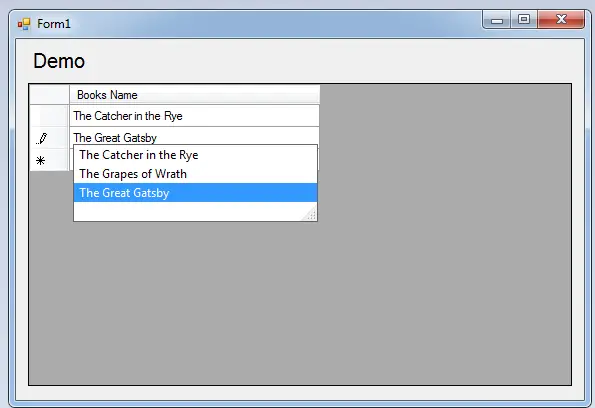
This time, I will teach you how to create an AutoComplete TextBox Column in the Datagridview using C#.net and SQL server 2005 Express Edition. With this, you can auto-suggest and append the column of the Datagridview.
The database of this project is here.
So, Let’s get started.
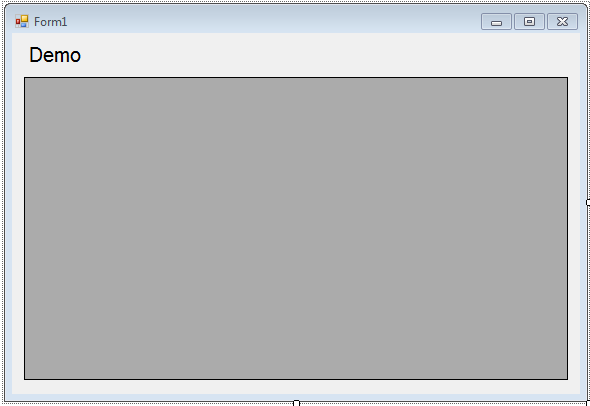
1. Open Microsoft Visual Studio and create a new windows form application for C#. After that, add a Label and DataGridView in the form and it will look like this.
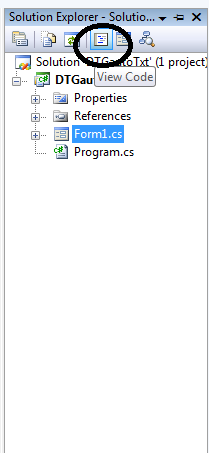
2. After that, go to the solution explorer and hit “View Code” to fire the code editor.
3. In the code editor, declare and initialize all the classes that are needed.
Note: Put ‘using System.Data.SqlClient;’ above the namespace to access sql server library.
//initializes new instance
 SqlConnection con = new SqlConnection();
 SqlDataAdapter da = new SqlDataAdapter();
 SqlCommand cmd = new SqlCommand();
 DataTable dt = new DataTable();
5. Go back to the design view, double-click the and do the following codes for adding a TextBox in the Datagridview and establish a connection between SQL Server 2005 and C#.net.
//'declaring a new textbox column in the datagridview
 DataGridViewTextBoxColumn txt = new DataGridViewTextBoxColumn();
 txt.Name = "Books Name";
 txt.Width = 250;
 //'adding a textbox column in the datagridview
 dataGridView1.Columns.Add(txt);

 //set a connection between SQL server and Visual C#
 con.ConnectionString = "Data Source=.\\SQLEXPRESS;Database=dbbooks;trusted_connection=true;";
6. Go back to the design view again and click the Datagridview. After that, go to the properties and hit the lightning symbol. Then, scroll down and find “EditingControlShowing” for the events. Double-click it to fire the event handler of it.
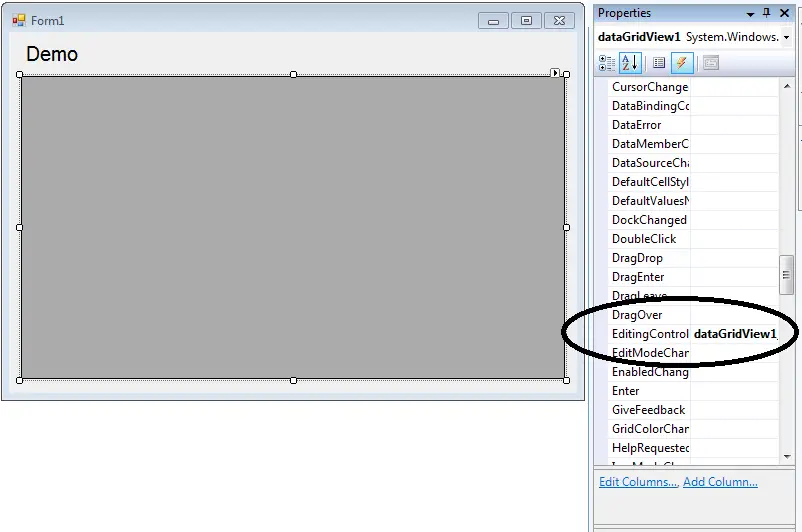
7. Do the following codes in the method to make the TextBox Column autoComplete.
//opening connection
 con.Open();
 try
 {
 //initialize a new instance of sqlcommand
 cmd = new SqlCommand();
 //set a connection used by this instance of sqlcommand
 cmd.Connection = con;
 //set the sql statement to execute at the data source
 cmd.CommandText = "SELECT * FROM tblbooks";
 //initialize a new instance of sqlDataAdapter
 da = new SqlDataAdapter();
 //set the sql statement or stored procedure to execute at the data source
 da.SelectCommand = cmd;
 //initialize a new instance of DataTable
 dt = new DataTable();
 //add or resfresh rows in the certain range in the datatable to match those in the data source.
 da.Fill(dt);


 foreach (DataRow r in dt.Rows)
 {
 //e represent the editing control in the datagridview
 //the condition is, if the type of e is combobox then set your code for autocomplete
 if (e.Control is TextBox)
 {
 DataGridViewTextBoxEditingControl txt = e.Control as DataGridViewTextBoxEditingControl;
 //adding the specific row of the table in the AutoCompleteCustomSource of the textbox
 txt.AutoCompleteCustomSource.Add(r.Field<string>("BooksName"));
 //set the propety of a texbox to autocomplete mode.
 txt.AutoCompleteMode = AutoCompleteMode.SuggestAppend;
 txt.AutoCompleteSource = AutoCompleteSource.CustomSource;
 }

 }

 }
 catch (Exception ex)
 {
 //catching error
 MessageBox.Show(ex.Message);
 }
 //release all resources used by the component
 da.Dispose();
 //closing connection
 con.Close();
Output:
For all students who need a programmer for your thesis system or anyone who needs a source code in any a programming languages. You can contact me @ :
Email – jannopalacios@gmail.com
Mobile No. – 09305235027 – TNT
Download Source Code
| ABOUT PROJECT | PROJECT DETAILS |
|---|---|
| Project Name : | Autocomplete Text Box Column in the Data grid view With SQL Server |
| Project Platform : | C# |
| Programming Language Used: | C# Programming Language |
| Developer Name : | itsourcecode.com |
| IDE Tool (Recommended): | Visual Studio 2019 |
| Project Type : | Desktop Application |
| Database: | MYSQL DATABASE |
| Upload Date and Time: | July 9, 2016- 2:25 am |
Frequently Asked Questions
How does this C# DataGridView example work?
Demonstrates binding a DataGridView control to a DataTable / List
What .NET and SQL Server versions does this project require?
Most projects in this batch use C# WinForms on .NET Framework 4.5+ (the dominant stack for tutorial sites) with SQL Server 2012 Express or higher. A few newer projects use .NET 6/7/8. To run: install Visual Studio 2019 / 2022 (Community edition is free), install SQL Server Express + SSMS, open the .sln file, build, run.
How do I set up the database for this C# project?
Open SQL Server Management Studio (SSMS) and connect to your SQL Server instance (e.g. localhost\SQLEXPRESS). Right-click Databases > Restore Database OR > New Database then import the included .sql script. Update the connection string in App.config (or in code-behind) with your server name + credentials. Rebuild and run.
Can I use this C# project for a BSIT capstone or thesis?
Yes, but extend it. A bare CRUD form is too narrow for full capstone scope. Add: role-based access (admin/staff/customer login redirect), Crystal Reports or RDLC reports, dashboard with Chart controls, audit log, multi-branch support. Pair with Chapter 1-5 documentation matching your panel’s rubric.
Why am I getting ‘connection error’ or ‘object reference not set’?
Three common C# issues: (1) Connection error: SQL Server isn’t running OR connection string in App.config has wrong server name. Open SQL Server Configuration Manager + verify SQL Server (SQLEXPRESS) service is running. (2) NullReferenceException: a control reference or DB column returned NULL, add a check or use ?? operator. (3) Build error ‘The type or namespace could not be found’: missing assembly reference, add via Project > Add Reference.
Where can I find more C# projects with source code?
Browse the C# Projects hub for the full library. For other .NET stacks see VB.NET Projects (300+ Windows Forms systems). For ASP.NET WebForms see ASP.NET Projects. For BSIT capstone idea lists see 150 Best Capstone Project Ideas.
Thank you for this code. Can you guide me for the code if i would like to search for matching any part while typing the letters to shorten the large data in datagridview text box column.