
Payroll Management System Project in ASP NET With Source Code
Payroll Management System Project In ASP NET – The payroll management system handles the financial aspects of the organization’s employees, such as salaries, allowances, deductions, gross pay, net pay, and so on.
After some deductions, a payroll refers to the total amount of money or compensation that the company pays to its employees.
In this payroll management system in the asp.net database, you may also keep track of your employee’s attendance and leave requests.
There is a risk of misunderstanding between the organization and its employees if data is not adequately tracked or recorded.
The payroll management system database project is crucial in resolving this issue. ASP.NET and SQL Server Payroll Management System
Project Information
| Project Title: | Payroll Management System Project In ASP NET |
|---|---|
| Abstract : | A payroll management system in ASP.Net is a system used by companies to help manage the computation, disbursement, and reporting of employees’ salaries efficiently and accurately. |
| Project Type: | Website |
| Technology : | Microsoft Visual Studio 2022 |
| Database : | SQL Server Database |
Features of Payroll Management System Project in ASP net MVC with Source Code
- Reduction of work: This application will reduce the pen paper work that is required for storing all the information related to the salary, allowances, deduction, gross pay, net pay, etc.
- Employee database management: The details of the employees of the organization with great ease.
- Ease of access: All the information related to the employees can be accessed with great ease with just one mouse click.
Importance of Payroll Management System in ASP.net
The payroll management system aids in the provision of complete information about an employee’s profile within the company.
It will include a full employee report, salary report, and department, and designation information, among other things.
It also aids in the preservation of pay stubs, monthly allowances, deductions, overtime pay, no-time pay, loan maintenance, late-minute deductions, and so on. This database system allows for correct salary processing.
This payroll administration system maintains the findings, which means there are fewer errors to be made. Unlike the manual technique, you may effortlessly enter payment information into the system. It will also save a lot of time in a variety of ways.
Project Output
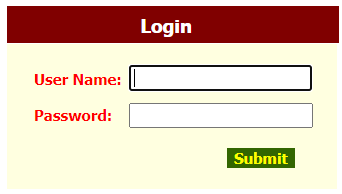
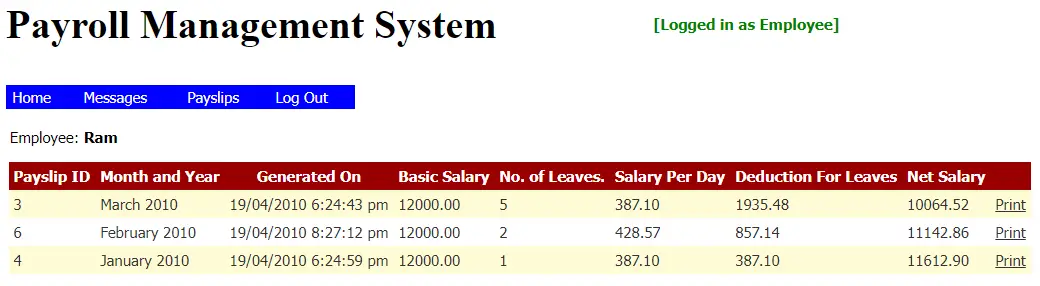
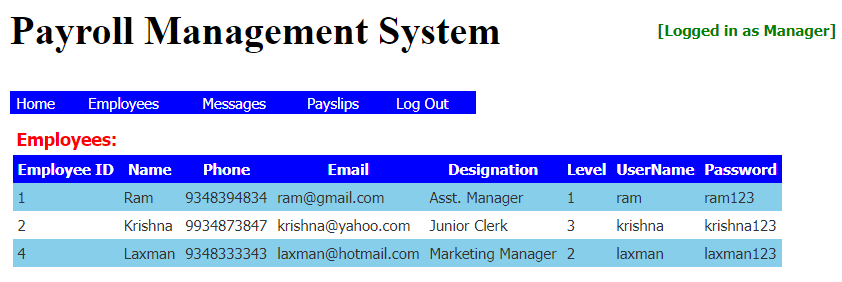
This ASP.NET Project also includes a Payroll Management System Project With Source Code for free, just find the downloadable source code below and click to start downloading.
To start executing this Payroll Management System Project make sure that you have Microsoft Visual Studio installed on your computer.
Steps on how to run Payroll Management System Project using ASP.NET
Time needed: 5 minutes
Payroll Management System Project In ASP NET.
- Step 1: Download Source Code
First, find the downloadable source code below and click to start downloading the source code file.

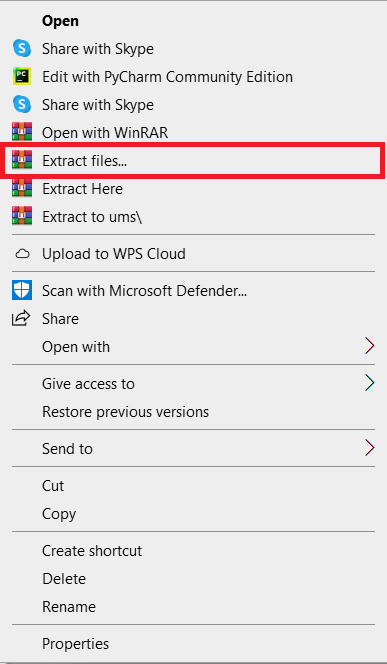
- Step 2: Extract File
Next, after finishing downloading the file, go to the file location, right-click the file, and click extract.

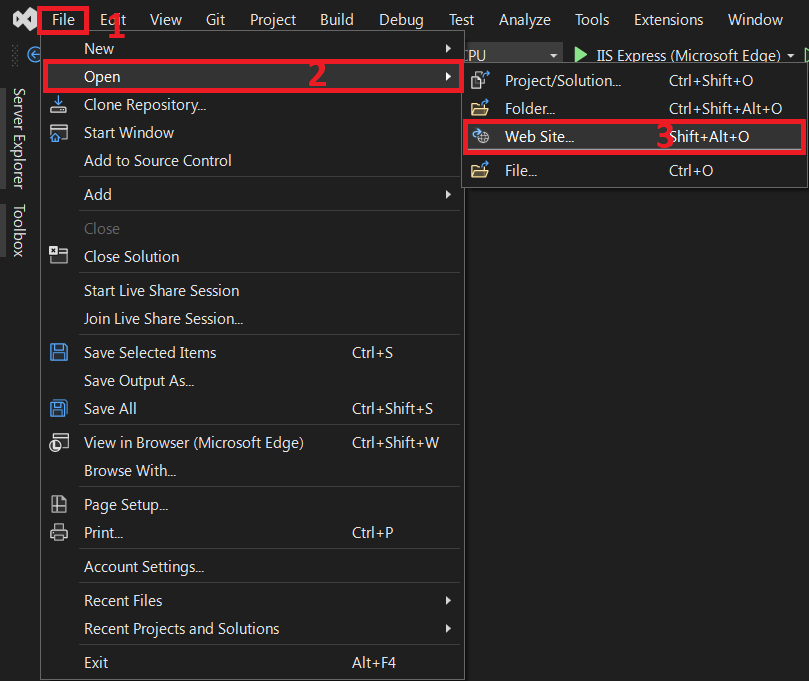
- Step 3: Open Visual Studio
Next, open Microsoft Visual Studio, click File and Open, then Web site…, and open the extracted folder.

- Step 4: Run Project
Last, click the run button to start executing the project



Download the Source Code below
Anyway, if you want to level up your programming knowledge, especially ASP.net, try this new article I’ve made for you ASP.Net Projects With Source Code For Final Year Students.
Summary
This Payroll Management System is a web application that was developed using ASP.NET Programming and SQL Server Database as the systems Back-End, It also includes a downloadable source code for free.
Related Articles
- Payroll Management System Activity Diagram | UML
- Payroll Management System UML Diagrams
- Payroll Management System Class Diagram | UML
- Payroll Management System Sequence Diagram | UML
- Payroll Management System Project in Laravel With Source Code
Inquiries
If you have any questions or suggestions about the Payroll Management System Project In ASP NET With Source Code, please feel free to leave a comment below.
Frequently Asked Questions
Official documentation
How does this ASP.NET payroll system work?
Employee master + salary components (basic, allowances, deductions, taxes, SSS/PhilHealth/Pag-IBIG for PH). Pay-period generation, payslip PDF (iTextSharp), bank file export. Integrates with Attendance/Leave.
What ASP.NET and Visual Studio versions does this project require?
Most projects in this batch use ASP.NET MVC 5 on .NET Framework 4.5+ OR ASP.NET Core 3.1/6.0+. Check the .csproj file’s TargetFramework for exact version. To run: install Visual Studio 2019/2022 (Community is free) with the ‘ASP.NET and web development’ workload, open the .sln, restore NuGet packages, build, then F5.
How do I set up the database for this ASP.NET project?
Open SQL Server Management Studio (SSMS) and connect to your SQL Server (typically localhost\SQLEXPRESS). Right-click Databases > Restore (or run the included .sql script). Update the connection string in Web.config (or appsettings.json for .NET Core) with your server name + credentials. For EF Code-First: run Update-Database in Package Manager Console.
Can I use this ASP.NET project for a BSIT capstone or thesis?
Yes, but extend it. A bare CRUD app is too narrow for full capstone scope. Add: ASP.NET Identity roles, dashboards (Chart.js + AJAX endpoints), PDF exports (iTextSharp or Rotativa), email notifications (SmtpClient), real domain extension (analytics, audit log, multi-branch). Pair with Chapter 1-5 documentation.
Why am I getting ‘login failed’ or ‘cannot connect to SQL Server’ errors?
Three common ASP.NET startup issues: (1) Connection string in Web.config has wrong server name OR SQL Server service isn’t running (check SQL Server Configuration Manager). (2) Login failed: SQL Server authentication mode is set to ‘Windows only’ but connection string uses SQL auth – enable Mixed Mode in SSMS server properties. (3) ‘Cannot open database’: database name in connection string doesn’t match the restored database name.
Where can I find more ASP.NET projects with source code?
Browse the ASP.NET Projects hub for the full library. For C# WinForms desktop alternatives see C# Projects (55+ Windows Forms systems). For other .NET stacks see VB.NET Projects (300+ systems). For BSIT capstone idea lists see 150 Best Capstone Project Ideas.

Angel Jude Suarez
Full-Stack Developer at PIES IT Solution
Focuses on Python development, machine learning, and AI integration. Has built production AI systems including OpenAI Whisper integration for medical transcription and GPT-4o-powered diagnosis assistance. Strong background in pandas, scikit-learn, and TensorFlow.
Expertise: Python · PHP · Java · VB.NET · ASP.NET · Machine Learning · AI Integration · OpenCV · Django · CodeIgniter · View all posts by Angel Jude Suarez →
Payroll Management System Project In ASP NET With Source Code.
What is Logic Credentials for entering inside the Website.
please Provide information ASAP needed in Final year project . Please sir.
Login Credentials for entering inside the Website is in the database.
bhai mila password
can you give me credential for manager login