
The Sequence Diagram for Online Food Ordering System is a UML sequence diagram symbols which helps to illustrate the structure of a Food Ordering System.
In order to achieve your desired system structure and behavior, you must design its sequence diagram before developing it.
What is Sequence Diagram for Online Food Ordering System
As I mentioned above, the sequence diagram would be a great help to all programmers and developers. It does not only show the series of events in the food ordering system, it also shows the behavior of the system in terms of exchanging messages.
These were needed to determine and plot in a sequence diagram to know the function of the system and the deliverance of messages that pass through the system.
Here’s what you need to know about Sequence diagram for Online Food Ordering System. You’ll need to collect data first about the online order activities to be able to build a system for it. The collected data will be valued and will be applied to its essential diagram which is the sequence diagram.
Online Food Ordering System Functions and Information
Here are the important information about the food ordering system before you design a sequence diagram for it. You should have a deep analyzation about its core functions before jumping into its blueprints. This technique will help you avoid unnecessary repetitions.
An online food ordering system is software that enables restaurants to accept and manage orders sent through the internet. Its goal is to give clients a method to order food from a restaurant over the internet.
So, what’s the big deal about this? The key reason for this is because it is advantageous to both the customer and the company.
Customers benefit from online food ordering system since it assures that prices are precise and that there is less space for error when it comes time to pay the bill. Customers would select an item from a menu that corresponds to a price, guaranteeing that the correct amount is always paid.
The information given explains how should the Online Food Ordering System system work. These expectation or existing factors must be meet to achieve and develop an excellent software.
How to Design an Online Food Ordering System Sequence Diagram?
Now, to create the Sequence Diagram for Online Food Ordering System, you must be familiar first with its symbols. This is to know how would you emphasize the whole content of your Food Ordering System.
With the symbol familiarization, you’ll then easily understand the ways on how would you develop the system.
Sequence Diagram for Online Food Ordering System (UML)
Here, I will be showing you the Online Food Ordering System Sequence Diagram. This design will enlighten you on how should the system or the actor approach each other.
This will also teach you on how would you develop the system to achieve its desired behavior. In addition to that, the design shows the detailed illustration of events sequenced and happens in Food Ordering System.
This designed sequence diagram is able to show programmers and readers about the sequence of messages between the actor and the objects.
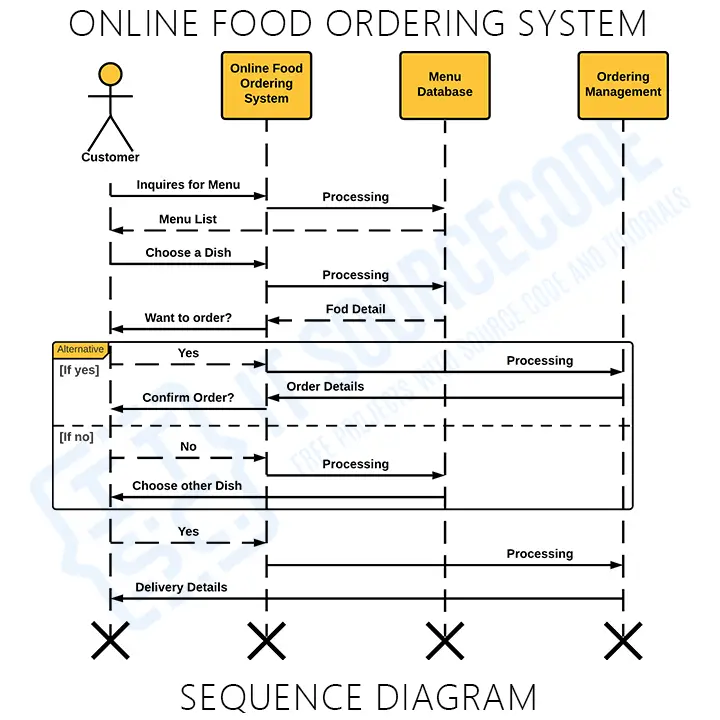
As you can see through the illustration, the conditions and interactions are emphasized. These interactions are essential for the Online Food Ordering System development.
The series of messages are shown and labeled to guide you in building the System. You can modify the design if you have more ideas. You can also add more features to this design and use it as your project blueprint.
You’ll be able to understand and educate yourself on how the Food Ordering System works by creating a sequence diagram. Because it determines the needed objects, actors and messages and their interactions.
Conclusion
The Food Ordering System is a sort of interaction sequence diagram that shows how a group of items interacts and in what order. Software engineers and business experts use these diagrams to understand the requirements of the system or to describe an existing process.
The Food Ordering System must have a designed diagram to define the event sequences that will result in a desired outcome. The flow of communication that appears is more important than the message itself.
Though the majority of sequence diagrams will show what messages are transmitted and in what order they usually occur.
And that completes our discussion fellas! I hope that this article will help you a lot.
Related Articles
- Online Food Ordering System UML Diagrams
- Online Food Ordering System Class Diagram | UML
- Use Case Diagram for Online Food Delivery System
Inquiries
If you have inquiries or suggestions about the Sequence Diagram, just leave us your comments below. We would be glad to hear to concerns and suggestions and be part of your learning.
How to read a sequence diagram
A sequence diagram shows the messages exchanged between objects over time, top to bottom. Each object has a vertical lifeline (dashed line); messages are horizontal arrows between them.
- Lifeline. Vertical dashed line representing the object’s presence during the interaction.
- Activation bar. Thin rectangle on a lifeline showing when the object is actively processing.
- Synchronous message. Solid arrow with filled triangle — sender waits for a return.
- Asynchronous message. Solid arrow with stick arrowhead — sender does not wait.
- Return message. Dashed arrow with stick arrowhead going back to the sender.
Combined fragments (control flow)
- alt. Alternative paths (if/else).
- opt. Optional path.
- loop. Repeated messages.
- par. Parallel execution.
Common capstone mistakes
- Missing return messages. Every synchronous call needs a return arrow.
- Wrong order. Top-to-bottom = time order.
- Too many objects. Focus on one use case per sequence diagram.
- No control-flow fragments. Use alt/opt/loop.
Where the sequence diagram fits
- Section 3.2 (System Design).
- One per major use case.
- Reference the use case.
Official documentation

Mary Grace G. Patulada
Programmer & Technical Writer at PIES IT Solution
Mary Grace G. Patulada (pen name ‘Nym’) is a programmer and writer at PIES IT Solution with a BSIT background from Carlos Hilado Memorial State College, Binalbagan Campus. Authored 370+ UML diagram tutorials and capstone documentation guides at itsourcecode.com. Specializes in UML (class, use case, activity, sequence, component, deployment), DFD, and ER diagrams for BSIT capstone projects.
Expertise: UML Diagrams · DFD · ER Diagrams · Use Case Diagrams · Activity Diagrams · Capstone Documentation · PHP
· View all posts by Mary Grace G. Patulada →
Working source code for this system
Download the actual implementation of this system in your preferred language. Each project includes source code, database, and setup instructions for BSIT capstone use.
- PHP: [Complete] Online Food Ordering System In CodeIgniter
- Python: Python Django Online Food Ordering System with Source Code
- Django: Python Django Online Food Ordering System with Source Code
- CodeIgniter: [Complete] Online Food Ordering System In CodeIgniter
- ASP.NET: Online Food Ordering System Project in ASP.net FREE Download
Frequently asked questions
What is a sequence diagram used for in BSIT capstone?
A sequence diagram shows how objects interact over time to accomplish a specific use case: the messages, calls, and return values in chronological order. It complements the use case and class diagrams in Chapter 3.
What tool should I use to draw the sequence diagram?
Free options: draw.io (browser-based, saves to Google Drive), Lucidchart free tier, PlantUML (text-based, version-controllable), StarUML (30-day trial then reduced feature set), Visual Paradigm Community Edition. Paid options: Microsoft Visio, Lucidchart pro, Enterprise Architect. For BSIT capstones, draw.io is the most commonly used free tool.
How detailed does the sequence diagram need to be for capstone defense?
Panel members expect the diagram to match the actual system implementation. Include every major class/use case/entity relevant to the system. Omit trivial helper classes. Every diagram element should have a clear justification. Aim for 1-2 diagrams that fully cover the system, not many partial ones.
Should I use black-and-white or colored diagrams?
Black-and-white is standard for capstone documentation to match the thesis format. Use color only if it improves clarity (e.g., grouping subsystems). Ensure text is readable at printed size (10pt minimum for labels).
Where does this diagram go in the capstone documentation?
Chapter 3 (System Design and Methodology) typically holds all UML diagrams. Introduce each diagram with a 1-paragraph description explaining what it shows and how to read it. Reference specific elements in the surrounding text so panel members can follow the design rationale.