

INVENTORY MANAGEMENT SYSTEM CLASS DIAGRAM – is a designed structure that shows the classes (data) in the project and their relationships. UML Class Diagram is made to guide programmers along with the Inventory management system development with concern to the data structures.
It contains the class attributes, methods as well as the relationships between them. The mentioned contents makes sure that your Inventory management system development must inline with what should be its functions.
Here’s what you need to know about the Diagram for Inventory Management System. It contains all the needed information and are complete in details.
From the Classes, its attributes and methods up to its visibility and relationships are arranged and declared thoroughly. You just have to know the needed information before doing your UML Class Diagram for Inventory Management System.
How to Construct Inventory Management System UML Class Diagram?
Now, to create the Class Diagram for the Inventory Management System, you will first determine the classes. So the classes that are included in inventory management would be stocks, sales, products, customers, users, suppliers, and transactions.
The classes mentioned were just general. If you want a more complex or wider scope for your inventory management system, then you can add your desired classes. You must also include the database on your class diagram for your system.
You just have to be guided accordingly in creating your UML class diagram. This is to keep you from unwanted repetitions and mistakes. And, if you have successfully made this diagram, you will then easily build your inventory management system.
Simple Class Diagram (UML) for Inventory Management System
Here’s the constructed Class Diagram for Inventory Management System. It was provided with its attributes with matching methods. This is constructed with the simple idea derived from the common function of an Inventory System.
The illustration shown in this article gives you the hint on how will you design your own Inventory Management System UML Class Diagram. It has the simple idea on how the class Diagram works.
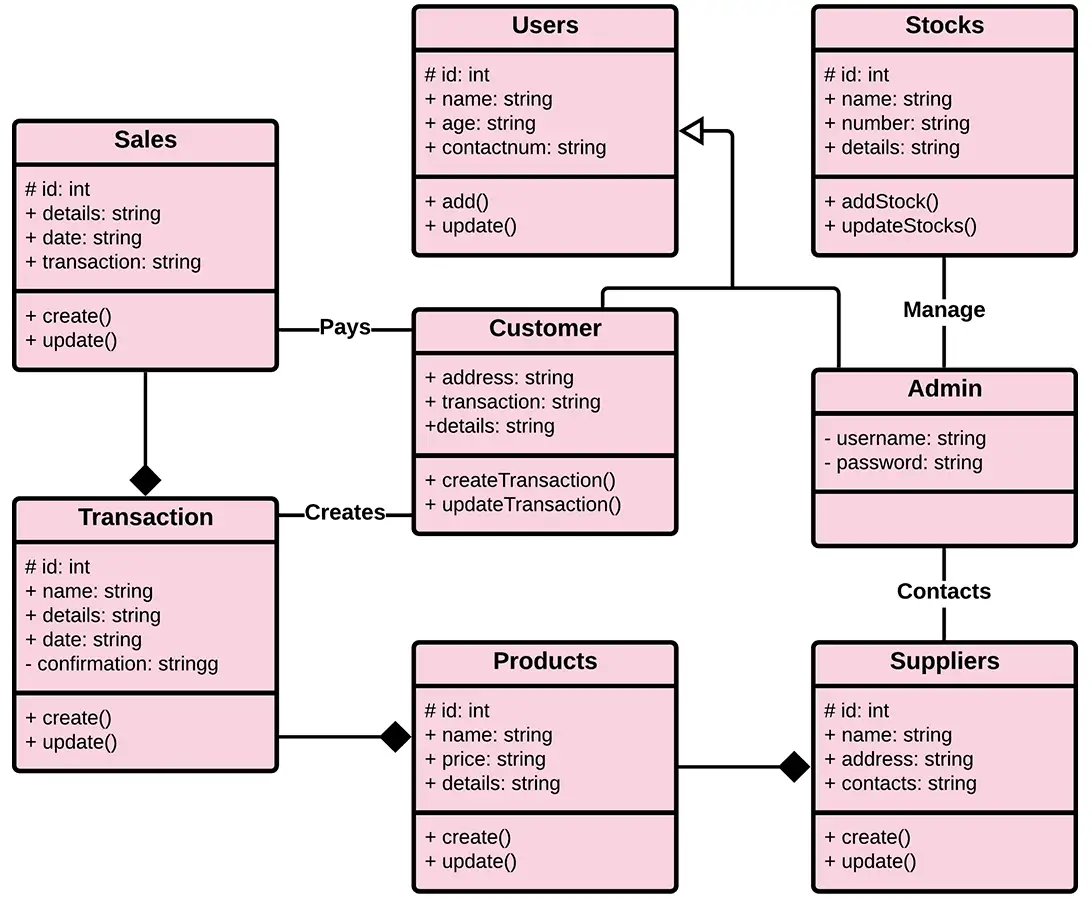
As you can see through the illustration, the classes were determined which is symbolized by boxes. They were designated with their corresponding attributes and shows the class’ methods.
Their relationships are also plotted to show the connections between classes and their multiplicity. You should also look into the visibility symbols displayed in the diagram.
These are important because it declares the status of attributes in your Class Diagram. Some of the Class’ attributes are for public (+) which means that they can be accessed by the classes connected to them.
While the protected (#) symbols, means that the attributes of the data can be accessed by the same classes or subclass and the (-) symbol means it cannot be accessed by other class.
Just bear in mind that when you create your own class diagram, you have to be specific. That is because, it will affect your project development. Do not worry because you can use the sample given as your project reference or you may also create your own.
Important Considerations before Designing your UML Class Diagram for Inventory Management System.
You must be informed that an Inventory Management system (also known as an inventory system) is a method of tracking items across your whole supply chain, from purchase to production to final sales. It determines how you handle inventory management in your company.
The process of ordering, storing, using, and selling a company’s inventory is referred to as inventory management. This comprises the storage and processing of raw materials, components, and completed products, as well as the administration of raw materials, components, and final products.
Inventory management in business terms refers to having the correct stock, at the right levels, in the right place, at the right time, and at the right cost and price. Therefore you must be aware of all the information needed in constructing its class diagram.
The factors mentioned should be present and represented by classes provided with their attributes. You also have to plot their relationships because it will be the guide in the system development.
Inventory Management System Class Diagram in Java (2026 Code Example)
Below is a complete Java implementation following the Class Diagram structure. You can copy these classes directly into your capstone project as a starting point:
Product Class
import java.util.ArrayList;
import java.util.Date;
import java.util.List;

public class Product {
    private String productId;
    private String productName;
    private String category;
    private int quantityInStock;
    private List<Transaction> transactions;

    public Product(String productId, String productName,
                   String category, int quantityInStock) {
        this.productId = productId;
        this.productName = productName;
        this.category = category;
        this.quantityInStock = quantityInStock;
        this.transactions = new ArrayList<>();
    }

    public void recordTransaction(Supplier supplier, int quantity) {
        Transaction transaction = new Transaction(this, supplier, new Date(), quantity);
        transactions.add(transaction);
    }

    public List<Transaction> getTransactions() {
        return transactions;
    }

    // Getters and setters
}
Supplier Class
public class Supplier {
    private String supplierId;
    private String supplierName;
    private String contactNumber;
    private String address;

    public Supplier(String supplierId, String supplierName,
                    String contactNumber, String address) {
        this.supplierId = supplierId;
        this.supplierName = supplierName;
        this.contactNumber = contactNumber;
        this.address = address;
    }

    public void updateContactInfo(String contactNumber) {
        this.contactNumber = contactNumber;
    }

    // Getters and setters
}
Transaction Class
import java.util.Date;

public class Transaction {
    private Product product;
    private Supplier supplier;
    private Date transactionDate;
    private int quantity;

    public Transaction(Product product, Supplier supplier,
                       Date transactionDate, int quantity) {
        this.product = product;
        this.supplier = supplier;
        this.transactionDate = transactionDate;
        this.quantity = quantity;
    }

    public void recordQuantity(int quantity) {
        this.quantity = quantity;
    }

    // Getters and setters
}
Inventory Management System Class Diagram in PHP (2026 Code Example)
Here’s the same Class Diagram implemented in modern PHP 8.x. This pattern works well for Laravel and CodeIgniter capstones:
Product.php
<?php

class Product {
    private string $productId;
    private string $productName;
    private string $category;
    private int $quantityInStock;
    private array $transactions = [];

    public function __construct(
        string $productId,
        string $productName,
        string $category,
        int $quantityInStock
    ) {
        $this->productId = $productId;
        $this->productName = $productName;
        $this->category = $category;
        $this->quantityInStock = $quantityInStock;
    }

    public function recordTransaction(
        Supplier $supplier,
        int $quantity
    ): void {
        $this->transactions[] =
            new Transaction($this, $supplier, new DateTime(), $quantity);
    }

    public function getTransactions(): array {
        return $this->transactions;
    }

    // Getters and setters
}
Supplier.php
<?php

class Supplier {
    private string $supplierId;
    private string $supplierName;
    private string $contactNumber;
    private string $address;

    public function __construct(
        string $supplierId,
        string $supplierName,
        string $contactNumber,
        string $address
    ) {
        $this->supplierId = $supplierId;
        $this->supplierName = $supplierName;
        $this->contactNumber = $contactNumber;
        $this->address = $address;
    }

    public function updateContactInfo(string $contactNumber): void {
        $this->contactNumber = $contactNumber;
    }

    // Getters and setters
}
Transaction.php
<?php

class Transaction {
    private Product $product;
    private Supplier $supplier;
    private DateTime $transactionDate;
    private int $quantity;

    public function __construct(
        Product $product,
        Supplier $supplier,
        DateTime $date,
        int $quantity
    ) {
        $this->product = $product;
        $this->supplier = $supplier;
        $this->transactionDate = $date;
        $this->quantity = $quantity;
    }

    public function recordQuantity(int $quantity): void {
        $this->quantity = $quantity;
    }

    // Getters and setters
}
UML Class Diagram Symbols , Complete Reference Table
Use this reference table to read or draw any UML Class Diagram correctly. These symbols are standard across all UML modeling tools:
| Symbol | Name | Meaning |
|---|---|---|
| ― | Association | Solid line , basic “uses” or “knows about” relationship |
| ―◇ | Aggregation | Hollow diamond , weak “has-a” (part can exist without whole) |
| ―◆ | Composition | Filled diamond , strong “contains-a” (part dies with whole) |
| ―▷ | Inheritance / Generalization | Hollow triangle , “is-a” parent/child relationship |
| – – – ▷ | Realization | Dashed line with hollow triangle , interface implementation |
| – – – ► | Dependency | Dashed arrow , temporary “uses” relationship |
| + | Public visibility | Attribute or method accessible from anywhere |
| – | Private visibility | Attribute or method accessible only inside the class |
| # | Protected visibility | Accessible within the class and subclasses |
| ~ | Package visibility | Accessible within the same package (mostly Java) |
| 1, 0..1, 0..*, 1..* | Multiplicity | Cardinality at relationship endpoints (how many instances) |
Quick rule: If you’re unsure between aggregation and composition, ask: “If I destroy the whole, does the part still exist?” Yes = aggregation. No = composition.
How to Draw the Inventory Management System Class Diagram , Step by Step
Follow these 6 steps to draw this Class Diagram from scratch using draw.io (recommended for BSIT capstones):
Step 1 , Open draw.io and set up the canvas
Go to app.diagrams.net → create a blank diagram → enable the UML shape library in the left panel. You will now see Class, Association, and Relationship tools.
Step 2 , Draw the Product class
Drag a Class shape onto the canvas.
Class Name: Product
Attributes:
- productId: String
- productName: String
- category: String
- quantityInStock: int
Methods:
- recordTransaction(supplier: Supplier, quantity: int): void
- getTransactions(): List
Step 3 , Draw the Supplier class
Add another Class shape.
Class Name: Supplier
Attributes:
- supplierId: String
- supplierName: String
- contactNumber: String
- address: String
Methods:
- updateContactInfo(contactNumber: String): void
Step 4 , Draw the Transaction association class
Create a class named Transaction.
Attributes:
- transactionDate: Date
- quantity: int
Methods:
- recordQuantity(quantity: int): void
Transaction is an association class that connects Product and Supplier and stores extra details about stock movement.
Step 5 , Draw relationships
Use UML connectors:
- Product → Transaction (Aggregation, 1..*)
- Supplier → Transaction (Aggregation, 1..*)
- Supplier → Product (Association, 1..*)
Transaction sits between Product and Supplier as the event that records inventory changes.
Step 6 , Add multiplicity labels
Add multiplicity on each relationship:
- Product: 1 → Transaction: 0..*
- Supplier: 1 → Transaction: 0..*
- Supplier: 1 → Product: 0..*
This shows that products can have many transactions and suppliers can supply many products over time.
Export
Export your diagram:
- PNG (minimum 1200px width) for presentations
- PDF for documentation and printing
Always ensure text is readable when zoomed in during your defense.
Common Mistakes Students Make with Class Diagrams
Avoid these mistakes that capstone defense panels frequently catch:
Mistake #1 , Confusing aggregation with composition
Don’t automatically use composition (filled diamond) for every relationship. Ask: “Can this object exist independently?”
For example, a Supplier can continue to exist even if a Product is removed from inventory. Therefore, aggregation is more appropriate than composition.
Mistake #2 , Missing multiplicity
Every relationship should have multiplicity labels at both ends.
Examples:
- Product → Transaction: 1 to 0..*
- Supplier → Transaction: 1 to 0..*
- Supplier → Product: 1 to 0..*
Without multiplicity labels, the relationship is incomplete.
Mistake #3 , Mixing database fields with class attributes
Class Diagrams should represent objects and their relationships.
Use:
- product: Product
- supplier: Supplier
instead of:
- productId: int
- supplierId: int
Foreign key IDs belong in the database schema, not necessarily in the UML relationship model.
Mistake #4 , Putting “Database”, “Inventory System”, or “User Interface” as a class
Class Diagrams model business entities such as Product, Supplier, and Transaction.
Components such as Database, Web Application, Barcode Scanner, or API should be represented in Component Diagrams or Deployment Diagrams.
Mistake #5 , Empty method compartments
Classes should contain meaningful behavior.
Examples:
Product
- recordTransaction()
- getTransactions()
Supplier
- updateContactInfo()
Transaction
- recordQuantity()
- generateReceipt()
A common defense question is: “What does this class do?” Make sure every class has a clear responsibility.
Mistake #6 , Drawing in low resolution
Export diagrams as PNG files with a minimum width of 1200px for presentations.
For capstone documentation, PDF export is recommended because it preserves readability and diagram quality regardless of zoom level.
Conclusion
The Inventory Management System Management System is a modeled diagram that explain its classes and relationships. The diagram depicts the names and attributes of the classes, as well as their links and, their methods.
It is the most essential type of UML diagram which is critical in software development. It is an approach to show the system’s structure in detail, including its properties and operations.
The Inventory Management System must have a designed diagram to define the classes needed for the desired outcome. It is used to model the items that make up the system, depict their relationships, and define what those objects perform and the services they provide.
And that completes our discussion fellas! I hope that this article about UML Class Diagram for Inventory Management System will help you a lot.
Related Article:
- UML Class Diagram Discussion: Complete Guide with Examples
- Library Management System Class Diagram | UML
- Online Shopping System Class Diagram | UML
- Payroll Management System Class Diagram | UML
- Online Food Ordering System Class Diagram | UML
Inquiries:
If you have inquiries or suggestions about Inventory Management System Class Diagram | UML just leave us your comments below.
Keep us updated and Good day!
Official documentation

Mary Grace G. Patulada
Programmer & Technical Writer at PIES IT Solution
Mary Grace G. Patulada (pen name ‘Nym’) is a programmer and writer at PIES IT Solution with a BSIT background from Carlos Hilado Memorial State College, Binalbagan Campus. Authored 370+ UML diagram tutorials and capstone documentation guides at itsourcecode.com. Specializes in UML (class, use case, activity, sequence, component, deployment), DFD, and ER diagrams for BSIT capstone projects.
Expertise: UML Diagrams · DFD · ER Diagrams · Use Case Diagrams · Activity Diagrams · Capstone Documentation · PHP
· View all posts by Mary Grace G. Patulada →
Working source code for this system
Download the actual implementation of this system in your preferred language. Each project includes source code, database, and setup instructions for BSIT capstone use.
- PHP: Stock Management System in PHP with Source Code
- VB.NET: Sales and Inventory Management System Project in VB.Net Source Code
- Java: Stock Management System Project in Java with Source Code
- Python: Django Warehouse Management System with Source Code
- Django: Django Warehouse Management System with Source Code
- Laravel: Inventory Management System in Laravel With Source Code
Frequently asked questions
What is a class diagram used for in BSIT capstone?
A class diagram shows the static structure of the system: classes, attributes, methods, and relationships (inheritance, association, aggregation, composition). It goes in Chapter 3 of the capstone documentation and communicates the object-oriented design of the system.
What tool should I use to draw the class diagram?
Free options: draw.io (browser-based, saves to Google Drive), Lucidchart free tier, PlantUML (text-based, version-controllable), StarUML (30-day trial then reduced feature set), Visual Paradigm Community Edition. Paid options: Microsoft Visio, Lucidchart pro, Enterprise Architect. For BSIT capstones, draw.io is the most commonly used free tool.
How detailed does the class diagram need to be for capstone defense?
Panel members expect the diagram to match the actual system implementation. Include every major class/use case/entity relevant to the system. Omit trivial helper classes. Every diagram element should have a clear justification. Aim for 1-2 diagrams that fully cover the system, not many partial ones.
Should I use black-and-white or colored diagrams?
Black-and-white is standard for capstone documentation to match the thesis format. Use color only if it improves clarity (e.g., grouping subsystems). Ensure text is readable at printed size (10pt minimum for labels).
Where does this diagram go in the capstone documentation?
Chapter 3 (System Design and Methodology) typically holds all UML diagrams. Introduce each diagram with a 1-paragraph description explaining what it shows and how to read it. Reference specific elements in the surrounding text so panel members can follow the design rationale.