

The UML activity diagram is a diagram that presents the flow of hotel room booking system activities. It is one of the methods used to document the system’s behavior in terms of its activities and development.
Additionally, the activity diagram uses symbols to define the overall workflow of the hotel management system. It is composed of activities, decisions, and paths (flows).
Hotel Room Booking Activity Diagram: Details
| Name: | Hotel Room Booking System Activity Diagram |
| UML Diagram: | Activity Diagram |
| Users: | Hotel Admin, Customers, and Employees. |
| Tools Used: | Online tools that provide activity diagram symbols. |
| Designer: | ITSourceCode.com |
What is Online Hotel Room Booking System?
The online hotel room booking system is a convenient software that lets the customer book a room online. It is used by hotel businesses to process transactions without the need for a middleman. This also helps them provide quality service for their customer.
The advantage of online hotel booking software is it makes the hotel accessible to customers anytime and anywhere. As a result, the software could improve the competitiveness of the business as well as its productivity. Above all, the system enables the owners to save money, time, and effort.
Define Hotel Room Booking System Activity Diagram
UML defines a hotel room booking system activity diagram as a very effective behavior diagram. This diagram shows the flow of interaction between the system and clients. This is done by helping them visualize the system’s functionality in various degrees of detail.
The activity diagram in UML describes the processes in a use case diagram. Its’ illustration can also be sequential or concurrent. It is one of the Online Hotel Room Booking System UML diagrams.
Hotel Room Booking System Activity Diagram
The activity diagram example expands the hotel management system’s concepts. It is shown in the detailed illustration to enlighten the programmers.
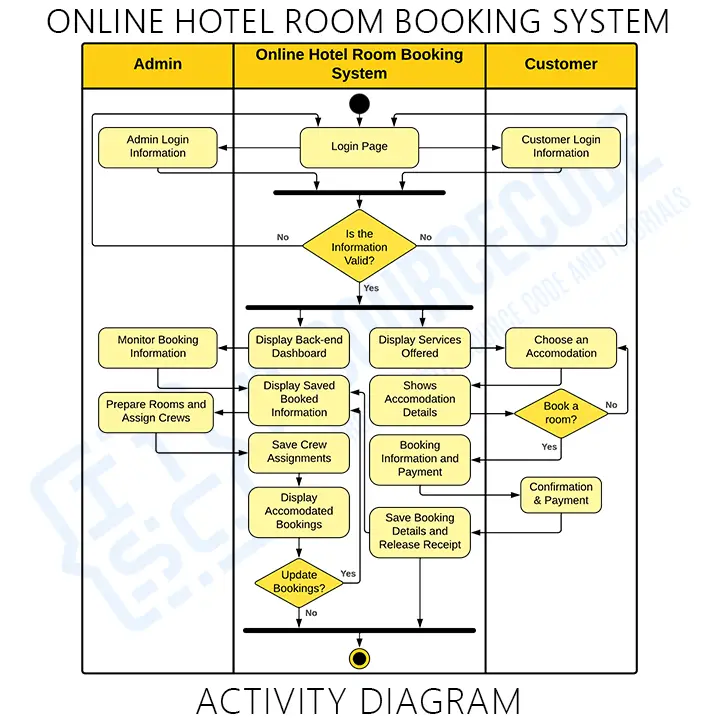
As seen in the illustration, we used the swimlane with three partitions. The left partition of the diagram shows the admin lane. This lane covers all the possible activities and scope of an admin when using the system.
The right partition is used as the customer’s lane. This lane shows the customer’s scope and activities.
Now, the system’s scope and activities were placed in the middle. This is to show that the system acts as the middleman between the admin and the customer. Therefore, the system is accessible to both users.
To access the system, the users must have their accounts logged into the software. The functions were then emphasized as the activities flowed and the system and the user communicates.
You can add more to this and it is up to you how will you create your activity diagram. But, make sure that you have precise information and include the important decisions (actions).
Downloadable Pdf File
How to Draw an Activity Diagram?
Time needed: 1 minute
Here are the steps in developing (designing) the activity diagram.
- Step 1: Familiarize Activity Diagram Symbols
To draw an activity diagram, you need to familiarize yourself first with the symbols used. The symbols let you discuss the system’s flow of activities and interaction.
- Step 2: Identify the flow of actions.
After familiarizing the symbols used, you will need to identify the flow of actions. The flow of actions would be based on your use case diagram.
Actions describe the series of activities when a user invokes the hotel room booking.
- Step 3: Involve the Actors (users) included.
Actors carry out their actions on things, transforming them into other objects or changing their state. This actor is someone or something that interacts with the system.
- Step 4: Map the flow of activities.
To make a flow or path for activities, make sure you know that the flows can be sequential, branching, or run.
Conclusion:
In conclusion, we have learned What is an activity diagram for hotel management system and the steps including room reservations. This diagram acts as one of the methodologies for creating a room booking for the hotel management system.
Therefore, using an activity diagram in UML will not only let you understand the project but also tell you its benefits. This diagram works best with the other UML Diagrams.
Recommended Articles:
- Hotel Management System UML Diagrams
- Component Diagram for Hotel Reservation System
- Hotel Management System Class Diagram
- Sequence Diagram for Hotel Reservation System
- DFD for Hotel Management System
- ER Diagram for Online Hotel Reservation System
Inquiries
If you have inquiries or suggestions about the Activity Diagram for Online Hotel Room Booking, just leave us your comments below. We would be glad to hear to concerns and suggestions and be part of your learning.
How to read an activity diagram
An activity diagram is essentially a flowchart with UML notation. It shows the sequence of actions in a process or use case.
- Initial node. Filled black circle marks the start.
- Activity/Action. Rounded rectangle for a step.
- Decision node. Diamond with a guard condition on each outgoing arrow (e.g., [amount > 100]).
- Merge node. Diamond joining multiple flows back into one.
- Fork. Horizontal bar splitting one flow into parallel flows.
- Join. Horizontal bar merging parallel flows back into one.
- Final node. Circle with a filled dot inside — end of the activity.
- Swimlanes. Vertical columns showing which actor performs each action.
Common capstone mistakes to avoid
- Decision without guard condition. Every branch from a decision must have a condition in brackets.
- Missing merge nodes. When branches rejoin, use a merge diamond, not just connect the lines.
- Fork/join mismatch. Every fork must have a matching join.
- No swimlanes. Multi-actor processes benefit greatly from swimlanes for clarity.
- Too detailed. Focus on business logic, not UI clicks.
Where the activity diagram fits in Chapter 3
- Section 3.3 (Process Design). Ideal for business workflows.
- One diagram per major use case or workflow.
- Reference from the use case description so panel can trace the flow.
Official documentation
Working source code for this system
Download the actual implementation of this system in your preferred language. Each project includes source code, database, and setup instructions for BSIT capstone use.
- PHP: Hotel Reservation System using Laravel With Source Code
- VB.NET: Triple A’s Hotel Room Reservation System
- Python: Online Hotel Reservation System Project in Django with Source Code
- Django: Online Hotel Reservation System Project in Django with Source Code
- Laravel: Online Hotel Booking System Project in Laravel with Source Code
Frequently asked questions
What is a activity diagram used for in BSIT capstone?
An activity diagram shows the workflow or business logic: activities, decisions, forks, and joins in a process. It communicates the sequence of steps for a specific operation and is placed in Chapter 3.
What tool should I use to draw the activity diagram?
Free options: draw.io (browser-based, saves to Google Drive), Lucidchart free tier, PlantUML (text-based, version-controllable), StarUML (30-day trial then reduced feature set), Visual Paradigm Community Edition. Paid options: Microsoft Visio, Lucidchart pro, Enterprise Architect. For BSIT capstones, draw.io is the most commonly used free tool.
How detailed does the activity diagram need to be for capstone defense?
Panel members expect the diagram to match the actual system implementation. Include every major class/use case/entity relevant to the system. Omit trivial helper classes. Every diagram element should have a clear justification. Aim for 1-2 diagrams that fully cover the system, not many partial ones.
Should I use black-and-white or colored diagrams?
Black-and-white is standard for capstone documentation to match the thesis format. Use color only if it improves clarity (e.g., grouping subsystems). Ensure text is readable at printed size (10pt minimum for labels).
Where does this diagram go in the capstone documentation?
Chapter 3 (System Design and Methodology) typically holds all UML diagrams. Introduce each diagram with a 1-paragraph description explaining what it shows and how to read it. Reference specific elements in the surrounding text so panel members can follow the design rationale.

Mary Grace G. Patulada
Programmer & Technical Writer at PIES IT Solution
Mary Grace G. Patulada (pen name ‘Nym’) is a programmer and writer at PIES IT Solution with a BSIT background from Carlos Hilado Memorial State College, Binalbagan Campus. Authored 370+ UML diagram tutorials and capstone documentation guides at itsourcecode.com. Specializes in UML (class, use case, activity, sequence, component, deployment), DFD, and ER diagrams for BSIT capstone projects.
Expertise: UML Diagrams · DFD · ER Diagrams · Use Case Diagrams · Activity Diagrams · Capstone Documentation · PHP
· View all posts by Mary Grace G. Patulada →