
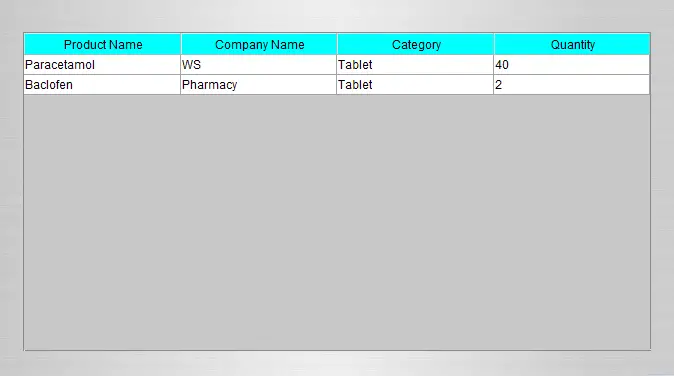
Change the background color of table header in table using Java Tutorial
This tutorial is all about Change the background color of table header in table using Java Tutorial. In this tutorial you will learn how to Change the background color of table header in table using Java Tutorial.
Sometimes you need to change the background color of your table header in order to make your table more presentable and user friendly.
It helps the users to better understand your system and to be more attractive. Please follow all the steps below to complete this tutorial.
Change the background color of table header in table using Java Tutorial steps
First of all, you must create your project by clicking File at the top left of your netbeans and the new project. You can name you project whatever you want.
After creating project, the next is to create your own jframe form by right clicking the Source Packages and then clicking New JFrame Form, Drag one table and copy and paste the code below:
[java]

try{

String sql = "SELECT product_name as 'Product Name',company_name as 'Company Name',product_category as 'Category',quantity as 'Quantity' FROM products";

pst = conn.prepareStatement(sql);

rs = pst.executeQuery();

while(rs.next()){

tableName.setModel(DbUtils.resultSetToTableModel(rs));

}


//code to change the background of a tableheader

JTableHeader theader = tableName.getTableHeader();

theader.setBackground(Color.CYAN);


}catch(Exception e){

JOptionPane.showMessageDialog(null, e);

}

[/java]
Take note that tableName is the variable of the table
Then you’re done, run your project and see if it works.
About The Change the background color of table header in table In Java
<figure class="wp-block-table is-style-stripes">
<table>
<tbody>
<tr>
<td><strong>Project Name:</strong></td>
<td>Change the background color of table header in table</td>
</tr>
<tr>
<td><strong>Language/s Used:</strong></td>
<td>JAVA</td>
</tr>
<tr>
<td><strong>Database:</strong></td>
<td>MySQL</td>
</tr>
<tr>
<td><strong>Type:</strong></td>
<td>Desktop Application</td>
</tr>
<tr>
<td><strong>Developer:</strong></td>
<td>IT SOURCECODE</td>
</tr>
<tr>
<td><strong>Updates:</strong></td>
<td>0</td>
</tr>
</tbody>
</table><figcaption><em><strong>Change the background color of table header in table In Java</strong>- Project Information</em></figcaption></figure>
For questions or any other concerns or thesis/capstone creation with documentation, you can contact me through the following:
E-Mail: [email protected]
Facebook: facebook.com/RyyanSalem
Contact No.: +639098911050
Ryan A. Salem
BSIT Graduate, soon to be MIT.
Java Developer / System Developer
Related topic(s) that you make like:
1.) Automated Payroll System using Java
2.) How to resize the column in table using Java
Frequently Asked Questions
How does this Java project work?
Built with Java Swing (NetBeans IDE) and MySQL backend via JDBC. Standard structure: JFrame designer to event handlers to DAO layer to MySQL. Login form for auth. Ready to extend for BSIT capstone scope.
What Java JDK and MySQL versions does this project require?
Most projects in this batch use Java JDK 8 or 11 with MySQL 5.7+ or MariaDB 10+. To run: install JDK (Adoptium / Oracle), install MySQL Server + MySQL Workbench, install NetBeans IDE (15+ supports modern JDK), open the project (.zip extracted folder), right-click + Open Project, add MySQL JDBC driver to Project Libraries, run.
How do I set up the database for this Java project?
Open MySQL Workbench (or phpMyAdmin if you have XAMPP), create a new empty database with the name specified in the project. Import the included .sql file via Server, Data Import in Workbench (or Import tab in phpMyAdmin). Update the connection class (usually DBConnection.java or DatabaseConnection.java) with your MySQL host, port, username, password, and database name.
Can I use this Java project for a BSIT capstone or thesis?
Yes, Java is one of the most accepted languages by Philippine BSIT panels. Extend it: add role-based access (admin/staff/customer login redirect), JasperReports printable reports, dashboards with JFreeChart, audit log, multi-branch support. Pair with Chapter 1-5 documentation matching your panel’s rubric.
Why am I getting ‘ClassNotFoundException: com.mysql.jdbc.Driver’ or ‘No suitable driver’?
Three common Java JDBC issues: (1) MySQL JDBC driver JAR not added to project Libraries. Right-click Project, Properties, Libraries, Add JAR/Folder, select mysql-connector-java-X.X.X.jar. (2) Wrong driver class name. Modern (8.0+) uses com.mysql.cj.jdbc.Driver, legacy (5.x) uses com.mysql.jdbc.Driver. (3) Connection URL missing serverTimezone parameter, add ?serverTimezone=UTC to the URL.
Where can I find more Java projects with source code?
Browse the Java Projects hub for the full library (120+ Java desktop systems). For modern Java web alternatives consider Spring Boot. For other desktop stacks see VB.NET Projects or C# Projects. For BSIT capstone idea lists see 150 Best Capstone Project Ideas.