

How to solve the modulenotfounderror: no module named ‘aiohttp’ error message?
Let’s find out the best solution through this article.
Errors mold you into a great data scientist, developer, or programmer; they make you think even more than usual, but usually, these errors are simple.
In this article, we will discuss the solutions for this error no module named aiohttp, what it means, the reason behind it, and how to troubleshoot it.
What is the modulenotfounderror: no module named ‘aiohttp’ error?
ModuleNotFoundError: No module named 'aiohttp'The modulenotfounderror: no module named ‘aiohttp‘ error message in Python indicates that the required module you are trying to import is not installed in your system.
That’s the reason why the Python interpreter is unable to find the module.
By that, it will throw an error no module named ‘aiohttp’ that you need to address to run your program.
The aiohttp module is a popular Python library that is used for asynchronous HTTP requests and web sockets.
Why does modulenotfounderror: no module named ‘aiohttp’ error occur?
The error message modulenotfounderror: no module named ‘aiohttp’ has several reasons why it occurs. The following are the reasons that you need to fix it right away:
1. The “aiohttp” module is not installed
The Python interpreter was unable to find the module. If you did not install the ‘aiohttp’ module, you’ll face this error. Your program won’t run if there’s a missing package.
2. Incorrect installation
When you already installed the ‘aiohttp’ module, the error still exists because the module was not installed correctly.
3. Incorrect module name
This error occurs when the name of the module is incorrect. When you are trying to import the ‘aiohttp’ module but it’s actually named something else, Python will definitely be unable to find it and you’ll get an error.
4. Virtual environment issue
When you are working in a virtual environment, it’s possible that the ‘aiohttp’ module is installed in the global environment but not in the virtual environment you are currently working in.
By this, the Python interpreter cannot find the module, and you will face this error.
5. Conflict aiohttp module
Conflicts occur when you install multiple versions of the geopy module. You have to remove the conflicting modules to resolve the conflict.
How to fix modulenotfounderror: no module named ‘aiohttp’ error
Here are the effective solutions to fix the error no module named aiohttp.
Just follow the following command until you have successfully fixed the error.
1. Install the ‘aiohttp’ module
When you haven’t installed the ‘aiohttp’ module yet, you can simply install it using the following command:

or if you are using Python 3

Installing ‘aiohttp’ module in different platforms
Jupyter Notebook:
✅!pip install aiohttpAnaconda:
✅ conda install -c conda-forge aiohttp

or

✅ conda install -c conda-forge aiohttp
Virtual environment or using Python 2:
✅ pip install aiohttppy alias (Windows):
✅ py -m pip install aiohttpWhen you get permissions error:
✅ sudo pip3 install aiohttp

or

✅ pip install aiohttp --user
When you don’t have pip in your PATH environment variable:
✅ python -m pip install aiohttp2. Update the ‘aiohttp’ module
When you are using an outdated version of module, then an error occurs. Try to update your module.
For instance, if you are using Python version is 3.11.2, you should install the aiohttp module with the latest version of the module.

or, you do the following command:

In addition to that, if you want to install a specific version, you can use the following command:
✅ pip install aiohttp==<version>You just replace <version> with the version number you wanted to install.
3. Check if the ‘aiohttp’ module is installed
When you are unsure if the module has been installed or not, you can use the following command:

or
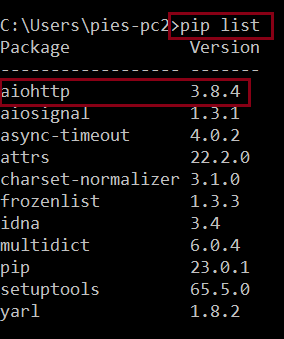
4. Reinstall the ‘aiohttp’ module
When the above solutions do not resolve the error, try to reinstall the “aiohttp’ module using the following commands:
To uninstall:

After typing the command: pip3 uninstall aiohttp, then press enter. It will show some data, and you just have to type (y), which means yes.
Right after that, the module will be removed. Let’s proceed to the next step, which is reinstalling the module.
To reinstall the module:
Diagnostic checklist for “No module named ‘aiohttp'”
- Verify pip install target. Run
pip show aiohttp— if not installed, runpip install aiohttp. - Check the active Python interpreter.
which python(mac/Linux) orwhere python(Windows). Both pip and python must point to the same environment. - Check virtual environment activation. If you use venv/conda, activate before installing:
source .venv/bin/activate. - Rule out uppercase/lowercase. Python imports are case-sensitive:
import PyPDF2notimport pypdf2. - Rule out the pip-vs-package-name mismatch. Some packages install under a different name than you import (e.g.
pip install beautifulsoup4→import bs4).
Installing aiohttp — web scraping library
# Standard install
pip install aiohttp

# For beautifulsoup4
pip install beautifulsoup4  # note: 4 in the name

# For Selenium (needs browser driver)
pip install selenium
# Also install ChromeDriver or GeckoDriver
Common causes for missing scraping modules
- bs4 vs beautifulsoup4. Install as
pip install beautifulsoup4, import asfrom bs4 import BeautifulSoup. - Selenium browser driver missing. Selenium 4+ can auto-download via Selenium Manager. Older versions need manual ChromeDriver/GeckoDriver install.
- lxml missing. Some scrapers require lxml as a parser dependency:
pip install lxml. - requests vs httpx. Modern async scrapers use httpx or aiohttp — both need separate install.
Working code example
# Requests quick check
import requests
r = requests.get("https://httpbin.org/json")
print(r.status_code)

# BeautifulSoup quick check
from bs4 import BeautifulSoup
soup = BeautifulSoup("<p>hi</p>", "html.parser")
print(soup.text)
Best practices
- Respect robots.txt. Do not scrape sites that explicitly disallow it.
- Add rate limiting. Sleep between requests to avoid overwhelming target sites.
- Consider httpx over requests. httpx supports HTTP/2 and async. Requests is still perfect for simple use cases.
Official documentation
Frequently Asked Questions
What is Python ModuleNotFoundError and what causes it?
ModuleNotFoundError (a subclass of ImportError) is raised when Python cannot find the module you tried to import. Common causes: the package isn’t installed (pip install missing), wrong virtual environment activated, typo in module name, or Python can’t find your local module on the import path. The error message names exactly which module is missing.
How do I fix ‘ModuleNotFoundError: No module named X’?
Run pip install X first. If that succeeds but you still get the error, check which Python you’re using (which python OR python –version) vs which pip (which pip OR pip –version), they must match. Common gotcha: pip points to system Python 3.9 but you’re running python3.11 in a venv. Inside the venv, use python -m pip install X to be sure pip matches the active Python.
Why does my code work in one environment but not another?
Different Python versions or different installed packages. To diagnose: pip freeze > requirements.txt on the working environment, then pip install -r requirements.txt on the broken one. Use virtualenv (python -m venv venv) or conda for every project to avoid system-wide package collisions.
Is ModuleNotFoundError the same as ImportError?
ModuleNotFoundError is a subclass of ImportError added in Python 3.6. It specifically means ‘no such module exists.’ Plain ImportError covers a wider set: module exists but a name inside it can’t be imported (e.g. ‘cannot import name X from Y’). except ImportError catches both; except ModuleNotFoundError catches only the missing-module case.
Where can I find more ModuleNotFoundError fixes?
Browse the ModuleNotFoundError reference hub for 198+ specific module fixes (TensorFlow, Flask, Django, pandas, numpy, etc.). For related issues see ImportError. For broader Python setup see Python Tutorial hub.
Conclusion
This article already gives you different solutions to resolve the modulenotfounderror: no module named ‘aiohttp’ error.
By following the solutions above, it will help you resolve the error no module named aiohttp immediately.
We also have solutions if you encounter an error like modulenotfounderror: no module named ‘paramiko’.
Thank you very much for reading until the end of this article.

Caren Bautista
Technical Writer at PIES IT Solution
Responsible for crafting clear, well-structured, and beginner-friendly content across the platform. Handles the writing, proofreading, and editorial review of tutorials, guides, and documentation to ensure every article is accurate, readable, and easy to follow.
Expertise: Technical Writing · Content Creation · Documentation · Editorial Writing · JavaScript · TypeScript · Python · Python Errors · HTTP Errors · MS Excel
· View all posts by Caren Bautista →