
What is the Difference Between Overloading and Overriding in Java?
The Difference Between Overloading And Overriding In Java, method overloading is a type of compile-time polymorphism.
While method overriding is a type of run-time polymorphism.
It makes it easier to read the program. It’s used to add a different way to do something that the parent class or superclass already does.
What is Overriding in Java?
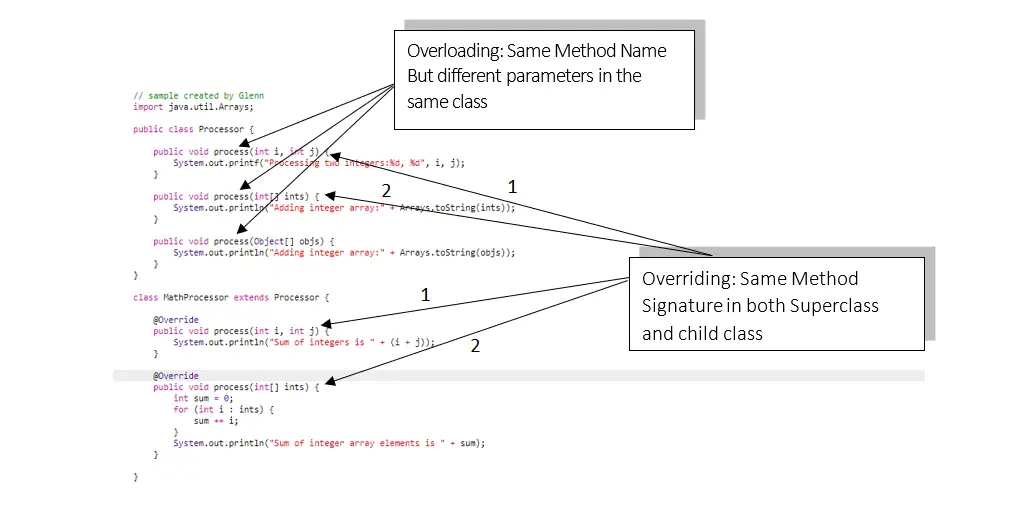
An Overriding In Java happens when a subclass (also called a child class) has the same method as the parent class.
Method overriding happens when a subclass implements a method declared by one of its parent classes differently.
What is Overloading in Java?
In Java, two or more methods with different parameters can have the same name (different number of parameters, different types of parameters, or both).
These methods are called “overloaded” methods, and this is called “method overloading.”
Top 10 Difference between Overloading and Overriding in Java
The following, listed below in the table, are the top 10 differences between overloading and overriding in Java.
Top 10 differences between overloading and overriding in Java:
| Method Overloading | Method Overriding |
|---|---|
| Method overloading is a compile-time polymorphism. | Method overriding is a run-time polymorphism. |
| It helps to increase the readability of the program. | It is used to grant the specific implementation of the method which is already provided by its parent class or superclass. |
| It occurs within the class. | It is performed in two classes with inheritance relationships. |
| Method overloading may or may not require inheritance. | Method overriding always needs inheritance. |
| In method overloading, methods must have the same name and different signatures. | In method overriding, methods must have the same name and same signature. |
| In method overloading, the return type can or can not be the same, but we just have to change the parameter. | In method overriding, the return type must be the same or co-variant. |
| Static binding is being used for overloaded methods. | Dynamic binding is being used for overriding methods. |
| The argument list should be different while doing method overloading. | Poor performance |
| Private and final methods can be overloaded. | Private and final methods can’t be overridden. |
| The argument list should be same in method overriding. | The argument list should be the same in method overriding. |
What is Overriding and Overloading in Java?
- Overloading is what happens when two or more methods in the same class have the same name but different parameters.
- Overriding is when the method signature (name and parameters) of the superclass and the child class are the same.
Difference between Overloading and Overriding in Java in tabular form
Overloading happens when two methods in the same class do the same thing.
Overriding methods have the same signature, which means they have the same name and same arguments.
Overloaded methods have the same names but different parameters.
When Overloading is used, the method to call is decided when the code is being written.
Which is faster Overloading or Overriding?
Overloading is more efficient or faster than Overriding because the compiler figures out which method to use when it’s time to run the program.
In Java, you can override methods that are not final or private, but you can’t overload them.
This means that you can have one or more final/private methods in the same class.
Rules for Method Overriding
The following listed below are the rules we should follow when overriding a method.
- The list of arguments should be the same as that of the method being overridden.
- The return type should be the same or a subtype of what was declared in the original overridden method in the superclass.
- The access level can’t be stricter than the access level of the method being overridden. For example, if the method in the superclass is marked as public, the method in the subclass that overrides it cannot be either private or protected.
- Instance methods can only be changed if they are inherited by the subclass.
- A method that is marked as final can’t be changed.
- A method that is declared static cannot be changed, but it can be re-declared.
- If you can’t inherit a method, you can’t change it.
- A subclass in the same package as the instance’s superclass can override any non-private or non-final superclass method.
- Only the non-final methods that are marked as public or protected can be overridden by a subclass in a different package.
- Any uncheck exceptions can be thrown by an overriding method, whether the method it is overriding throws exceptions or not. But the method that is overridden shouldn’t throw checked exceptions that are different from or more general than the ones declared by the method that is being overridden. The method that is being overridden can throw fewer or narrower exceptions than the method that is being overridden.
- Constructors can’t be overridden.
Overriding Vs. Overloading
- Overriding uses polymorphism at runtime while overloading uses polymorphism at compile time.
- The way that Overriding occurs between a superclass and a subclass. Overloading occurs between methods in the same class.
- Overriding methods have the same signature, which means they have the same name and the same arguments. Overloaded methods have the same names but different parameters.
- With Overloading, the method to call is chosen when the code is being compiled. With overriding, the call to the method is decided at runtime based on the type of the object.
- If overriding fails, it can cause serious problems in our program because the effect will be seen at runtime. If overloading breaks, a compile-time error will appear, which is easy to fix.
Overriding and Overloading Example
                // sample created by Glenn
                import java.util.Arrays;

                public class Processor {

                	public void process(int i, int j) {
                		System.out.printf("Processing two integers:%d, %d", i, j);
                	}

                	public void process(int[] ints) {
                		System.out.println("Adding integer array:" + Arrays.toString(ints));
                	}

                	public void process(Object[] objs) {
                		System.out.println("Adding integer array:" + Arrays.toString(objs));
                	}
                }

                class MathProcessor extends Processor {

                	@Override
                	public void process(int i, int j) {
                		System.out.println("Sum of integers is " + (i + j));
                	}

                	@Override
                	public void process(int[] ints) {
                		int sum = 0;
                		for (int i : ints) {
                			sum += i;
                		}
                		System.out.println("Sum of integer array elements is " + sum);
                	}

                }
Summary
In summary, this article explained the key differences between method overloading and method overriding in Java.
It covered essential concepts such as compile-time polymorphism for overloading and run-time polymorphism for overriding.
The top 10 differences were listed, emphasizing factors like occurrence, inheritance, and signature requirements.
What’s Next
The next section talks about Polymorphism. At the end of the session, you’ll know what is Polymorphism all about in Java.
< PREVIOUS
Modern Java (17-21) essentials
- var. Local-variable type inference (Java 10+) ,
var list = new ArrayList<String>(); - Records (Java 16+). Concise data classes ,
record Point(int x, int y) {}auto-generates equals, hashCode, toString. - Text blocks (Java 15+). Multi-line strings with
"""...""". - Pattern matching (Java 21+). Switch on types ,
case Circle c -> c.area(). - Sealed classes (Java 17+). Closed hierarchies , the compiler can check exhaustiveness.
Working code example
public class ModernJava {
    // Records + sealed interfaces (Java 17+)
    sealed interface Shape permits Circle, Square {}
    record Circle(double radius) implements Shape {}
    record Square(double side) implements Shape {}

    // Pattern matching in switch (Java 21+)
    static double area(Shape s) {
        return switch (s) {
            case Circle c -> Math.PI * c.radius() * c.radius();
            case Square sq -> sq.side() * sq.side();
        };
    }

    public static void main(String[] args) {
        var shapes = java.util.List.of(new Circle(5), new Square(3));
        shapes.forEach(s -> System.out.println(area(s)));
    }
}
Common pitfalls
- NullPointerException. Java’s most common bug. Use Optional for values that may not exist, and enable NullAway or similar in CI.
- Catching Exception. Hides real bugs. Catch specific types.
- Public mutable fields. Breaks encapsulation. Use records or private fields with getters.
Best practices
- Enable warnings. Compile with
javac -Xlint:allto surface unsafe operations. - Use static analysis. SpotBugs and Error Prone catch real bugs before they hit production.
- Prefer immutability. Records, final fields, immutable collections. Simpler to reason about and thread-safe.
Official documentation
Frequently asked questions
What version of Java should you use for this tutorial?
Java 17 LTS (2021) or Java 21 LTS (2023) are the recommended long-term-support versions in 2026. Both include modern features like records, sealed classes, pattern matching, and virtual threads. Older Java 8 is still widely deployed but missing key modernization features.
How do you compile and run a Java program?
Compile with javac FileName.java (creates FileName.class), then run with java FileName. From Java 11+, you can run single-file source directly with java FileName.java (no compile step required). Most IDEs (IntelliJ IDEA, Eclipse, VS Code) handle both automatically.
What tools should you use to write Java in 2026?
IntelliJ IDEA Community Edition (free) is the top pick , excellent auto-complete, refactoring, and debugging. Eclipse and VS Code with the Java extension pack are strong alternatives. Use Maven or Gradle for dependency management, JUnit 5 for testing, and SpotBugs or Error Prone for static analysis.
What is the difference between JDK and JRE?
JDK (Java Development Kit) includes the compiler (javac), development tools, and the JRE. JRE (Java Runtime Environment) contains only what is needed to run compiled Java , the JVM and standard library. As of Java 11, Oracle stopped shipping a standalone JRE , you install a JDK for both.
How does Java compare to other JVM languages like Kotlin or Scala?
Java is the most widely adopted, has the largest ecosystem, and gets the newest LTS features (Loom, Panama, Valhalla). Kotlin is more concise and popular for Android. Scala focuses on functional programming and big-data (Spark). All three interoperate on the JVM.

Glenn Azuelo
Programmer & Technical Writer at PIES IT Solution
Glenn Azuelo is a programmer and writer at PIES IT Solution, author of 40+ PHP tutorials, Java capstone projects, and Python game guides at itsourcecode.com. Specializes in PHP built-in functions (string manipulation, arrays, filesystem, magic methods), Java Windows Forms projects for BSIT capstone (chat application, POS, faculty management, memory game), and Python game programming with Pygame (chess, blackjack, dice).
Expertise: PHP, PHP Tutorials, PHP Built-in Functions, PHP String Functions, PHP Array Functions, PHP Magic Methods, Java, Java Swing, Windows Forms, Python, Pygame, Capstone Projects · View all posts by Glenn Azuelo →