
CRANE Thesis Chapter 4 | Presentation and Discussion of Result
This CRANE Thesis Chapter 4 | Presentation and Discussion of Result, It reviews the results and analysis of the qualitative data, the compilation of the questionnaire and the results and analysis of the quantitative findings of the study.
CRANE Thesis Chapter 4 | Presentation and Discussion of Result : Design Criteria
Major Features
2-dimensional shapes or objects in geometry are flat plane figures that have two dimensions – length and width. Two-dimensional or 2-D shapes do not have any thickness and can be measured in only two faces.
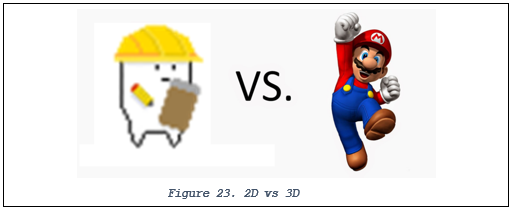
Figure 23 shows the comparison of 2D and 3D.
In CRANE, the 2D represents the type picture that was used in game.
Desktop
A desktop is a hardware device that consists of a hardware device, an operating system that an application program or process runs upon, and Windows is an operating system. The game runs on PC platform only.
In this (game) case, the game platform can only support windows/desktop. It cannot run using mac platform.
Player Defined Goals
Player Defined Goals are possible by providing mechanics to let players determine the requirements, rewards, and punishments of the goals by having explicit game rules that govern these goals.
By specifying the end conditions and evaluation functions within the game as conditions of the game state, these Player Defined Goals can then be monitored by the game system similarly to other goals.
For Coordinated Response Authority for National Emergencies, you will have a goals or an objective to finish each level.
Roleplaying
According to Wikipedia, Role-playing is the changing of one’s behavior to assume a role, either unconsciously to fill a social role, or consciously to act out an adopted role. In this(game) case, the player will act as the Incident Commander.
CRANE Thesis Chapter 4 | Presentation and Discussion of Result : Experts’ Evaluation Result
The proponents asked five (5) IT game experts to evaluate the game using the proponent’s questionnaire and the results are followed.

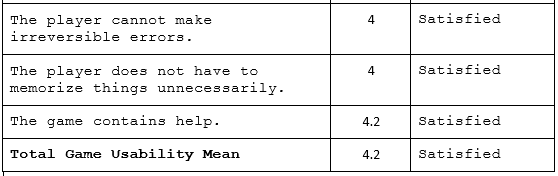
With the overall mean of game usability criteria which is 4.2, the experts’ are satisfied with the game controls and interface through which the player interacts with. The experts agree that the game allows the player to control the game fluently and display all necessary information about the game status and possible actions.
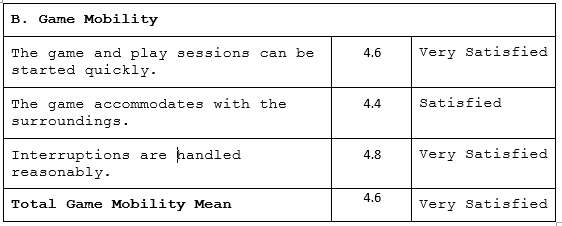
With the overall mean of game mobility criteria which is 4.6, the experts’ are very satisfied with the concern issues that affect mobility of the game.
The experts agree that the game design assimilate freedom into the game experience of users.

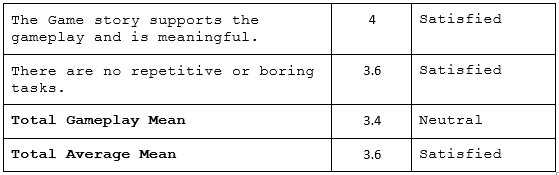
With the overall mean of gameplay criteria which is 3.4, the experts’ are neutral with the platform on which the game is played when evaluating the gameplay of the game.
The experts recommend more feature during the process of player-game interaction to provide a motivating, fun experience for the users.
The overall mean of the experts’ ratings’ summation using proponent’s questionnaire was 3.6 and this was interpreted as “Satisfied”. Therefore, IT game experts were Satisfied with the developed game.
CRANE Thesis Chapter 4 | Presentation and Discussion of Result : End-User’s Evaluation Result
The proponents conducted a random evaluation to gamers using the proponent’s questionnaire with 5 totals of respondents, and the results are followed.
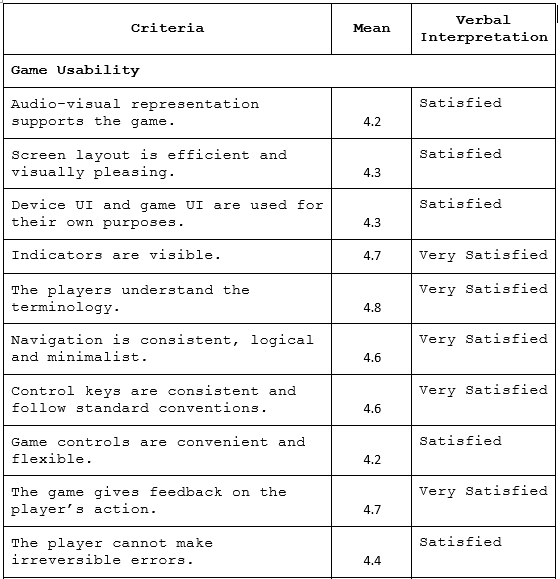
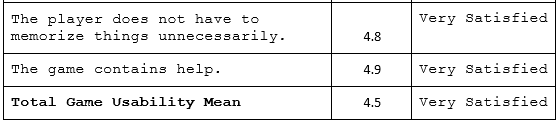
With the overall mean of game usability criteria which is 4.5, the end-users’ are satisfied with the game controls and interface through which the player interacts with.
The experts agree that the game allows the player to control the game fluently and display all necessary information about the game status and possible actions.
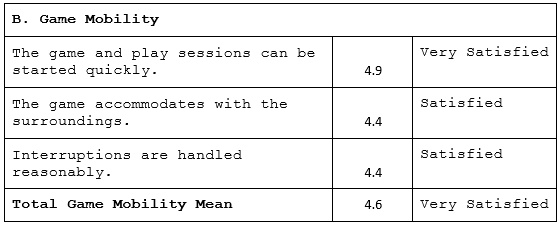
With the overall mean of game mobility criteria which is 4.6, the end-users’ are very satisfied with the concern issues that affect mobility of the game.
The experts agree that the game design assimilate freedom into the game experience of users.
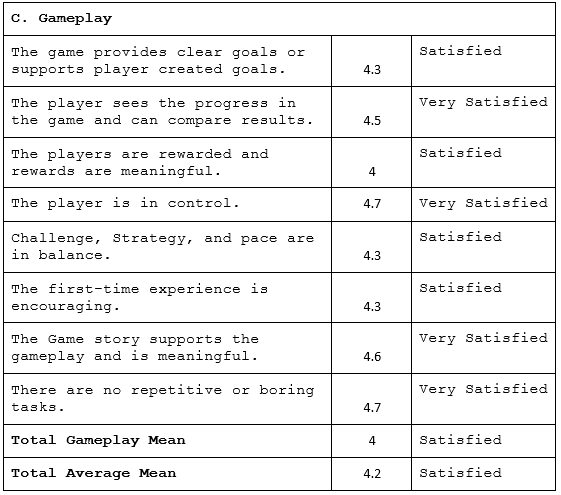
With the overall mean of gameplay criteria which is 4.2, the end-users’ are satisfied with the platform on which the game is played when evaluating the gameplay of the game.
The game the process of player-game interaction provides a motivating, fun experience for the users.
The overall mean of the end-users’ test using proponent’s questionnaire was 4.2 and this was interpreted as “Satisfied”. The results implied that the respondents were satisfied with the developed game.
Related Capstone Resources
- Crane Thesis Documentation Chapter 1
- Crane Thesis Documentation Chapter 2 Related Literature
- Crane Thesis Documentation Chapter 3 Methodology
- Crane Thesis Chapter 5
- Chapter 3 Thesis Writing
- Chapter 2 Thesis Writing
Inquiries
if you have any questions or suggestions about CRANE Thesis Chapter 4 | Presentation and Discussion of Result, please let’s me know by dropping your comment below.
Capstone chapter writing checklist
Structuring a BSIT capstone chapter correctly saves rework and eases the defense. Follow this checklist for consistent quality across all 5 chapters.
- Draft the outline first. Every section header first, then fill in the content.
- Write the methodology before the introduction. Chapter 3 (methodology) forces you to think through the system; Chapter 1 becomes easier after.
- Include diagrams early. UML diagrams in Chapter 3 clarify what you’re building.
- Cite sources as you write. Do not defer citations. Use Zotero or Mendeley to track sources.
- Get adviser feedback per chapter. Do not write all 5 chapters then ask for review.
- Number figures and tables. Figure 3.1, Table 4.2, etc. Panels reference these numbers.
- Follow the school template exactly. Font, margins, spacing — do not deviate.
Common capstone mistakes to avoid
- Copying without attribution. Panels use Turnitin. Cite everything you did not write yourself.
- Over-scoping the project. A well-executed simple system beats a poorly-executed ambitious one.
- Deferring documentation. Documentation quality is a big part of the grade.
- Skipping user testing. Panels ask about user feedback. Have real data.
- Ignoring adviser feedback. Advisers know what the panel will ask.
Recommended free tools for capstone projects
- draw.io / diagrams.net. UML diagrams for Chapter 3.
- Google Docs. Collaboration + version history + adviser comments.
- Zotero or Mendeley. Reference management + auto-formatted citations.
- GitHub. Version control for the source code (also earns E-E-A-T signal on your CV).
- Grammarly. Language + tone check on the documentation.
- Turnitin. Plagiarism check before submission (some schools provide access).
- ChatGPT or Claude. For outline scaffolding — not for writing the actual content.
Where to get more capstone resources
- Capstone project ideas. Browse itsourcecode.com/topics/fyp/ for 140+ tested capstone concepts.
- Working source code. itsourcecode.com/topics/free-projects/ has 1,000+ downloadable projects.
- UML diagrams. itsourcecode.com/uml/ has 300+ free UML examples for Chapter 3.
- ER diagrams. itsourcecode.com/topics/uml/erd/ for database schemas.
Official references
Frequently asked questions
How many pages should a BSIT capstone chapter be?
Chapter 1 (Introduction) is typically 8-12 pages. Chapter 2 (RRL) is 15-25 pages. Chapter 3 (Methodology and System Design) is 15-30 pages depending on diagram count. Chapter 4 (Results) is 10-20 pages. Chapter 5 (Conclusions) is 5-10 pages. Total: 60-100 pages for the whole capstone.
What order should I write the chapters in?
Recommended order: Chapter 3 first (system design and methodology — most concrete), then Chapter 1 (introduction with the problem statement), then Chapter 2 (RRL to justify Chapter 1), then Chapter 4 (results — after implementation), then Chapter 5 (conclusions). This avoids rewrites and speeds up defense readiness.
What formatting style should I use for the capstone documentation?
Most Philippine BSIT programs require IEEE or APA 7th edition. Confirm with your adviser first. Use Times New Roman 12pt, double-spaced, 1-inch margins, and page numbers. Reference all sources properly and use consistent citation style throughout.
How many references do I need per chapter?
Chapter 1: 5-10 references. Chapter 2 (RRL): 20-40 references. Chapter 3: 10-15 references. Chapter 4-5: minimal, mostly self-referential. Recent sources (last 5 years) are strongly preferred over older ones.
What tools help write the capstone chapters?
Zotero or Mendeley for reference management, Grammarly for language check, Turnitin for plagiarism scan, Google Docs for collaboration with adviser, LaTeX (Overleaf) for advanced formatting, and ChatGPT or Claude for outline scaffolding (not for writing the actual content).

Adrian Mercurio
Full-Stack Developer at PIES IT Solution
Specializes in building complete capstone projects with full documentation. Strong background in PHP/MySQL development and database design. Has personally built and tested over 30 capstone-ready projects with ER diagrams, DFDs, and chapter-by-chapter thesis documentation.
Expertise: PHP, Laravel, Database Design, Capstone Projects, C#, C, C++, Python, AI Projects · View all posts by Adrian Mercurio →