
Attendance Monitoring System for RTTSE in VB.net with Source Code
In our research Using the Attendance Monitoring System for RTTSE in VB.net has shown that regular attendance and academic achievement are closely linked; it is, therefore, important that we know you are attending regularly.
By monitoring student attendance we hope to be able to identify students who need support at an early stage and put in place measures to help them continue their studies.
Student Attendance Monitoring is a requirement for all students. The University expects you to attend all your mandatory timetabled sessions.
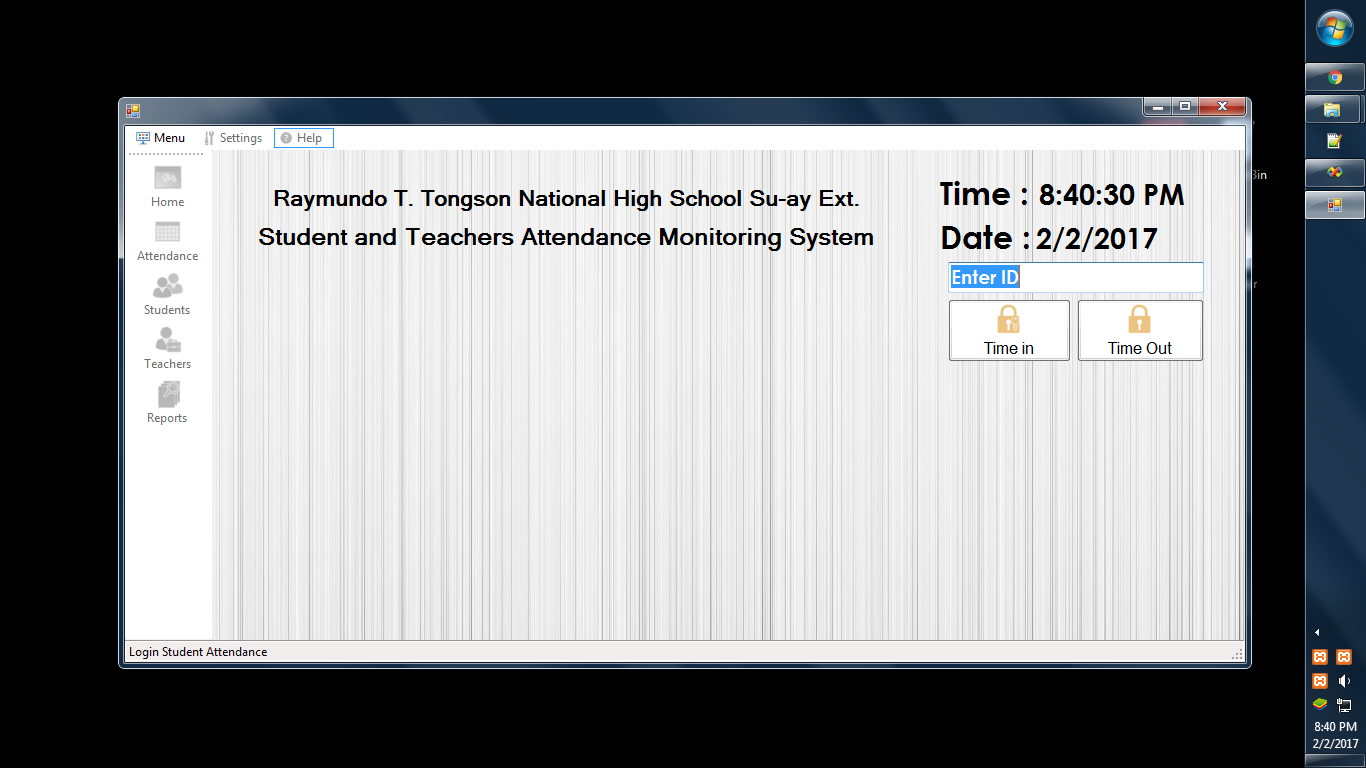
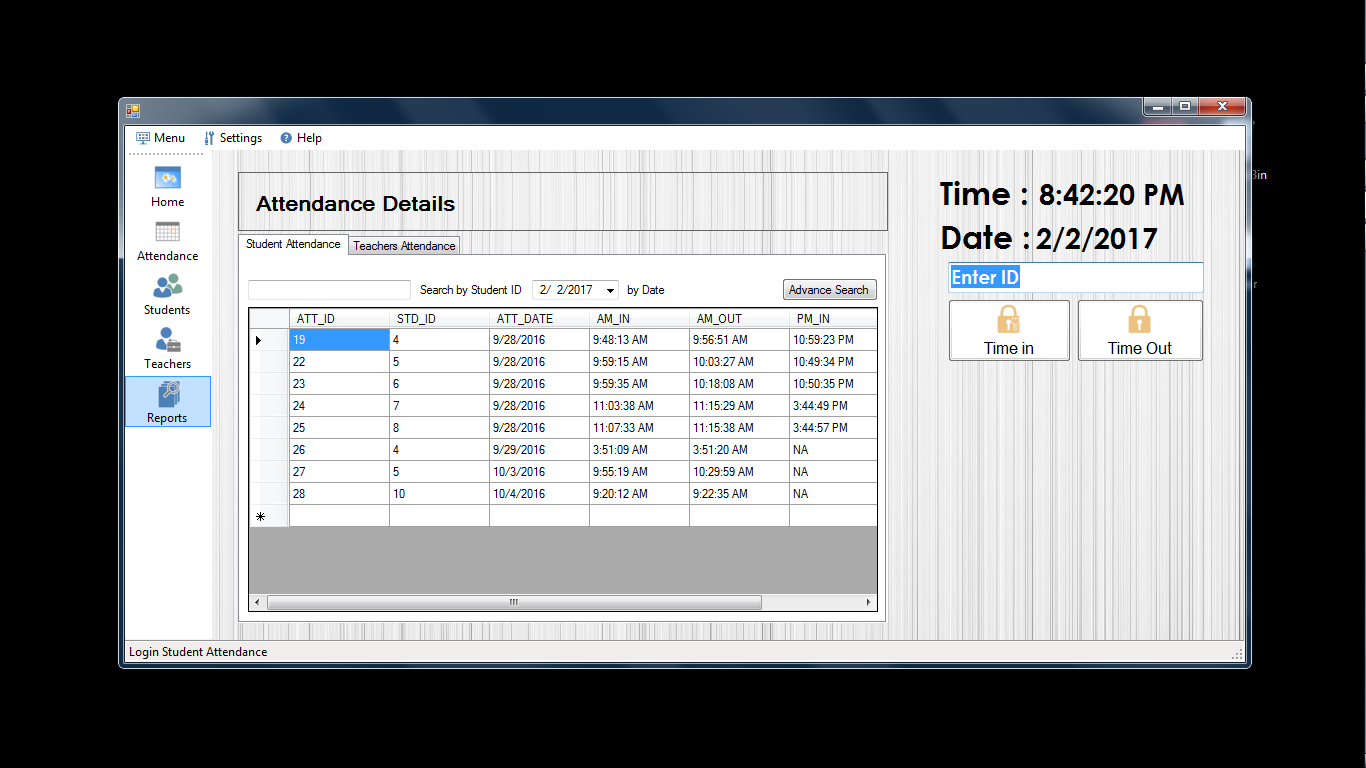
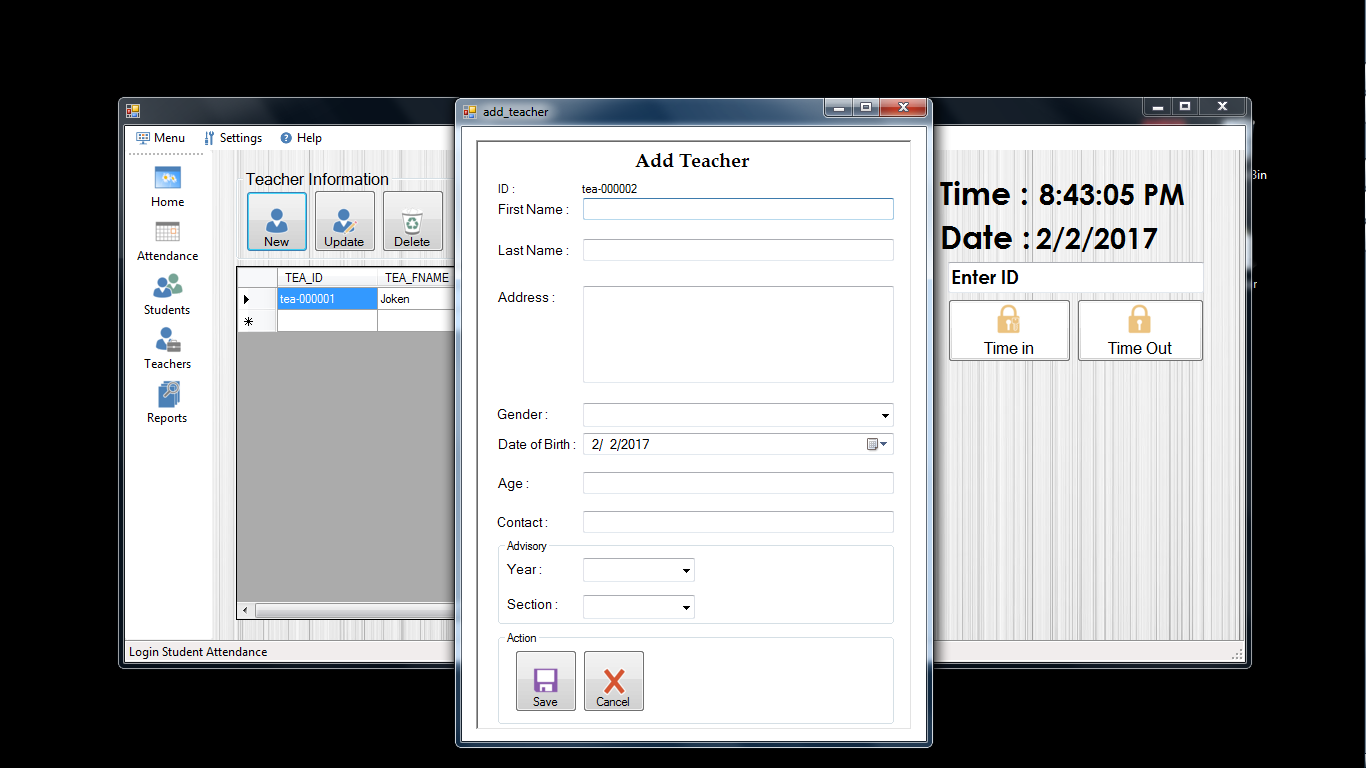
The proposed system was generally focused on the monitoring of the login and logout of the students and teachers. Students and teachers will only provide their identification code for their attendance after registering their information.
The system will automatically determine and reflected if a student did not attend his classes.
What is Visual Basic’s purpose?
The third-generation programming language was created to aid developers in the creation of Windows applications. It has a programming environment that allows programmers to write code in.exe or executable files.
They can also utilize it to create in-house front-end solutions for interacting with huge databases. Because the language allows for continuing changes, you can keep coding and revising your work as needed.
However, there are some limits to the Microsoft Visual Basic download. If you want to make applications that take a long time to process, this software isn’t for you.
That implies you won’t be able to use VB to create games or large apps because the system’s graphic interface requires a lot of memory and space.
Furthermore, the language is limited to Microsoft and does not support other operating systems.
What are the most important characteristics of Visual Basic?
Microsoft Visual Basic for Applications Download, unlike other programming languages, allows for speedier app creation.
It has string processing capabilities and is compatible with C++, MFC, and F#.
Multi-targeting and the Windows Presentation Framework are also supported by the system, allowing developers to create a variety of Windows apps, desktop tools, metro-style programs, and hardware drivers.
Features:
- Manage Teacher/Student attendance records
- Monitor the Log-in and Log-out of teachers and students
- Generate user-Friendly Reports
- Student management system
Our Attendance system thesis documentation system has the following contents:
- Scope and Limitation of the Study
- Review of related literature and systems
- Methodology
- Architectural Diagram
- Use Case Diagram
- Data Flow Diagram
- Data Dictionaries
- Entity Relationship Diagram
If you are interested in our Automated DTR system documentation just contact us:
Download the full Source Code of the Attendance Monitoring System for RTTSE in VB.net
Click the download button below:
If you have any questions or suggestions about this automated system, please leave a comment below.
Technology stack and requirements
To run this VB.NET project, you need the following on your development machine:
- Visual Studio 2019 or later. The free Community Edition is enough for building, debugging, and running the project.
- .NET Framework 4.7.2 or higher. Most Windows 10 and 11 systems have it preinstalled through Windows Update.
- MySQL Server 8.0 or MSSQL Express 2019. Choose whichever your capstone panel prefers; both work with VB.NET data adapters.
- MySQL Connector/NET or SqlClient library. Add via NuGet Package Manager inside Visual Studio.
- Crystal Reports (optional). Required only if the project generates printable reports; install the runtime redistributable.
Installing the source code
The download link contains a ZIP archive with the full solution. Extract and set up in five steps:
- Extract the archive to a folder outside Program Files (avoids permission issues).
- Open the .sln file in Visual Studio. It loads the full solution with all forms and modules.
- Restore NuGet packages. Right-click the solution then Restore NuGet Packages if prompted.
- Import the database. Locate the .sql file in the archive and import via phpMyAdmin (MySQL) or SQL Server Management Studio.
- Update the connection string in App.config or module code to match your local database name, user, and password.
How to use this project for your BSIT capstone
This VB.NET project maps cleanly to standard BSIT capstone documentation. Suggested chapter alignment:
- Chapter 1 (Introduction). Discuss the problem the system solves in real-world context. Cite Philippine business or academic use cases where a manual process could be replaced.
- Chapter 2 (Review of Related Literature). Compare this system’s features against 5-10 similar published projects. Cite journals like IJERT or IEEE Access for academic-standard sources.
- Chapter 3 (Methodology). Include Use Case Diagram, Data Flow Diagram, Entity Relationship Diagram, and Activity Diagram covering all major workflows in the system.
- Chapter 4 (Results and Discussion). Screenshot each module of the running system with a caption explaining what data it processes and which user role interacts with it.
- Chapter 5 (Conclusion and Recommendations). Identify features that could be added in a Version 2, such as web dashboard, mobile app, or REST API export.
Modules typical of Attendance Monitoring System for RTTSE
- Employee master data. CRUD forms for employee profile, position, salary rate, and hire date.
- Attendance logging. Time-in / time-out entries via biometric device, RFID card, or manual entry.
- Payroll processing. Compute basic pay, overtime, deductions (SSS, PhilHealth, Pag-IBIG), and net pay per period.
- Leave management. Application, approval workflow, and running leave-credit balance per employee.
- Reports. Daily time record (DTR), payslip generation, monthly summary, and government-mandated forms.
- User management. Role-based access (HR, Payroll Officer, Supervisor, Employee self-service).
Common enhancements for capstone review
- SMS notification. Send late-arrival alerts to the employee’s registered mobile via a Semaphore or Twilio integration.
- Biometric device support. Integrate with a ZKTeco or Suprema time-and-attendance device via SDK.
- Web dashboard. Add an ASP.NET dashboard so managers can view attendance from any browser.
- Government compliance reports. Auto-generate SSS R3, PhilHealth RF-1, and BIR 1601-C forms in the correct format.
Official documentation
Frequently Asked Questions
How does this VB.NET attendance management system work?
Daily attendance entry (manual, biometric integration, barcode scan), tardy/absent calculation, monthly report, payroll integration.
What Visual Studio and SQL Server versions does this VB.NET project require?
Most projects use VB.NET WinForms on .NET Framework 4.5+ with SQL Server 2012 Express or higher. To run: install Visual Studio 2019 / 2022 (Community is free) with the ‘Desktop development with .NET’ workload, install SQL Server Express + SSMS, open the .sln file, build, run.
How do I set up the database for this VB.NET project?
Open SQL Server Management Studio (SSMS) and connect to your SQL Server (e.g. localhost\SQLEXPRESS). Right-click Databases, choose Restore Database OR New Database then import the included .sql script. Update the connection string in App.config (or in code-behind Module) with your server name + credentials. Rebuild and run.
Can I use this VB.NET project for a BSIT capstone or thesis?
Yes, VB.NET is one of the most accepted languages by Philippine BSIT panels. Extend it: add role-based access (admin/staff/customer login redirect), Crystal Reports or RDLC reports, dashboards with Chart control, audit log, multi-branch support. Pair with Chapter 1-5 documentation matching your panel’s rubric.
Why am I getting ‘connection error’ or ‘cannot find SQL Server’?
Three common VB.NET issues: (1) Connection error: SQL Server isn’t running. Open SQL Server Configuration Manager and verify SQL Server (SQLEXPRESS) service is started. (2) Wrong server name in connection string. Try .\SQLEXPRESS, (local)\SQLEXPRESS, or your machine name. (3) Login failed: SQL Server is set to ‘Windows-only’ authentication. Switch to Mixed Mode in SSMS Server Properties, Security.
Where can I find more VB.NET projects with source code?
Browse the VB.NET Projects hub for the full library. For C# WinForms alternatives see C# Projects. For ASP.NET web alternatives see ASP.NET Projects. For BSIT capstone idea lists see 150 Best Capstone Project Ideas.
caN i get the source code pls?
the source code is already available for download.
this very interset for an employee
Hi very interested please give me source air ty