
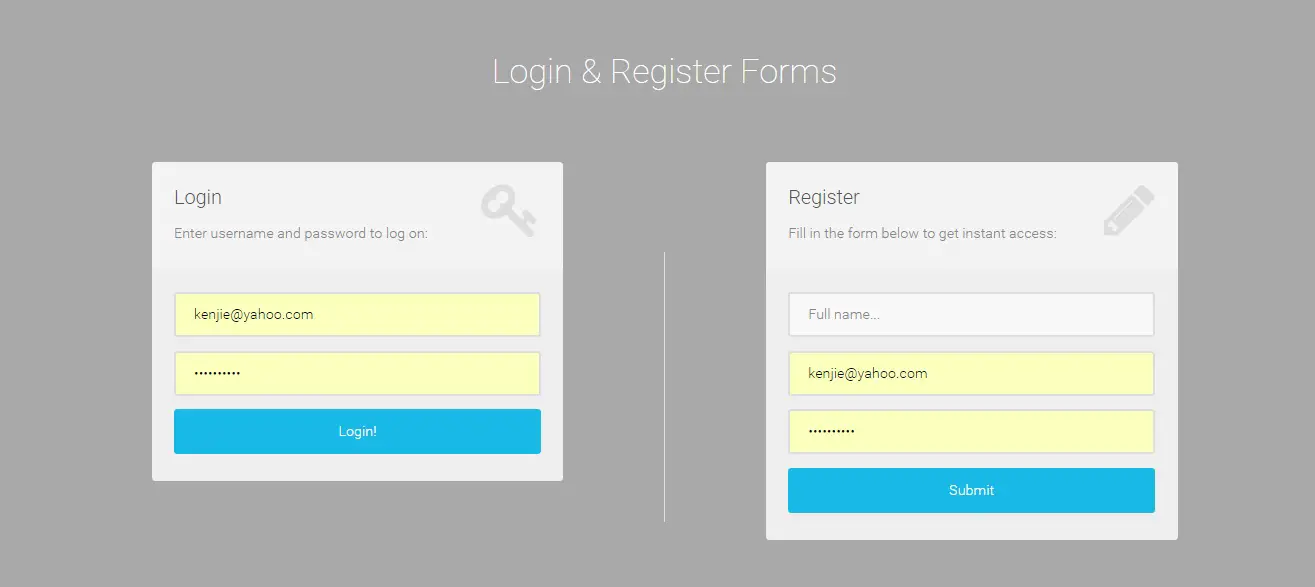
3 Steps on How to Create a User Registration Form in PHP
This time, I will show you the 3 steps on how to create a User Registration form in PHP and MySQL Database.
With this, you can log in to the user that you have registered in the Registration Form. We are going to use a bootstrap template for the design of the Login and User Registration Form.
3 Steps to on How to Create a User Registration Form in PHP
Step 1:
Create a database in the MySQL Database and name it “dbuser”. After that, set this query for creating a table into it.
CREATE TABLE IF NOT EXISTS `tblusers` (
`user_id` int(11) NOT NULL AUTO_INCREMENT,
`user_name` varchar(40) NOT NULL,
`user_username` varchar(40) NOT NULL,
`user_pass` varchar(90) NOT NULL,
PRIMARY KEY (`user_id`)
) ENGINE=InnoDB;
Step 2:
Do the following codes for the design of your page.
<!-- CSS extention-->
<!-- ################################################################# -->
<!-- Top content -->
<div class="top-content">
<div class="inner-bg">
<div class="container">
<div class="row">
<div class="col-sm-8 col-sm-offset-2 text">
<h1>Login & Register Forms</h1>
</div>
</div>
<div class="row"><!-- Login Form -->
<div class="col-sm-5">
<div class="form-box">
<div class="form-top">
<div class="form-top-left">
<h3>Login</h3>
Enter username and password to log
on:
</div>
<div class="form-top-right"></div>
</div>
<div class="form-bottom"><form class="login-form" role="form" action="process.php" method="post">
<div class="form-group"><label class="sr-only" for="form-username">Username</label>
<input id="form-username" class="form-username form-control" name="form-username" type="text" placeholder="Username..." /></div>
<div class="form-group"><label class="sr-only" for="form-password">Password</label>
<input id="form-password" class="form-password form-control" name="form-password" type="password" placeholder="Password..." /></div>
<button class="btn" name="login" type="submit">Login!</button>
</form></div>
</div>
</div>
<!-- End Login Form-->
<!-- Seperator -->
<div class="col-sm-1 middle-border"></div>
<div class="col-sm-1"></div>
<!-- End Separator -->
<!-- Register Form -->
<div class="col-sm-5">
<div class="form-box">
<div class="form-top">
<div class="form-top-left">
<h3>Register</h3>
Fill in the form below to get instant
access:
</div>
<div class="form-top-right"></div>
</div>
<div class="form-bottom"><form class="registration-form" role="form" action="process.php" method="post">
<div class="form-group"><label class="sr-only" for="fname">Name</label> <input id="fname" class="full-name form-control" name="fname" type="text" placeholder="Full name..." /></div>
<div class="form-group"><label class="sr-only" for="user-name">Username</label>
<input id="user-name" class="user-name form-control" name="user-name" type="text" placeholder="Username..." /></div>
<div class="form-group"><label class="sr-only" for="user-pass">Password</label>
<input id="user-pass" class="user-pass form-control" name="user-pass" type="password" placeholder="Password..." /></div>
<button class="btn" name="register" type="submit">Submit</button>
</form></div>
</div>
</div>
<!-- End Registration Form -->
</div>
</div>
</div>
</div>
<!-- Footer -->
<footer>
<div class="container">
<div class="row">
<div class="col-sm-8 col-sm-offset-2">
<div class="footer-border"></div>
itsoucecode.com
</div>
</div>
</div>
</footer><!-- End Footer -->
<!-- Javascript extension -->
<script src="assets/js/jquery-1.11.1.min.js">
</script>
<script src="assets/bootstrap/js/bootstrap.min.js">
</script>
<script src="assets/js/scripts.js">
</script> <!-- ############################################$ -->
Step 3:
Create a page for the connection between the PHP script and MySQL database. Name the page “config.php”.
<!--?php $server = 'localhost'; $dbuser = 'root'; $dbpass = ''; $dbname = 'dbuser'; $con = mysql_connect($server, $dbuser, $dbpass); if (isset($con)) { # code... $dbSelect = mysql_select_db($dbname); if (!$dbSelect) { echo "Problem in selecting database! Please contact administraator"; die(mysql_error()); } } else { echo "Problem in database connection! Please contact administraator"; die(mysql_error()); } ?-->
[/php]
<h2>Step 4:</h2>
Create a page for login and adding user. Name the page "process.php"
<!--?php // include your conection in the first load of the page. include 'config.php'; if (isset($_POST['register'])) { # code... // set the query for saving the data $sqlQuery = "INSERT INTO tblusers ( `user_name`, `user_username`, `user_pass`) VALUES ('" . $_POST['fname'] . "','" . $_POST['user-name'] . "','" . $_POST['user-pass'] . "')"; // execute the query $result = mysql_query($sqlQuery); // checking if the syntax of the query that you performed is correct or not. if ($result) { # code... // retuurn true value ?--> <script type="text/javascript"> // <!-- Pop-up Message --> alert('User has been registered. You can login now.') // <!-- End pop-up message --> // redirect to main page. window.location='index.php' // end redirect </script> <!--?php } else { // return false echo 'Error to save.'; die(mysql_error()); } } if (isset($_POST['login'])) { # code... // start the session session_start(); // set the query for retrieving the data $sqlQuery = "SELECT * FROM tblusers WHERE user_username ='" . $_POST['form-username'] . "' AND user_pass = '" . $_POST['form-password'] . "'"; // execute the query $result = mysql_query($sqlQuery); // checking if the syntax of the query that you performed is correct or not. if ($result) { # code... // getting the maxrow of the table; $maxrows = mysql_num_rows($result); // checking if the table a row or nothing. if ($maxrows > 0) {<br ?--> # code... while ($row = mysql_fetch_array($result)) { # code... // set the session variable and place the retrieved data in the table. $_SESSION['fname'] = $row['user_name']; $_SESSION['username'] = $row['user_username']; $_SESSION['password'] = $row['user_pass']; } ?> <script type="text/javascript"> // <!-- Pop-up Message --> alert('Welcome <?php echo $_SESSION['fname']; ?>') // <!-- End pop-up message --> // redirect to main page. window.location='index.php' // end redirect </script> <script type="text/javascript"> // <!-- Pop-up Message --> alert('Account does not exist. Please contact administrator') // <!-- End pop-up message --> // redirect to main page. window.location='index.php' // end redirect </script> Summary
In this lesson, we learn how to create a login system with user registration using PHP and MySQL. We also included in the code the use of PHP Session to have a secure login page in PHP.
The complete Source Code is included. Click Login User and User Registration page
Official documentation
Frequently Asked Questions
How does this PHP login or registration system work?
User signup form (with email verification optional), password hashing via password_hash() / password_verify(), login form with session_start(), remember-me cookie, logout, password reset via emailed token.
What PHP and MySQL versions does this project require?
Most projects in this batch run on PHP 7.4 to PHP 8.2 with MySQL 5.7+ or MariaDB 10+. A few older projects need PHP 5.6 (deprecated, use XAMPP 7.x). To run: install XAMPP / WAMP / Laragon, extract project to htdocs, import the included .sql file via phpMyAdmin, edit the connection file (usually config.php or db_connect.php) with your DB credentials, browse to the project URL in your browser.
How do I set up the database for this PHP project?
Open phpMyAdmin (http://localhost/phpmyadmin/ on XAMPP), create a new empty database with the name specified in the project’s config.php. Click the Import tab, choose the included .sql file, click Go. Then edit config.php (or includes/connection.php) with: ‘localhost’, your MySQL username (usually ‘root’), your MySQL password (usually blank for XAMPP), and the database name.
Can I use this PHP project for a BSIT capstone or thesis?
Yes, but extend it. A bare CRUD app is too narrow for full capstone scope. Add: user roles via session checks, reports/dashboards (Chart.js + AJAX), PDF exports (TCPDF library), email notifications (PHPMailer), real domain extension (analytics, audit log, multi-branch support). Pair with Chapter 1-5 documentation matching your panel’s rubric.
Why am I getting ‘connection error’ or ‘undefined function mysqli_connect’?
Three common PHP issues: (1) Connection error: Apache + MySQL services not running in XAMPP control panel, OR database name in config.php does not match what you created in phpMyAdmin. (2) ‘undefined function mysqli_connect’: MySQL extension not enabled, in php.ini uncomment extension=mysqli (then restart Apache). (3) ‘No such file or directory’: MySQL socket path wrong, use 127.0.0.1 instead of localhost in the connection string.
Where can I find more PHP projects with source code?
Browse the PHP Projects hub for the full library (300+ vanilla PHP systems). For modern PHP MVC alternatives see Laravel Projects (74 systems) or CodeIgniter Projects (32 systems). For BSIT-focused capstone idea lists see 150 Best Capstone Project Ideas.
For the reason that the admin of this web page is working, no doubt very shortly it will be famous, due to its quality contents.
Hi friends, its enormous piece of writing regarding teachingand entirely explained, keep it up all the time.
magnificent publish, very informative. I wonder why the opposite specialists of this sector don’t notice this. You must continue your writing. I am confident, you’ve a huge readers’ base already!
This information is worth everyone’s attention. Where can I find out more?
Source code download link is not working
you’re in point of fact a good webmaster. The web site loading pace is amazing. It sort of feels that you’re doing any distinctive trick. Moreover, The contents are masterpiece. you have performed a fantastic job in this matter!
I have read so many articles on the topic of the blogger lovers except this post is genuinely a good post, keep it up.
Very good site you have here but I was wondering if you knew of any user discussion forums that cover the same topics talked about here? I’d really love to be a part of community where I can get feed-back from other experienced people that share the same interest. If you have any recommendations, please let me know. Bless you!