
In my last tutorial entitle “Printing Hello Word in Java”, discuss the structure of Java programs and its parts.
This tutorial will teach you on how you can sum two integers values using Java. Integer is one of the examples of Data type in Java.
Remember that there are many Data type that handles Number values and Integer can only handle whole numbers.
Sum Two Integer Value in Java steps
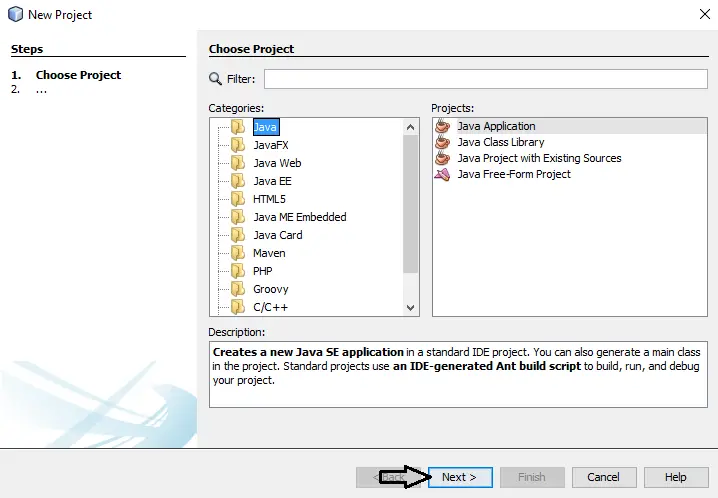
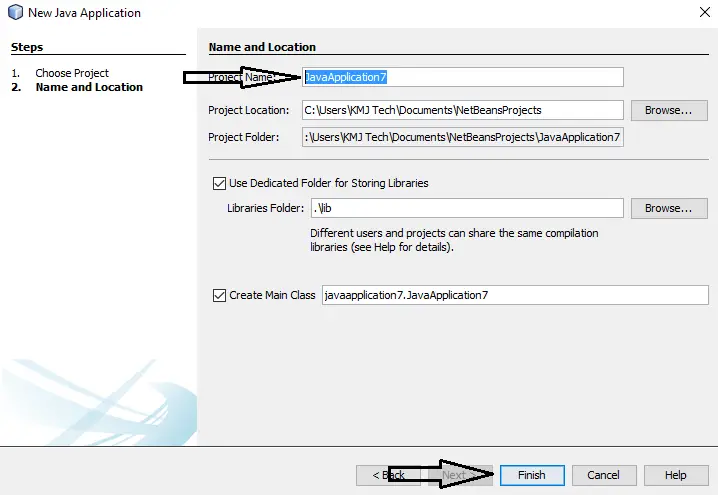
1.Create a new project in Netbeans and name the project on what you want to name it.
2.Insert a main method inside your Class.
[java]public static void main(String args[]){

}[/java]
3.Declare three integer variables and initialized it inside your new created main method.
[java]int num1=2;
int num2=2;
int total=0;[/java]
3.Insert the code below to calculate and display the result.
[java]total = num1 + num2;
System.out.println("The sum is :" + total);[/java]
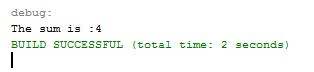
4. Run your program and the result should look like the image below.
5. Complete source code
[java]public class SumTwoIntegers {
public static void main(String args[]){
int num1=2;
int num2=2;
int total=0;
total = num1 + num2;
System.out.println("The sum is :" + total);
}
}[/java]
If you have any comments or suggestion about on Sum Two Integers Value using Java, Please feel free to leave your comment below, use the contact page of this website or use my contact information.
Email: info@kmjtech.net | Cell. No.: 09468362375
Readers might check this:
About The Sum Two Integers Value In Java
<figure class="wp-block-table is-style-stripes">
<table>
<tbody>
<tr>
<td><strong>Project Name:</strong></td>
<td>Sum Two Integers Value</td>
</tr>
<tr>
<td><strong>Language/s Used:</strong></td>
<td>JAVA</td>
</tr>
<tr>
<td><strong>Database:</strong></td>
<td>None</td>
</tr>
<tr>
<td><strong>Type:</strong></td>
<td>Desktop Application</td>
</tr>
<tr>
<td><strong>Developer:</strong></td>
<td>IT SOURCECODE</td>
</tr>
<tr>
<td><strong>Updates:</strong></td>
<td>0</td>
</tr>
</tbody>
</table><figcaption><em><strong>Sum Two Integers Value In Java</strong>- Project Information</em></figcaption></figure>
Technology stack and requirements
To run this Java project on your development machine, you need:
- Java Development Kit (JDK) 17 or higher. Download from adoptium.net (Eclipse Temurin) or oracle.com. JDK 21 LTS is recommended for new projects.
- Apache NetBeans or IntelliJ IDEA. Free IDEs with Java support, debugging, and GUI form designer.
- MySQL Server or MariaDB. Standalone install, or bundled with XAMPP for easier setup.
- MySQL Connector/J. JDBC driver JAR file included in the project’s lib folder or downloadable from dev.mysql.com.
- Git (optional). For version control if you want to extend the project.
Installing the source code
- Extract the ZIP archive to a folder outside Program Files.
- Open the project in NetBeans or IntelliJ. Choose File then Open Project and select the extracted folder.
- Import the database. Open phpMyAdmin (with XAMPP) or MySQL Workbench, create a new database, and import the .sql file from the archive.
- Update the JDBC connection string. Open the DatabaseConnection.java (or config file) and set your database host, name, user, and password.
- Add the MySQL Connector JAR to the classpath. Right-click Libraries then Add JAR, select mysql-connector-java-x.x.x.jar.
- Run the project. Press F6 (NetBeans) or Shift+F10 (IntelliJ) to run the main class.
Using this project for your BSIT capstone
- Chapter 1 (Introduction). Discuss the real-world problem this Java system solves. Cite Philippine business or academic use cases.
- Chapter 2 (RRL). Compare this project against 5-10 similar published works. Cite ACM, IEEE, or IJERT journal papers.
- Chapter 3 (Methodology). Include Use Case Diagram, DFD, ER Diagram, Class Diagram, and Sequence Diagram.
- Chapter 4 (Results). Screenshot each Swing form or JavaFX view with a caption explaining its role.
- Chapter 5 (Conclusion). Identify features for Version 2 (Spring Boot web version, REST API, mobile app).
Modules typical of Sum Two Integers Value using Java
- Master data CRUD. JFrame + JTable for the primary entities the system manages.
- Transaction processing. Data entry forms with validation before saving.
- Reports. JasperReports or iText for formatted printable output.
- User management. Login with role-based permissions (Admin, Encoder, Viewer).
- Backup / restore. Export MySQL database to .sql file.
Common enhancements for capstone review
- Modernize UI. FlatLaf or Substance look-and-feel for modern appearance.
- Add REST API. Wrap business logic with Spring Boot for mobile or web front-ends.
- Docker container. Package with Dockerfile for portable deployment.
- Cloud deployment. Deploy to AWS Elastic Beanstalk or Azure App Service.
Project timeline for BSIT capstone
Typical BSIT teams complete a Java project of this scope in one full academic semester. Suggested timeline:
- Weeks 1-2. Requirements gathering, interview with target user, Chapter 1 documentation.
- Weeks 3-4. Design: use case, DFD, class diagram, ER diagram, mockup screens.
- Weeks 5-8. Core development: database in MySQL, main JFrames in NetBeans, CRUD operations.
- Weeks 9-11. Reports, printing, user roles. Test with sample data.
- Weeks 12-13. Documentation: Chapter 3-5 with screenshots.
- Week 14. Mock defense with adviser, corrections, final panel.
Panel questions this project typically gets
- Why did you choose Java over other languages? Prepare an answer about Java’s ecosystem (Swing/JavaFX for UI, JDBC for DB, Spring for modernization).
- How does the system handle concurrent access? Explain JDBC transactions, connection pooling, and locking.
- What is your backup and disaster recovery plan? Document backup script + demo restore.
- How would you deploy this in production? JAR bundling, Windows installer via Launch4j, or Spring Boot cloud deployment.
Deployment options after the defense
- Standalone JAR. Package with dependencies via Maven shade plugin, distribute as a single .jar file.
- Windows installer. Wrap the JAR with Launch4j + NSIS for a proper .exe installer.
- Spring Boot web rewrite. Migrate to Spring Boot + Thymeleaf for browser-based deployment.
- Docker container. Package with Dockerfile for portable deployment on any Docker-capable host.
Common defense pitfalls to avoid
- Empty database. Pre-populate 20-50 realistic records for meaningful demos.
- Missing error handling. Wrap SQL calls in try-catch with user-friendly messages.
- SQL injection vulnerability. Use PreparedStatement everywhere, never string-concatenate queries.
- No printable output. Add JasperReports for panel-expected printable reports.
Official documentation
Frequently Asked Questions
How does this Java project work?
Built with Java Swing (NetBeans IDE) and MySQL backend via JDBC. Standard structure: JFrame designer to event handlers to DAO layer to MySQL. Login form for auth. Ready to extend for BSIT capstone scope.
What Java JDK and MySQL versions does this project require?
Most projects in this batch use Java JDK 8 or 11 with MySQL 5.7+ or MariaDB 10+. To run: install JDK (Adoptium / Oracle), install MySQL Server + MySQL Workbench, install NetBeans IDE (15+ supports modern JDK), open the project (.zip extracted folder), right-click + Open Project, add MySQL JDBC driver to Project Libraries, run.
How do I set up the database for this Java project?
Open MySQL Workbench (or phpMyAdmin if you have XAMPP), create a new empty database with the name specified in the project. Import the included .sql file via Server, Data Import in Workbench (or Import tab in phpMyAdmin). Update the connection class (usually DBConnection.java or DatabaseConnection.java) with your MySQL host, port, username, password, and database name.
Can I use this Java project for a BSIT capstone or thesis?
Yes, Java is one of the most accepted languages by Philippine BSIT panels. Extend it: add role-based access (admin/staff/customer login redirect), JasperReports printable reports, dashboards with JFreeChart, audit log, multi-branch support. Pair with Chapter 1-5 documentation matching your panel’s rubric.
Why am I getting ‘ClassNotFoundException: com.mysql.jdbc.Driver’ or ‘No suitable driver’?
Three common Java JDBC issues: (1) MySQL JDBC driver JAR not added to project Libraries. Right-click Project, Properties, Libraries, Add JAR/Folder, select mysql-connector-java-X.X.X.jar. (2) Wrong driver class name. Modern (8.0+) uses com.mysql.cj.jdbc.Driver, legacy (5.x) uses com.mysql.jdbc.Driver. (3) Connection URL missing serverTimezone parameter, add ?serverTimezone=UTC to the URL.
Where can I find more Java projects with source code?
Browse the Java Projects hub for the full library (120+ Java desktop systems). For modern Java web alternatives consider Spring Boot. For other desktop stacks see VB.NET Projects or C# Projects. For BSIT capstone idea lists see 150 Best Capstone Project Ideas.