
Retrieving and Deleting Data Using MySQL Database and C#.Net
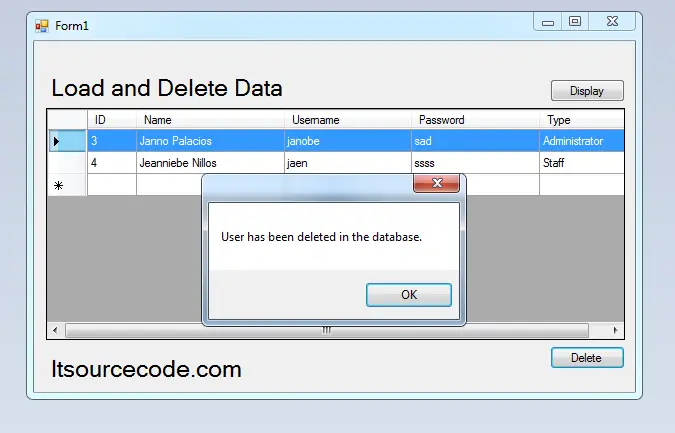
In this tutorial, I will teach you how to retrieve and delete data in the database using MySQL database and C#.net. These functionalities will help you to display the data from the database to the Datagridview.
And you can also delete the data that has been saved in the MySQL database. I will use Microsoft Visual Studio 2008 and MySQL for the database.
Let’s begin:
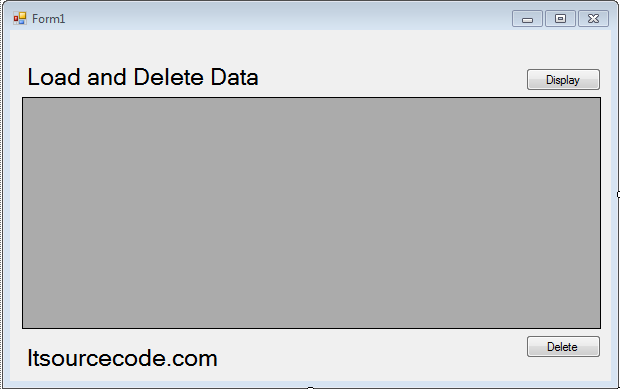
Step 1: Open Microsoft Visual Studio 2008 and create a new windows application for C#. Do the form just like this.
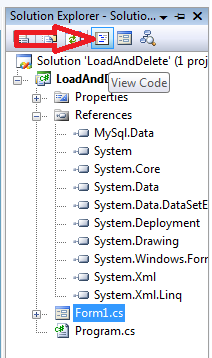
Step 2: Go to the solution explorer and hit the “view code“.
Step 3: In the code editor, declare all the classes and variables that are needed.
Note: Add MySQL.Data.dll as your references to access mysql server library.
 //initialize sql connection
 MySqlConnection con = new MySqlConnection();
 //initialize all classes
 MySqlCommand cmd = new MySqlCommand();
 MySqlDataAdapter da = new MySqlDataAdapter();
 DataTable dt = new DataTable();

 //declaring variables
 string strquery;
 int result;
Step 4: Go back to the design view, double-click the form and do the following codes for establishing the connection between MySQL Database and C#.net.
 private void Form1_Load(object sender, EventArgs e)
 {
 //set a connection string
 con.ConnectionString = "server=localhost;user id=root;password=;Database=dbuser;";
 }
Step 5: Go back to the design view again, double-click the “Display” button and do the following codes for displaying the data from the database to the Datagridview.
 private void btndisplay_Click(object sender, EventArgs e)
 {
 try
 {
 con.Open();
 //create a query for retrieving data in the database.
 strquery = "SELECT ID,`UNAME` as Name, `UUSERNAME` as Username, `UPASSWORD` as Password, `UTYPE` as Type FROM `tblusers` ";
 //initialize new Sql commands
 cmd = new MySqlCommand();
 //hold the data to be executed.
 cmd.Connection = con;
 cmd.CommandText = strquery;
 //initialize new Sql data adapter
 da = new MySqlDataAdapter();
 //fetching query in the database.
 da.SelectCommand = cmd;
 //initialize new datatable
 dt = new DataTable();
 //refreshes the rows in specified range in the datasource.
 da.Fill(dt);


 dataGridView1.DataSource = dt;


 }
 catch (Exception ex)
 {
 //catching error
 MessageBox.Show(ex.Message);
 }
 finally
 {
 da.Dispose();
 con.Close();
 }
 }
Step 6: Go back to the design view again, double-click the “Delete” button and do the following codes for deleting the data in the database.
 private void btnDel_Click(object sender, EventArgs e)
 {
 try
 {
 con.Open();
 //create a query for delete data in the database.
 strquery = "Delete From tblusers WHERE ID=" + dataGridView1.CurrentRow.Cells[0].Value;

 //initialize new Sql commands
 cmd = new MySqlCommand();
 //hold the data to be executed.
 cmd.Connection = con;
 cmd.CommandText = strquery;

 result = cmd.ExecuteNonQuery();

 if (result > 0)
 {
 MessageBox.Show("User has been deleted in the database.");

 }
 }
 catch (Exception ex)
 {
 //catching error
 MessageBox.Show(ex.Message);
 }
 finally
 {
 da.Dispose();
 con.Close();
 }
 }
Result:
For all students who need a programmer for your thesis system or anyone who needs a source code in any programming languages. You can contact me @ :
Email – jannopalacios@gmail.com
Mobile No. – 09305235027 – TNT
Download Source code: Click here
| ABOUT PROJECT | PROJECT DETAILS |
|---|---|
| Project Name : | Retrieving and Deleting Data Using MySQL Database and C#.Net |
| Project Platform : | C# |
| Programming Language Used: | C# Programming Language |
| Developer Name : | itsourcecode.com |
| IDE Tool (Recommended): | Visual Studio 2019 |
| Project Type : | Desktop Application |
| Database: | MYSQL DATABASE |
| Upload Date and Time: | August 4, 2016 – 2:25 am |
Frequently Asked Questions
How does this C# project work?
Built with C# WinForms (.NET Framework or .NET 6/7/8) and SQL Server backend. Standard structure: Form designer → code-behind event handlers → ADO.NET data access layer → SQL Server. Login form for auth. Ready to extend for BSIT capstone scope.
What .NET and SQL Server versions does this project require?
Most projects in this batch use C# WinForms on .NET Framework 4.5+ (the dominant stack for tutorial sites) with SQL Server 2012 Express or higher. A few newer projects use .NET 6/7/8. To run: install Visual Studio 2019 / 2022 (Community edition is free), install SQL Server Express + SSMS, open the .sln file, build, run.
How do I set up the database for this C# project?
Open SQL Server Management Studio (SSMS) and connect to your SQL Server instance (e.g. localhost\SQLEXPRESS). Right-click Databases > Restore Database OR > New Database then import the included .sql script. Update the connection string in App.config (or in code-behind) with your server name + credentials. Rebuild and run.
Can I use this C# project for a BSIT capstone or thesis?
Yes, but extend it. A bare CRUD form is too narrow for full capstone scope. Add: role-based access (admin/staff/customer login redirect), Crystal Reports or RDLC reports, dashboard with Chart controls, audit log, multi-branch support. Pair with Chapter 1-5 documentation matching your panel’s rubric.
Why am I getting ‘connection error’ or ‘object reference not set’?
Three common C# issues: (1) Connection error: SQL Server isn’t running OR connection string in App.config has wrong server name. Open SQL Server Configuration Manager + verify SQL Server (SQLEXPRESS) service is running. (2) NullReferenceException: a control reference or DB column returned NULL, add a check or use ?? operator. (3) Build error ‘The type or namespace could not be found’: missing assembly reference, add via Project > Add Reference.
Where can I find more C# projects with source code?
Browse the C# Projects hub for the full library. For other .NET stacks see VB.NET Projects (300+ Windows Forms systems). For ASP.NET WebForms see ASP.NET Projects. For BSIT capstone idea lists see 150 Best Capstone Project Ideas.
Fantastic post.Really looking forward to read more. Awesome.