Home » Validate a TextBox Using an Error Provider in C#
Validate a TextBox Using an Error Provider in C#
| by janobe
Validate a TextBox Using an Error Provider in C#
Validating a textbox Using an Error Provider in C# is very important and there are many ways on how to do it. But, in this tutorial, I’m going to teach you the simplest way on how to validate a textbox by using an error provider.
Error provider displays a user-friendly message to notify the user whenever validation fails. Then, that’s the time for the user to correct the error and validate the message in the textbox.
Let’s begin:
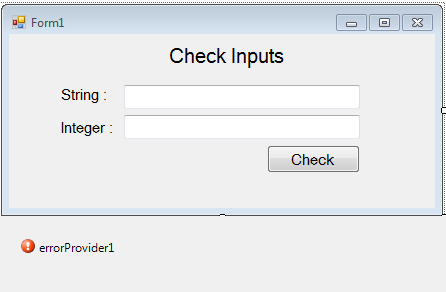
Open Microsoft Visual Studio and create a new windows form application. Then, drag two text boxes, labels, button and an error provider.
After setting up the form, double-click the “check” button and do the following codes for validating the textboxes.
 private void button1_Click(object sender, EventArgs e)
 {
 //'CHECKING IF THE TWO TEXTBOXES ARE CLEARED.
 if(txtStr .Text == "" )
 {
 //'THE ERROR PROVIDER WILL APPEAR AND IT WILL INFORM THE PROBLEM TO THE USER.
 errorProvider1.SetError(txtStr, "Textbox must be filled up.");

 }else if(txtInt .Text == ""){
 //'THE ERROR PROVIDER WILL APPEAR AND IT WILL INFORM THE PROBLEM TO THE USER.
 errorProvider1.SetError(txtInt, "Textbox must be filled up.");
 }
 else
 {
 //'SET THE ERROR PROVIDER TO BE CLEARED.
 errorProvider1.SetError(txtStr, "");
 errorProvider1.SetError(txtInt, "");
 //'CHECKING IF YOU HAVE INPUT A NUMERIC VALUE.
 if (!System.Text.RegularExpressions.Regex.IsMatch(txtStr.Text, "[^0-9]"))
 {
 //'THE ERROR PROVIDER WILL APPEAR AND IT WILL INFORM THE PROBLEM TO THE USER.
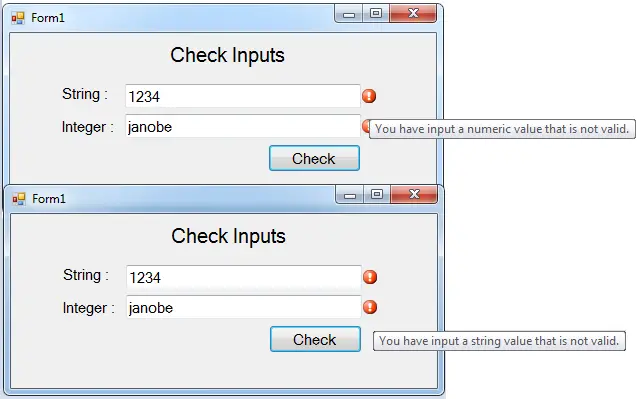
 errorProvider1.SetError(txtStr, "You have input a numeric value that is not valid.");

 }
 if (System.Text.RegularExpressions.Regex.IsMatch(txtInt.Text, "[^0-9]"))
 {
 //'THE ERROR PROVIDER WILL APPEAR AND IT WILL INFORM THE PROBLEM TO THE USER.
 errorProvider1.SetError(txtInt, "You have input a string value that is not valid.");

 }


 }
Output:
For all students who need a programmer for your thesis system or anyone who needs a source code in any programming languages. You can contact me @ :
Email – jannopalacios@gmail.com Mobile No. – 09305235027 – TNT
What does this C# WinForms control example demonstrate?
Core Windows Forms control (TextBox, CheckBox, RadioButton, ListBox, TreeView, ProgressBar, Button, DateTimePicker, etc.) usage pattern: properties, events, data binding, common gotchas. Foundation skill for building any C# desktop application capstone.
What .NET and SQL Server versions does this project require?
Most projects in this batch use C# WinForms on .NET Framework 4.5+ (the dominant stack for tutorial sites) with SQL Server 2012 Express or higher. A few newer projects use .NET 6/7/8. To run: install Visual Studio 2019 / 2022 (Community edition is free), install SQL Server Express + SSMS, open the .sln file, build, run.
How do I set up the database for this C# project?
Open SQL Server Management Studio (SSMS) and connect to your SQL Server instance (e.g. localhost\SQLEXPRESS). Right-click Databases > Restore Database OR > New Database then import the included .sql script. Update the connection string in App.config (or in code-behind) with your server name + credentials. Rebuild and run.
Can I use this C# project for a BSIT capstone or thesis?
Yes, but extend it. A bare CRUD form is too narrow for full capstone scope. Add: role-based access (admin/staff/customer login redirect), Crystal Reports or RDLC reports, dashboard with Chart controls, audit log, multi-branch support. Pair with Chapter 1-5 documentation matching your panel’s rubric.
Why am I getting ‘connection error’ or ‘object reference not set’?
Three common C# issues: (1) Connection error: SQL Server isn’t running OR connection string in App.config has wrong server name. Open SQL Server Configuration Manager + verify SQL Server (SQLEXPRESS) service is running. (2) NullReferenceException: a control reference or DB column returned NULL, add a check or use ?? operator. (3) Build error ‘The type or namespace could not be found’: missing assembly reference, add via Project > Add Reference.
Where can I find more C# projects with source code?