
The Number System Conversion project in C is a consoled based application and created using c programming language.
This system is a simple mini project and compiled in Code::Blocks IDE using GCC compiler. This simple mini project for Number System Conversion is complete and totally error free.
Also includes a downloadable Source Code for free, just find the downloadable source code below and click to start downloading.
Before you start to click the download now first you must click the Run Quick Scan for secure Download.
This Mini Project for Number System Conversion, the client can effectively change over any number framework such as: binary to decimal, binary to octal, binary to hexadecimal.
Decimal to binary, Decimal to octal and Decimal to hexadecimal. Octal to binary, Octal to decimal and Octal to hexadecimal.
Hexadecimal to binary, Hexadecimal to decimal and Hexadecimal to octal. The client must select numbers and after that enter the number agreeing to their change. This extend has made the number framework transformation quick and simple for the clients.
Anyway if you want level up your knowledge in programming especially C/C++ Programming Language, try this new article I’ve made for you Best C Projects with Source Code for Beginners Free Download 2022.
To start creating a Number System Conversion Project in C , make sure that you have a Code Blocks or any platform of C installed in your computer.
| ABOUT PROJECT | PROJECT DETAILS |
|---|---|
| Project Name : | Number System Conversion |
| Project Platform : | C/C++ |
| Programming Language Used: | C Programming Language |
| Developer Name : | itsourcecode.com |
| IDE Tool (Recommended): | Dev-C++/Codeblocks |
| Project Type : | Desktop Application |
| Database: | Stores data in .DAT file |
Steps on how to create a Number System Conversion Project in C
Time needed: 5 minutes
Number System Conversion Project in C with Source Code
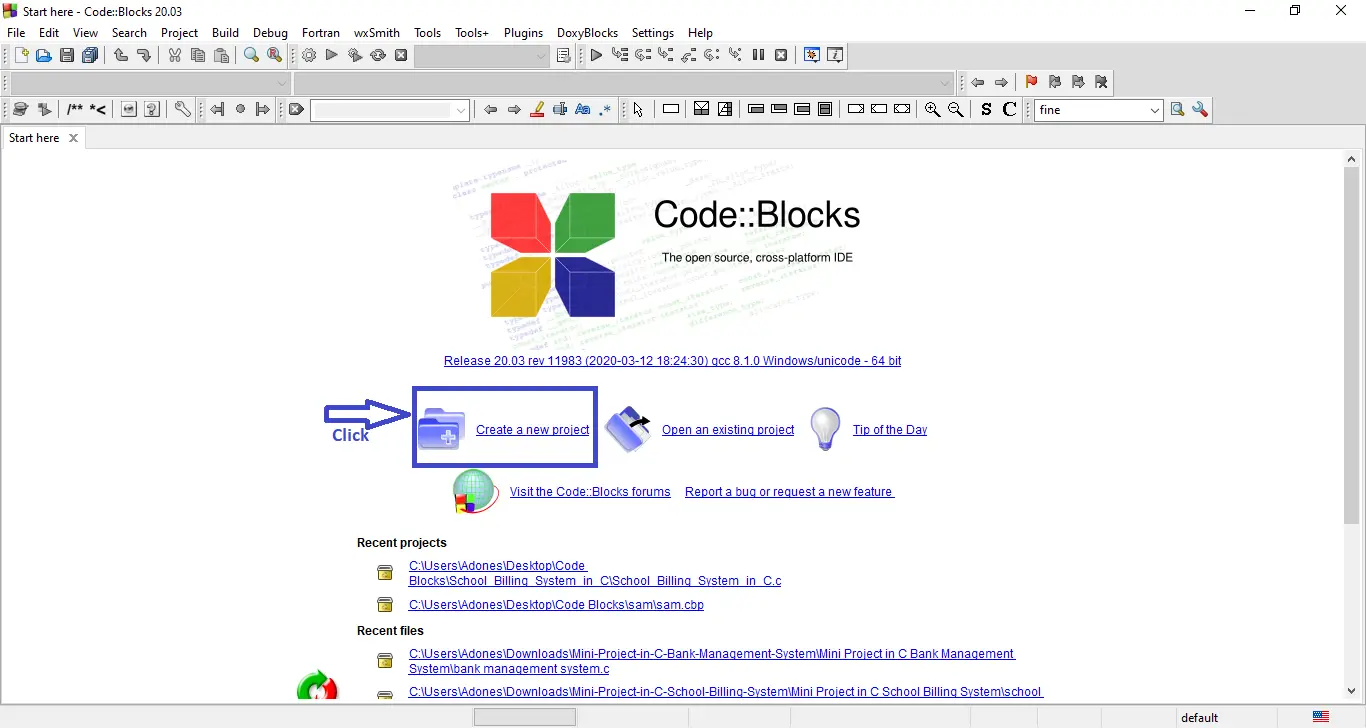
- Step 1: Create a new project.
First open the code blocks IDE and click “create a new project“.

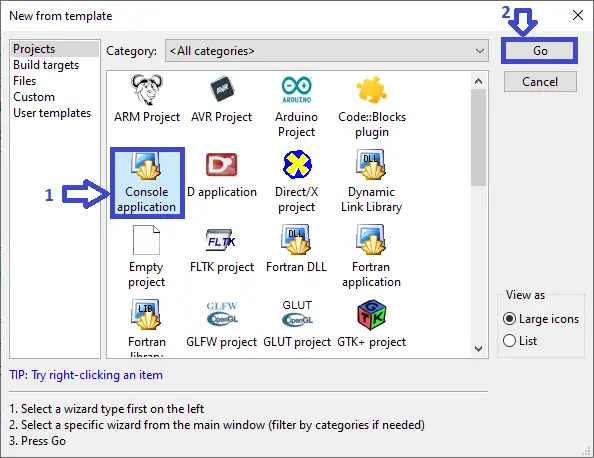
- Step 2: Choose console application.
Second click the “console application” and after that click “next“.

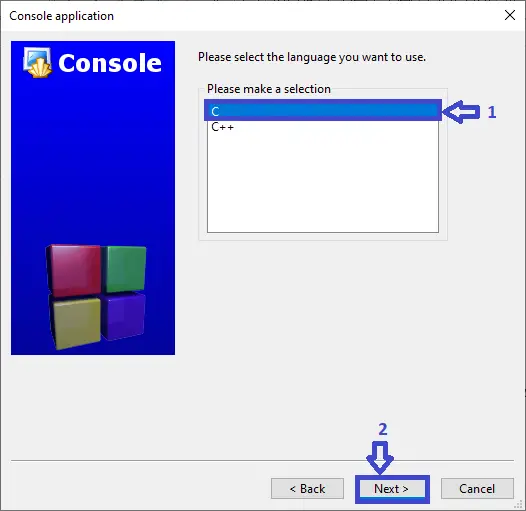
- Step 3: Choose C language.
Third choose “C language” and click “next“.

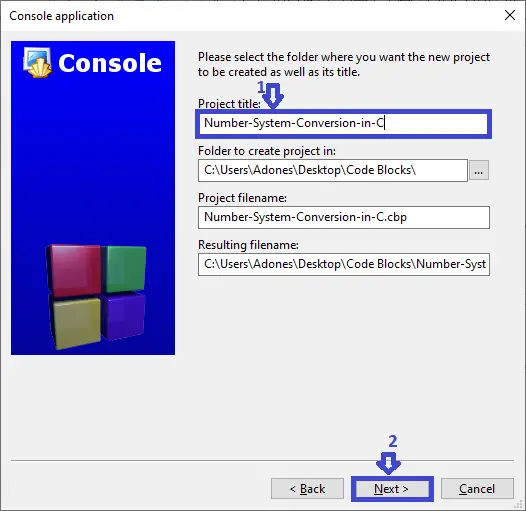
- Step 4: Name your project.
Fourth name the project you’ve created and click “next” after that click “finish“.
- Step 5: The actual code.
You are free to copy the given source code below or download the downloadable source code given.
Summary
In summary, this 2020 Number System Conversion Project in C project can be useful to students or professional who wants to learn C programming language.
This project can also be modified to fit your personal requirements. Hope this project will help you to improve your skills.
That’s how you create Number System Project in C with Source Code in your projects. You can always expand and try different ways in implementing the Number System Project in C in your C projects.
Related Articles
Inquiries
If you have any questions or suggestions about Number System Conversion Project in C with Source Code, please feel free to leave a comment below.
Frequently Asked Questions
How does this C or C++ project work?
Console application written in C (compiled with gcc) or C++ (compiled with g++). Uses standard library (stdio.h, conio.h, string.h, time.h) or C++ STL (iostream, vector, string, map). File-handling via fopen/fwrite or fstream for persistence. Foundation BSIT 1st-2nd year mini-project.
What compiler do I need to run this C or C++ project?
For C: gcc (GNU Compiler Collection) or MinGW (Windows). For C++: g++. IDE options: Code::Blocks (lightweight, built-in compiler), Dev-C++ (classic Philippine BSIT favorite), Visual Studio Code with C/C++ extension, CLion (paid). To compile from terminal: gcc program.c -o program (for C) or g++ program.cpp -o program (for C++), then run with ./program (Linux/macOS) or program.exe (Windows).
How do I run this C / C++ project?
Open the .c or .cpp file in your IDE (Code::Blocks, Dev-C++, VS Code). Click Build (or press F9), then Run (or press F5). From terminal: navigate to project folder, run gcc/g++ command above, then ./program. If using file storage, make sure the data file (e.g. records.txt) is in the same folder as the executable.
Can I use this C / C++ project for a BSIT capstone or thesis?
C/C++ projects are usually accepted for 1st-2nd year mini-projects or as building blocks. For a full capstone you would typically pair them with a more interactive frontend (e.g. wrap C++ logic with a Java/Python/PHP frontend, or extend to GTK/Qt for a real GUI). Standalone console C++ capstones are accepted by some panels but rare in 2026.
Why am I getting ‘undeclared identifier’ or ‘cannot find header’ errors?
Three common C/C++ issues: (1) Missing #include directive, e.g. #include
Where can I find more C or C++ projects with source code?
Browse the C and C++ Projects hub for the full library. For Java desktop alternatives see Java Projects. For higher-level languages see Python Projects. For BSIT capstone idea lists see 150 Best Capstone Project Ideas.

Adones Evangelista
Programmer & Technical Writer at PIES IT Solution
Adones Evangelista is a programmer and writer at PIES IT Solution, author of over 900 tutorials and error-fix guides at itsourcecode.com. Specializes in JavaScript, Django, Laravel, and Python error debugging covering ValueError, TypeError, AttributeError, ModuleNotFoundError, and RuntimeError, plus C/C++ and PHP capstone projects for BSIT students.
Expertise: JavaScript · Python · Django · Laravel · Error Debugging · C/C++ · View all posts by Adones Evangelista →
Chuyên viên trang điểm sân khấu kịch, điện ảnh.
I really like and appreciate your blog article.Really thank you!
Fantastic post. Really Cool.
Thank you so much.
Thanks for the blog post. Really Great.