
How to write a program to calculate BMI in c?
The BMI Calculator is developed using C Programming Language, in this BMI Formula In C Program calculate your pound and inches and display the output if you are underweight, normal or overweight.
A BMI Calculator In C flow, first the system ask to the user to enter your weight in whole pounds, after that the system ask again to enter your height in whole inches, after you enter that two request the system will display your body mass index calculator and your weight status. either normal, under weight or overweight.
The body mass index calculator is composed of BMI, weight , height in meters, kilograms and height.
This BMI Calculator also includes a downloadable BMI Calculator C Program Code for free, just find the downloadable source code below and click to start downloading.
To start creating a BMI Calculator in C Programming, make sure that you have code blocks or any platform of C/C++ language installed in your computer.
| ABOUT PROJECT | PROJECT DETAILS |
|---|---|
| Project Name : | BMI Calculator |
| Project Platform : | C/C++ |
| Programming Language Used: | C Programming Language |
| Developer Name : | itsourcecode.com |
| IDE Tool (Recommended): | Dev-C++/Codeblocks |
| Project Type : | Desktop Application |
| Database: | Stores data in .DAT file |
Steps on how to create a BMI Calculator In C Programming With Source Code
Time needed: 5 minutes
Here are the steps on how to create the BMI Calculator In C.
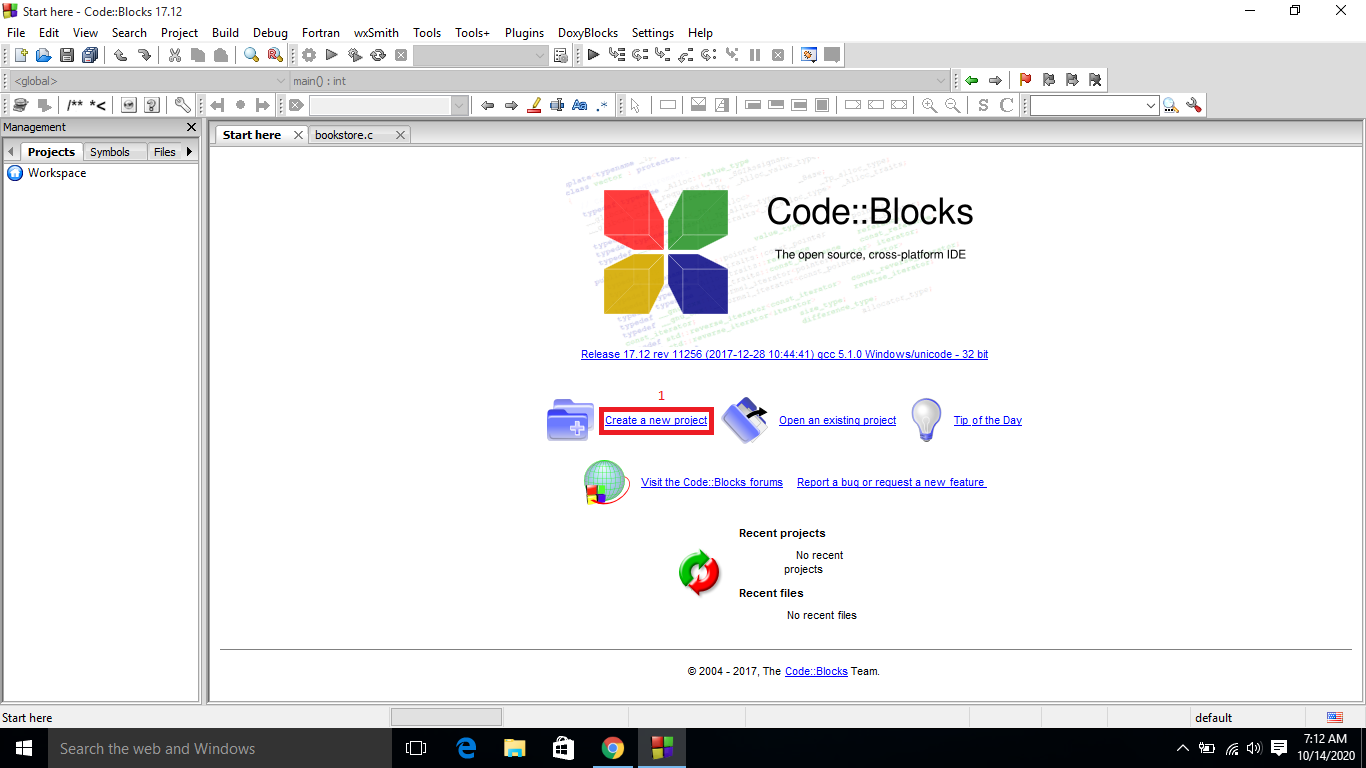
- Step 1: Create a new project.
First open the code blocks IDE and click “create a new project“.

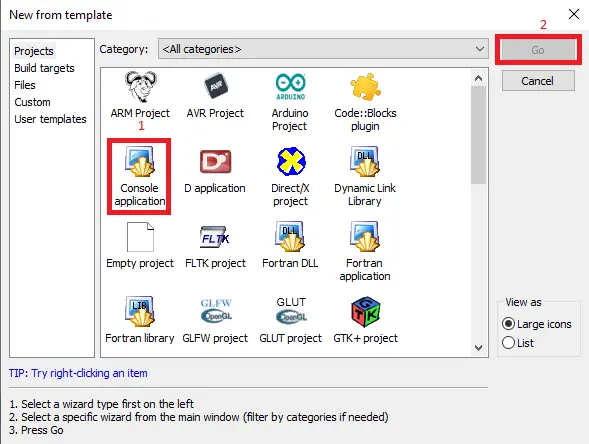
- Step 2: Choose console application.
Second click the “console application” and after that click “next“.

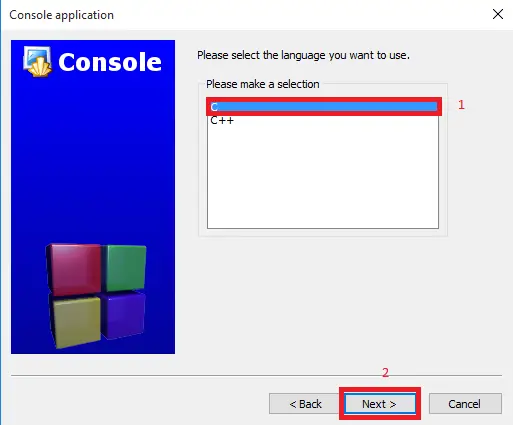
- Step 3: Choose C language.
Third choose “C language” and click “next“.

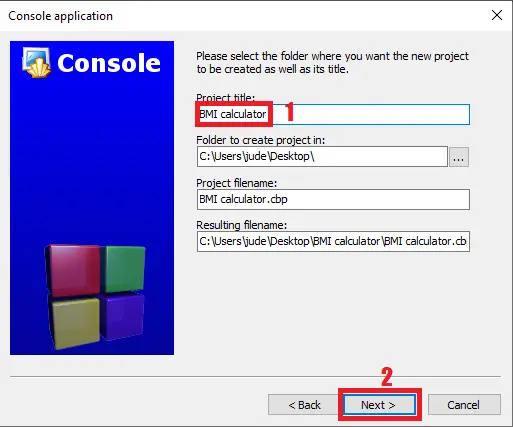
- Step 4: Name Your Project.
Fourth name the project you’ve created and click “next” after that click “finish“.

- Step 5: The actual code.
You are free to copy the given source code below or download the downloadable source code given.
Downloadable Source Code
Summary
The whole project is designed in ‘C’ language and different variables and strings have been used for the development of this project.
This mini project is easy to operate and understand by the users.
This simple project can enhance the knowledge of the beginners or the students to develop their skills in programming, also this project is easy to understand the module and their variables.
Related Article
Inquiries
If you have any questions or suggestions about BMI Calculator in C Programming, please feel free to leave a comment below.
Frequently Asked Questions
How does this C / C++ calculator project work?
Console calculator: read 2 numbers + operator, switch statement on operator (+, -, *, /, %), print result. Extended version: scientific functions, expression parser, history.
What compiler do I need to run this C or C++ project?
For C: gcc (GNU Compiler Collection) or MinGW (Windows). For C++: g++. IDE options: Code::Blocks (lightweight, built-in compiler), Dev-C++ (classic Philippine BSIT favorite), Visual Studio Code with C/C++ extension, CLion (paid). To compile from terminal: gcc program.c -o program (for C) or g++ program.cpp -o program (for C++), then run with ./program (Linux/macOS) or program.exe (Windows).
How do I run this C / C++ project?
Open the .c or .cpp file in your IDE (Code::Blocks, Dev-C++, VS Code). Click Build (or press F9), then Run (or press F5). From terminal: navigate to project folder, run gcc/g++ command above, then ./program. If using file storage, make sure the data file (e.g. records.txt) is in the same folder as the executable.
Can I use this C / C++ project for a BSIT capstone or thesis?
C/C++ projects are usually accepted for 1st-2nd year mini-projects or as building blocks. For a full capstone you would typically pair them with a more interactive frontend (e.g. wrap C++ logic with a Java/Python/PHP frontend, or extend to GTK/Qt for a real GUI). Standalone console C++ capstones are accepted by some panels but rare in 2026.
Why am I getting ‘undeclared identifier’ or ‘cannot find header’ errors?
Three common C/C++ issues: (1) Missing #include directive, e.g. #include
Where can I find more C or C++ projects with source code?
Browse the C and C++ Projects hub for the full library. For Java desktop alternatives see Java Projects. For higher-level languages see Python Projects. For BSIT capstone idea lists see 150 Best Capstone Project Ideas.

Angel Jude Suarez
Full-Stack Developer at PIES IT Solution
Focuses on Python development, machine learning, and AI integration. Has built production AI systems including OpenAI Whisper integration for medical transcription and GPT-4o-powered diagnosis assistance. Strong background in pandas, scikit-learn, and TensorFlow.
Expertise: Python · PHP · Java · VB.NET · ASP.NET · Machine Learning · AI Integration · OpenCV · Django · CodeIgniter · View all posts by Angel Jude Suarez →