
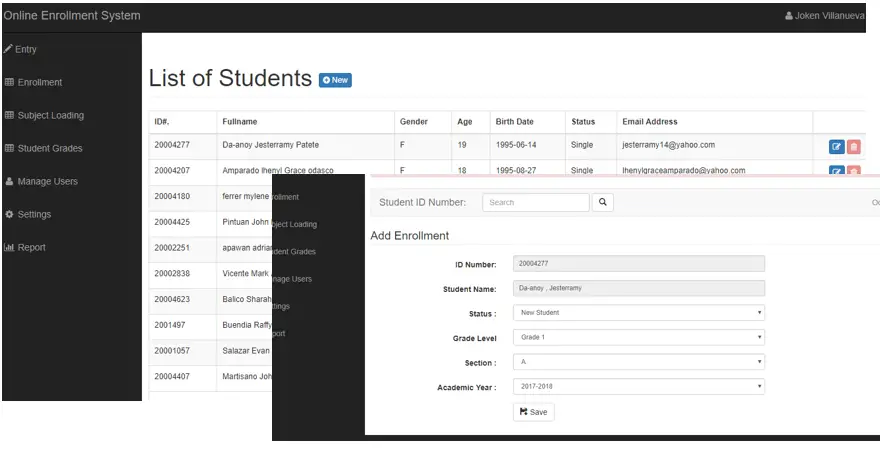
Due to the demand of our itsourcecoders to have a downloadable Online Enrollment System Thesis Using PHP, today the wish will come true for I will be uploading an Online Enrollment System Thesis Source Code for free. This system is created using PHP and MySQLi Database with a Twitter Bootstrap framework.
The system has the following features:
- Student Management system
- Subject Management system
- Employee Management system
- Grade Level Management system
- Enrollment System
- Assigning of Subjects to per students or per class
- Removing of subjects
- Subject Loading for teachers
- De-loading of subjects
- Student Grading System
- Settings of defaults
- and much more…
To Run this project entitled Online Enrollment System Thesis Source Code, just follow the steps here
- Download the source code here smsupdated
- After extracting the downloaded file put it inside your root directory
- Create a Database and name it as “Ladsdb”
- Download the database and import it into your PHPMyAdmin ladsdb
- Run the project
- You can only appreciate the source code if you run it by yourself
- To login, please use the user account given below:
Login Accounts:
Username: joken@yahoo.com
Password: j
If you have any suggestions or questions, please feel free to contact us.
Technology stack and requirements
To run this PHP project, you need these tools on your development machine:
- XAMPP or WAMP server. Bundles Apache, MySQL, and PHP so you can run PHP on Windows without individual installs. Free from apachefriends.org.
- PHP 8.0 or higher. Included with XAMPP. Older versions (5.x, 7.x) may work but modern PHP features improve security and performance.
- MySQL or MariaDB. Comes with XAMPP. phpMyAdmin manages the database through a browser UI.
- VS Code or PhpStorm. Free code editor with PHP syntax highlighting, IntelliSense, and debugging support.
- Web browser. Chrome, Firefox, or Edge for testing the running app.
Installing the source code
- Download the archive. Get the ZIP file from the download link on this page and extract it.
- Move to htdocs. Place the extracted folder inside C:\xampp\htdocs\ so Apache can serve it.
- Import the database. Open http://localhost/phpmyadmin, click Import, and select the .sql file included in the archive.
- Update database credentials. Open the config.php or connection.php file and set the correct database name, username, and password (default XAMPP: root / empty password).
- Run the project. Start Apache + MySQL in XAMPP, then visit http://localhost/your-project-folder/ in a browser.
Using this project for your BSIT capstone
This PHP project maps cleanly to standard BSIT capstone documentation. Suggested chapter alignment:
- Chapter 1 (Introduction). Discuss the problem the system solves in real-world context. Cite Philippine business or academic use cases where a manual process could be replaced.
- Chapter 2 (Review of Related Literature). Compare this system’s features against 5-10 similar published projects. Cite journals like IJERT or IEEE Access for academic-standard sources.
- Chapter 3 (Methodology). Include Use Case Diagram, Data Flow Diagram, Entity Relationship Diagram, and Activity Diagram covering all major workflows.
- Chapter 4 (Results and Discussion). Screenshot each module of the running system with a caption explaining what data it processes and which user role interacts with it.
- Chapter 5 (Conclusion and Recommendations). Identify features that could be added in a Version 2, such as mobile app, REST API export, or AI-powered analytics.
Modules typical of Online Enrollment System Thesis Using PHP
- Student information. Personal info, guardian details, enrollment status, program of study.
- Enrollment / registration. Term-by-term subject selection with prerequisite checking.
- Grading system. Teacher input for quiz, exam, and project scores with weighted average.
- Report card generation. Printable grade slip and transcript of records.
- Library / borrowing (optional). Track book borrowing, return date, fine computation.
- Announcements. Post school-wide bulletins visible from the login screen.
Common enhancements for capstone review
- Online portal. Add PHP or ReactJS portal so parents and students see grades from home.
- SMS grade notification. Auto-send new-grade alerts to parent’s mobile via a service like Semaphore.
- Digital ID card. Print student ID with photo, QR code, and academic year.
- Alumni tracking. Extend the database to include post-graduation contact info.
Official documentation
Frequently Asked Questions
How does this PHP student information or enrollment system work?
Records student demographics, enrollment per term, class assignments, grades, attendance, fees. Smaller-scope than full school management, student-centric. Foundation BSIT capstone.
What PHP and MySQL versions does this project require?
Most projects in this batch run on PHP 7.4 to PHP 8.2 with MySQL 5.7+ or MariaDB 10+. A few older projects need PHP 5.6 (deprecated, use XAMPP 7.x). To run: install XAMPP / WAMP / Laragon, extract project to htdocs, import the included .sql file via phpMyAdmin, edit the connection file (usually config.php or db_connect.php) with your DB credentials, browse to the project URL in your browser.
How do I set up the database for this PHP project?
Open phpMyAdmin (http://localhost/phpmyadmin/ on XAMPP), create a new empty database with the name specified in the project’s config.php. Click the Import tab, choose the included .sql file, click Go. Then edit config.php (or includes/connection.php) with: ‘localhost’, your MySQL username (usually ‘root’), your MySQL password (usually blank for XAMPP), and the database name.
Can I use this PHP project for a BSIT capstone or thesis?
Yes, but extend it. A bare CRUD app is too narrow for full capstone scope. Add: user roles via session checks, reports/dashboards (Chart.js + AJAX), PDF exports (TCPDF library), email notifications (PHPMailer), real domain extension (analytics, audit log, multi-branch support). Pair with Chapter 1-5 documentation matching your panel’s rubric.
Why am I getting ‘connection error’ or ‘undefined function mysqli_connect’?
Three common PHP issues: (1) Connection error: Apache + MySQL services not running in XAMPP control panel, OR database name in config.php does not match what you created in phpMyAdmin. (2) ‘undefined function mysqli_connect’: MySQL extension not enabled, in php.ini uncomment extension=mysqli (then restart Apache). (3) ‘No such file or directory’: MySQL socket path wrong, use 127.0.0.1 instead of localhost in the connection string.
Where can I find more PHP projects with source code?
Browse the PHP Projects hub for the full library (300+ vanilla PHP systems). For modern PHP MVC alternatives see Laravel Projects (74 systems) or CodeIgniter Projects (32 systems). For BSIT-focused capstone idea lists see 150 Best Capstone Project Ideas.
Related PHP Projects
- Online Student Enrollment System
- Thesis Online Archiving System Using PHP
- Online Pharmacy System Free Source Code
- Online Voting System Project In PHP With Source Code
- Online Admission System Project In PHP MySQL Source Code
- Online Cellphone System Using PHP

Joken E. Villanueva
Founder & Lead Developer at PIES IT Solution
Founder of PIES Information Technology Solutions, a software company building production-grade applications for institutions across the Philippines. Over 8 years of hands-on full-stack development experience, currently leading the development of ClinicAI, an AI-powered clinic management platform.
Expertise: PHP · MySQL · JavaScript · AI Integration · SaaS Architecture · VB.NET · Database Design · Capstone Documentation · Java
· View all posts by Joken E. Villanueva →
it says “Account does not exist! Please contact Administrator.” even if i already change the password and the username. help me please.
i got the same thing… was this solve??
same goes to me.. i can’t even log in cuz it always says that “Account does not exist! Please contact Administrator.” i really want to test it..
why i cant login?
It works! Thank you!
Why can’t I login? It says that”Account does not exist! Please contact Administrator” I really want to try this .
it works but i already encounter Notice: Undefined property: stdClass::$STUDENTNAME
The password is : 1234
Warning: require_once(C:/xampp/htdocs\studentTrans\includes\config.php): failed to open stream: No such file or directory in C:\xampp\htdocs\Projects\AAA1\StudentTranscript Processing System in PHP with MySQL\includes\initialize.php on line 21
Fatal error: require_once(): Failed opening required ‘C:/xampp/htdocs\studentTrans\includes\config.php’ (include_path=’C:\xampp\php\PEAR’) in C:\xampp\htdocs\Projects\AAA1\StudentTranscript Processing System in PHP with MySQL\includes\initialize.php on line 21
i cant login, i added new account still the same i cannot log in