
How to Load Data in the DataGridView in C# and SQL Server
How to Load Data in the ListView Using C#
In this tutorial, I will teach you how to Load data in Datagridview using C# and SQL server 2005. This method will help you retrieve data in the database to load those data in the DataGridview. You can also control whatever data you want to display to the DataGridView.
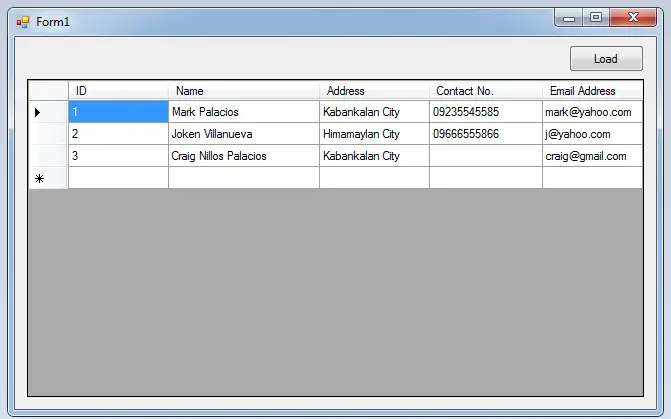
Let’s Begin How to Load Datagridview using C# and SQL server:
Create a database and name it “persondb”.
After that, do the following query for creating a table in the database that you have created.
SET ANSI_NULLS ON
GO
SET QUOTED_IDENTIFIER ON
GO
CREATE TABLE [dbo].[tblperson](
 [ID] [int] IDENTITY(1,1) NOT NULL,
 [Name] [nvarchar](50) NULL,
 [Address] [nvarchar](50) NULL,
 [Contact] [nvarchar](50) NULL,
 [Emailadd] [nvarchar](50) NULL,
 CONSTRAINT [PK_tblemployee] PRIMARY KEY CLUSTERED
(
 [ID] ASC
)WITH (PAD_INDEX = OFF, STATISTICS_NORECOMPUTE = OFF, IGNORE_DUP_KEY = OFF, ALLOW_ROW_LOCKS = ON, ALLOW_PAGE_LOCKS = ON) ON [PRIMARY]
) ON [PRIMARY]
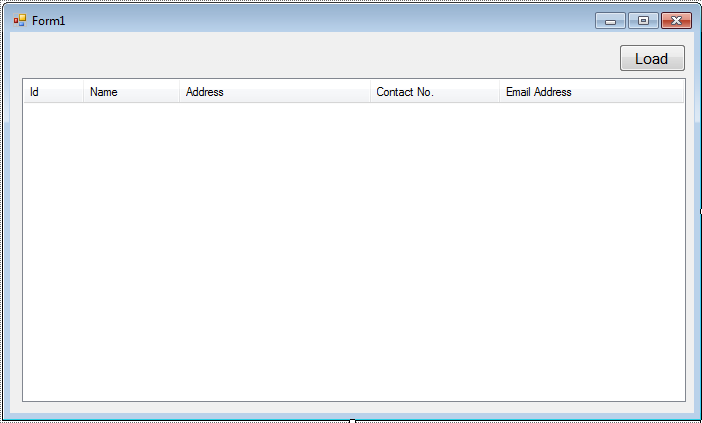
Open Microsoft Visual Studio 2008 and create new Windows Form Application for C#. Then do the following design of a Form as shown below.
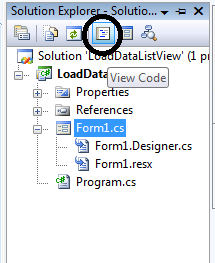
Go to the Solution Explorer, double click the “View Code” to display the code editor.
In the code editor, declare all the classes that are needed.
Note: Put using System.Data.SqlClient; above the namespace to access sql server library.
 //initialize all classes
 //initializes new instance
 SqlConnection con = new SqlConnection();
 SqlDataAdapter da = new SqlDataAdapter();
 SqlCommand cmd = new SqlCommand();
 DataTable dt = new DataTable();
After declaring the classes, go back to the design view double click the form and establish a connection between SQL server and C#.net.
private void Form1_Load(object sender, EventArgs e)
 {
 //set a connection between SQL server and Visual C#
 con.ConnectionString = "Data Source=.\\SQLEXPRESS;Database=testdb;trusted_connection=true;";
 }
After establishing the connection, go back to the design view double click the button and do the following codes for retrieving data in the database that will display in the ListView.
private void button1_Click(object sender, EventArgs e)
 {

 //opening connection
 con.Open();
 try
 {
 //initialize a new instance of sqlcommand
 cmd = new SqlCommand();
 //set a connection used by this instance of sqlcommand
 cmd.Connection = con;
 //set the sql statement to execute at the data source
 cmd.CommandText = "Select * FROM tblperson";

 //initialize a new instance of sqlDataAdapter
 da = new SqlDataAdapter();
 //set the sql statement or stored procedure to execute at the data source
 da.SelectCommand = cmd;
 //initialize a new instance of DataTable
 dt = new DataTable();
 //add or resfresh rows in the certain range in the datatable to match those in the data source.
 da.Fill(dt);
 //set the data source to display the data in the listview
 listView1.Items.Clear();
 foreach (DataRow r in dt.Rows)
 {
 var list = listView1.Items.Add(r.Field <int>(0).ToString());
 list.SubItems.Add(r.Field<string >(1));
 list.SubItems.Add(r.Field<string >(2));
 list.SubItems.Add(r.Field<string >(3));
 list.SubItems.Add(r.Field<string >(4));
 }

 }
 catch (Exception ex)
 {
 //catching error
 MessageBox.Show(ex.Message);
 }
 //release all resources used by the component
 da.Dispose();
 //dr.Close();
 //clossing connection
 con.Close();
 }
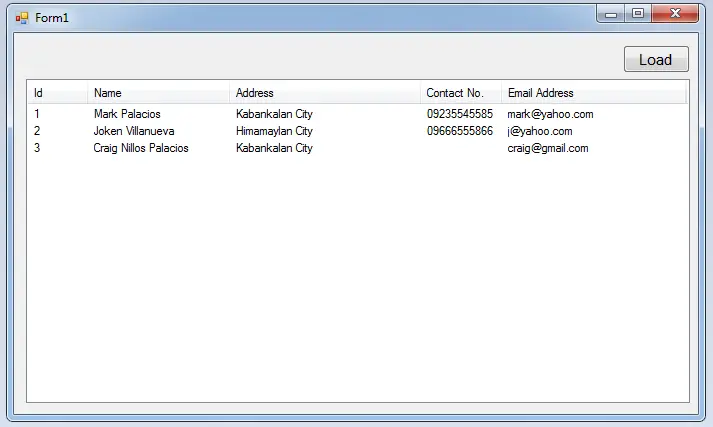
Output:
For all students who need programmer for your thesis system or anyone who needs a sourcecode in any programming languages. You can contact me @ :
Email – jannopalacios@gmail.com
Mobile No. – 09305235027 – tnt
How to Load Data in the ListView In C#
| ABOUT PROJECT | PROJECT DETAILS |
|---|---|
| Project Name : | How to Load Data in the DataGridView in C# and SQL Server |
| Project Platform : | C# |
| Programming Language Used: | C# Programming Language |
| Developer Name : | itsourcecode.com |
| IDE Tool (Recommended): | Visual Studio 2019 |
| Project Type : | Desktop Application |
| Database: | MySQL Database |
| Upload Date and Time: | June 18, 2016- 5:59 am |
Frequently Asked Questions
How does this C# ListView example work?
Demonstrates the ListView control in C# WinForms: populating with items + subitems, column sorting, multiple-selection, image-list integration, view modes (Details/LargeIcon/SmallIcon/Tile/List). Common pattern for displaying tabular or icon-grid data.
What .NET and SQL Server versions does this project require?
Most projects in this batch use C# WinForms on .NET Framework 4.5+ (the dominant stack for tutorial sites) with SQL Server 2012 Express or higher. A few newer projects use .NET 6/7/8. To run: install Visual Studio 2019 / 2022 (Community edition is free), install SQL Server Express + SSMS, open the .sln file, build, run.
How do I set up the database for this C# project?
Open SQL Server Management Studio (SSMS) and connect to your SQL Server instance (e.g. localhost\SQLEXPRESS). Right-click Databases > Restore Database OR > New Database then import the included .sql script. Update the connection string in App.config (or in code-behind) with your server name + credentials. Rebuild and run.
Can I use this C# project for a BSIT capstone or thesis?
Yes, but extend it. A bare CRUD form is too narrow for full capstone scope. Add: role-based access (admin/staff/customer login redirect), Crystal Reports or RDLC reports, dashboard with Chart controls, audit log, multi-branch support. Pair with Chapter 1-5 documentation matching your panel’s rubric.
Why am I getting ‘connection error’ or ‘object reference not set’?
Three common C# issues: (1) Connection error: SQL Server isn’t running OR connection string in App.config has wrong server name. Open SQL Server Configuration Manager + verify SQL Server (SQLEXPRESS) service is running. (2) NullReferenceException: a control reference or DB column returned NULL, add a check or use ?? operator. (3) Build error ‘The type or namespace could not be found’: missing assembly reference, add via Project > Add Reference.
Where can I find more C# projects with source code?
Browse the C# Projects hub for the full library. For other .NET stacks see VB.NET Projects (300+ Windows Forms systems). For ASP.NET WebForms see ASP.NET Projects. For BSIT capstone idea lists see 150 Best Capstone Project Ideas.