

For one or more players, Hangman Game In C++ Source Code is a traditional word guessing game. One person thinks of a word, phrase, or sentence, while the other tries to guess it by putting letters or numbers in their place. Designing and implementing a standard hangman would take time and effort.
How the Hangman Game Works in C++
Before pasting the source code, it helps to understand what each part of the program is doing. The Hangman game in C++ uses a simple state machine: a secret word, a guessed-letters log, and a lives counter. On each turn, the player enters a letter; the program checks whether it appears in the secret word, updates the display, and either deducts a life or reveals matching positions.
Game Flow Step by Step
- Word selection — the program picks a word from a hardcoded list or a
.DATfile. - Display masked word — every letter is shown as an underscore (e.g.,
_ _ _ _ _for a 5-letter word). - Read the player’s letter using
cin. - Validate the input — reject non-alphabetic characters and repeated guesses.
- Check the letter against the secret word. If found, reveal all matching positions; if not, decrement the lives counter.
- Loop until the player either reveals the full word (win) or runs out of lives (lose).
That’s the entire algorithm. Six steps, no external libraries needed beyond iostream, string, and vector.
| ABOUT PROJECT | PROJECT DETAILS |
|---|---|
| Project Name : | Hangman Game in C++ |
| Project Platform : | C/C++ |
| Programming Language Used: | C++ Programming Language |
| Developer Name : | itsourcecode.com |
| IDE Tool (Recommended): | Dev-C++/Codeblocks |
| Project Type : | Desktop Application |
| Database: | Stores data in .DAT file |
Complete C++ Source Code for Hangman
Here is the full working source code. Save it as hangman.cpp, compile with any C++ compiler (Dev-C++, Code::Blocks, or g++ from the command line), and run.
#include <iostream>
#include <string>
#include <vector>
#include <cstdlib>
#include <ctime>

using namespace std;

int main() {
    // Word bank — extend this with more words
    vector<string> words = {
        "computer", "programming", "hangman",
        "capstone", "itsourcecode", "developer"
    };

    // Seed the random number generator and pick a word
    srand(static_cast<unsigned int>(time(0)));
    string secretWord = words[rand() % words.size()];

    // Initialize the masked display
    string display(secretWord.length(), '_');
    string guessedLetters = "";
    int lives = 6;

    cout << "=== HANGMAN GAME ===\n";
    cout << "Guess the word, one letter at a time.\n";
    cout << "You have 6 lives. Good luck!\n\n";

    // Main game loop
    while (lives > 0 && display != secretWord) {
        cout << "Word: " << display << "\n";
        cout << "Guessed: " << guessedLetters << "\n";
        cout << "Lives left: " << lives << "\n";
        cout << "Enter a letter: ";

        char guess;
        cin >> guess;
        guess = tolower(guess);

        // Reject already-guessed letters
        if (guessedLetters.find(guess) != string::npos) {
            cout << "You already guessed '" << guess << "'. Try a different letter.\n\n";
            continue;
        }

        guessedLetters += guess;

        // Check if the letter is in the secret word
        bool found = false;
        for (size_t i = 0; i < secretWord.length(); i++) {
            if (secretWord[i] == guess) {
                display[i] = guess;
                found = true;
            }
        }

        if (!found) {
            lives--;
            cout << "Wrong! The letter '" << guess << "' is not in the word.\n\n";
        } else {
            cout << "Good guess!\n\n";
        }
    }

    // End-game message
    if (display == secretWord) {
        cout << "\nYOU WIN! The word was: " << secretWord << "\n";
    } else {
        cout << "\nGAME OVER. The word was: " << secretWord << "\n";
    }

    return 0;
}
To compile and run from the command line:
g++ hangman.cpp -o hangman
./hangman
Code Walkthrough — Understanding Each Section
Includes and Word Bank
The program uses four standard headers: iostream for input/output, string for the word and display, vector for the word bank, and cstdlib/ctime together to seed the random number generator. The word bank is a vector<string> so you can extend it easily — just add more words to the initializer list.
Random Word Selection
srand(time(0)) seeds the generator using the current time, so the word changes every run. rand() % words.size() produces a random index into the vector. If you skip the srand call, the same word would be picked every game.
The Main Game Loop
The loop continues as long as both conditions are true: the player has lives remaining AND the masked display does not yet equal the secret word. When either condition fails, the loop exits and the end-game message decides win vs. lose.
Why the Duplicate-Letter Check Matters
Without the guessedLetters.find(guess) check, a player could waste lives by repeatedly guessing the same wrong letter. This single line is what makes the game feel polished rather than amateur — examiners notice it during code review.
Common Errors When Running Hangman in C++
'srand' was not declared in this scope— you forgot#include <cstdlib>. Add it at the top.'tolower' was not declared— add#include <cctype>, or use a manual lowercase conversion:if (guess >= 'A' && guess <= 'Z') guess += 32;- The same word every run — you missed the
srand(time(0))seed line. Without it, the program uses the default seed of 1. - Program exits immediately after winning — add
system("pause");(Windows) orcin.ignore(); cin.get();(cross-platform) beforereturn 0if running from Dev-C++. - Compiler warning about
size_t— harmless, but to silence: changeint itosize_t iin the for loop (as shown in the code above).
Hangman Game In C++ Source Code Steps On How To Run The Project
Time needed: 5 minutes
Here’s the step’s on how to run a Hangman Game In C++ Source Code.
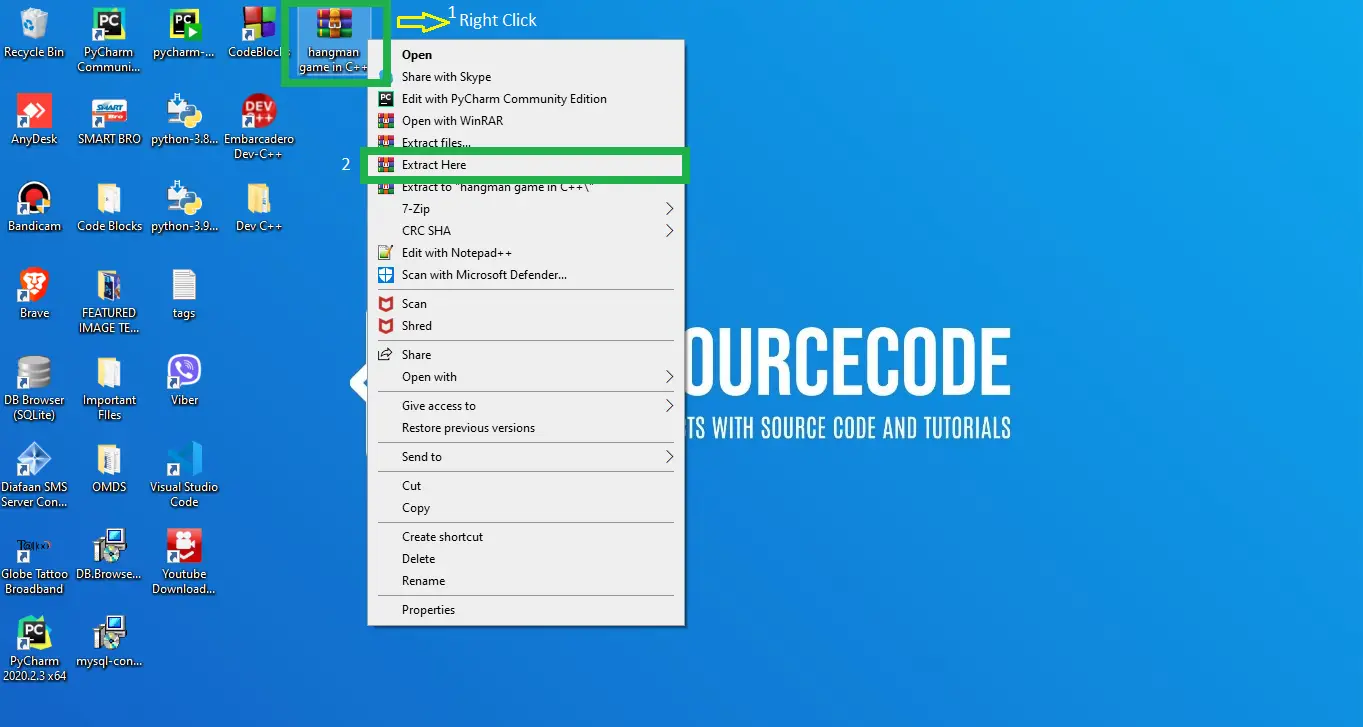
- Step 1: Extract file.
Then, after you finished download the source code, extract the zip file.

- Step 2: Open Code Blocks or Dev C++
Next, After extracting the zip file, open your “Code Blocks IDE” or “Dev C++”.

- Step 3: Open Project.
After that, open file tab and Open File after that open folder hangman game C++ click the “hangmanGame“.

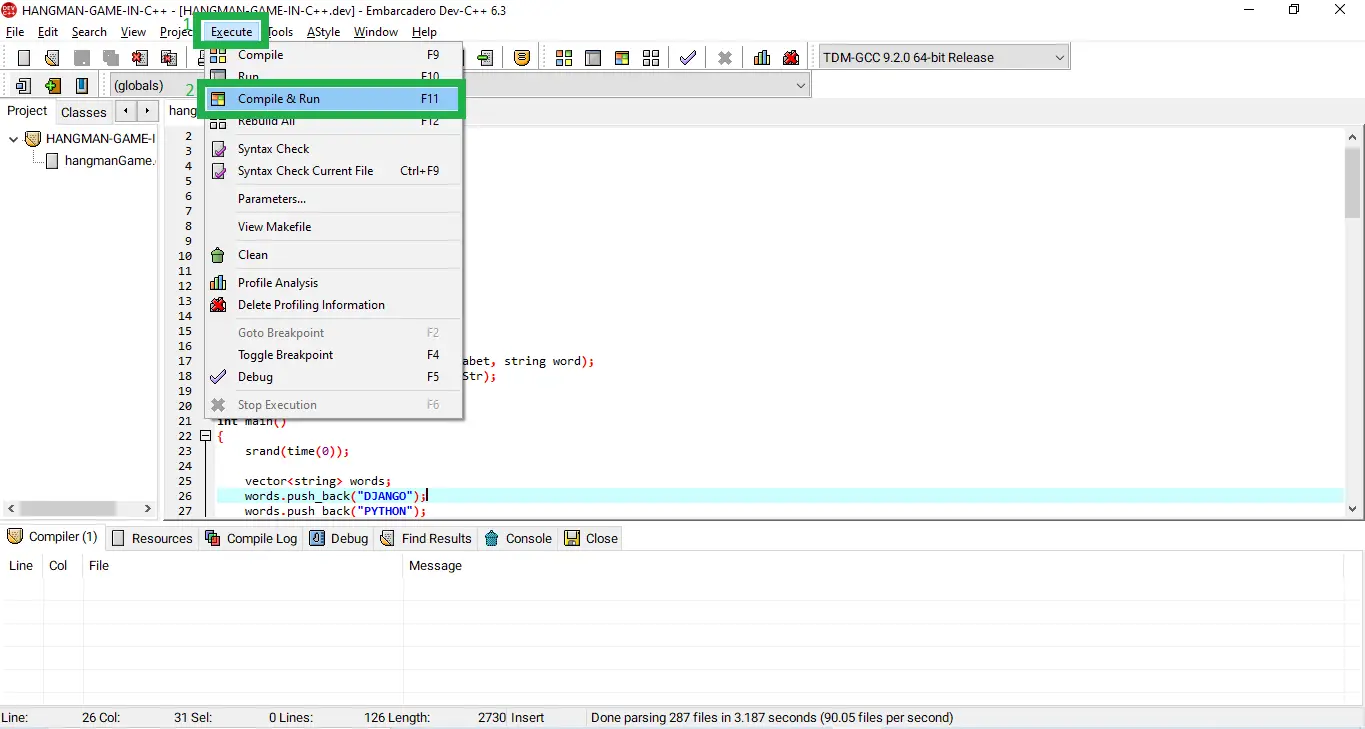
- Step 4: Run Project
Lastly, Click execute tab and select compile & run or you can use the shortcut key F11.

- Step 5: The actual code.
Finally, You are free to copy the given source code below or download the downloadable source code given.


Downloadable Source Code
In Summary
We hope you found the tutorial useful. Using a basic Hangman Code to learn the principles of C++ is a terrific way to get started.
To complete the game, you’ll need to understand how to manipulate random numbers and solicit user feedback.
Frequently Asked Questions
What language is best for a Hangman game beginner project?
C++ is one of the best choices because it is required in most BSIT curricula and the Hangman algorithm uses only basic concepts: loops, strings, and conditional checks. The full program fits in under 80 lines and doesn’t need any external libraries beyond the C++ standard library.
How does the Hangman code in C++ pick a random word?
The program calls srand(time(0)) to seed the random generator with the current Unix timestamp, then uses rand() % words.size() to get a random index into the word bank vector. Without the srand seed, the program would pick the same word every run.
Why do I need to lowercase the player’s input in Hangman?
Because the secret words are stored in lowercase, an uppercase guess like ‘A’ would never match a lowercase ‘a’ in the word. Calling tolower(guess) normalizes both sides to lowercase, making the comparison case-insensitive without storing duplicate uppercase entries.
Can I add a difficulty level to this Hangman C++ project?
Yes — the simplest approach is to filter the word bank by length: easy = words with 4-5 letters, medium = 6-7, hard = 8+. Add a prompt at startup asking the player to choose, then filter the vector before the random pick. This single feature is enough to justify a difficulty level in your capstone documentation.
How do I extend the Hangman game with ASCII art for the hangman figure?
Create a vector<string> of 7 ASCII art stages — one for each life lost. After updating the lives counter, print stages[6 - lives] to show the current state of the hangman figure. This is a 15-line addition that dramatically improves the user experience and is what examiners look for as “extra effort”.
Related C++ and Capstone Projects
- Tic-Tac-Toe Game in C++ with Source Code
- Snake Game in C++ with Source Code
- Hangman Game in C (without ++) Version
- Hangman Game in Python with Source Code
- Best Final Year Projects for IT and CSE Students 2026
Related Articles
- Airline Reservation System C++ Project With Source Code
- Hospital Management System In C++ With Source Code
- Tic Tac Toe Game In C++ With Source Code
Inquiries
If you have any questions or suggestions about Hangman Game In C++ With Source Code, please feel free to leave a comment below.

Adones Evangelista
Programmer & Technical Writer at PIES IT Solution
Adones Evangelista is a programmer and writer at PIES IT Solution, author of over 900 tutorials and error-fix guides at itsourcecode.com. Specializes in JavaScript, Django, Laravel, and Python error debugging covering ValueError, TypeError, AttributeError, ModuleNotFoundError, and RuntimeError, plus C/C++ and PHP capstone projects for BSIT students.
Expertise: JavaScript · Python · Django · Laravel · Error Debugging · C/C++ · View all posts by Adones Evangelista →
what is the password for the zipfile?
Zip file password: itsourcecode.com or itsourcecode