
How to make a multiplication table in c programming? This Multiplication Table Project in C teaches you how to create a simple Multiplication Table using computer programs.
This is a modification to the previous software that generates the multiplication table up to a specific range (where range is also a positive integer entered by the user).
You will learn how to generate the multiplication table of a number entered by the user in this example.
Multiplication Table Game Code in C Language it include a free Download Source Code. Simply locate the downloadable source code below and click the “Download Now” button.
To start creating a Calculator in C Language, make sure that you have a Code Blocks or any platform of C installed in your computer.
| ABOUT PROJECT | PROJECT DETAILS |
|---|---|
| Project Name : | Multiplication Table |
| Project Platform : | C/C++ |
| Programming Language Used: | C Programming Language |
| Developer Name : | itsourcecode.com |
| IDE Tool (Recommended): | Dev-C++/Codeblocks |
| Project Type : | Desktop Application |
| Database: | Stores data in .DAT file |
How to make a multiplication table in c?
Time needed: 5 minutes
Here’s the step’s on how to create a Multiplication in C with Source Code.
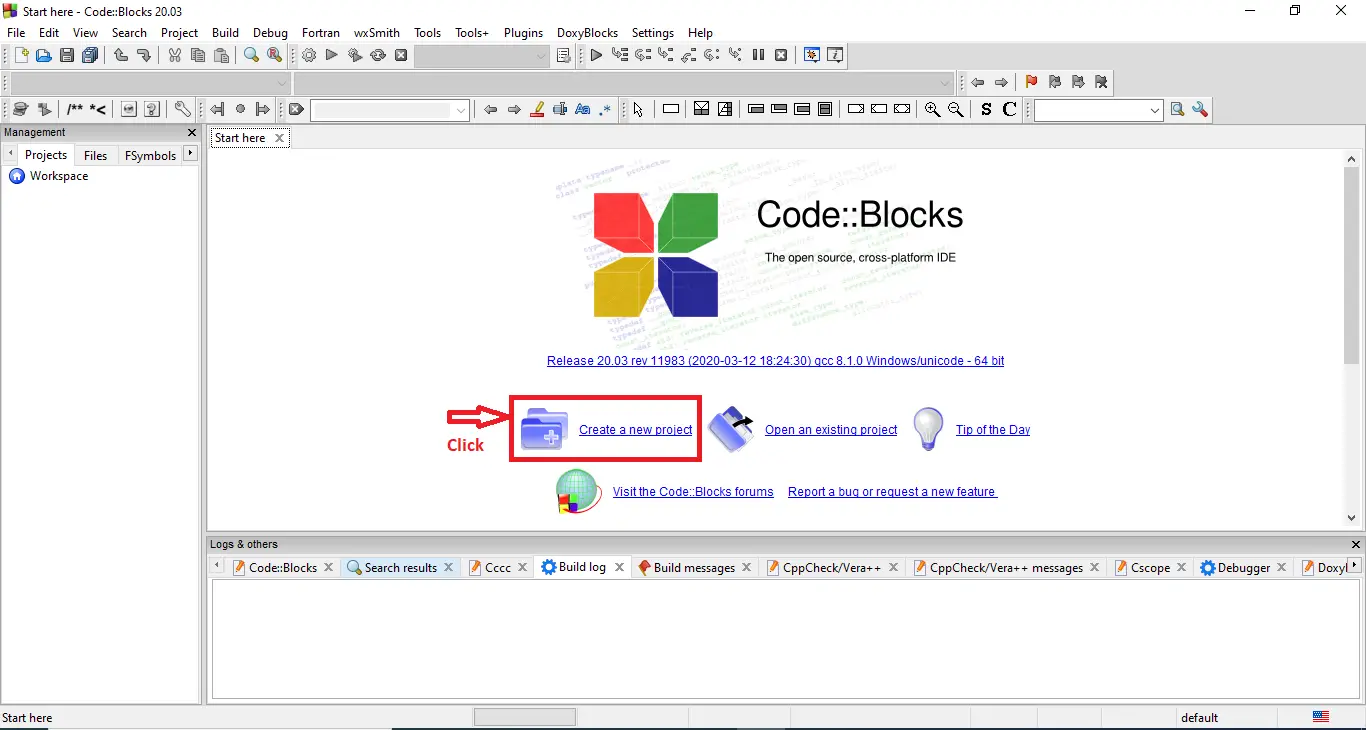
- Step 1: Create a new project.
First open the code blocks IDE and click “create a new project“.

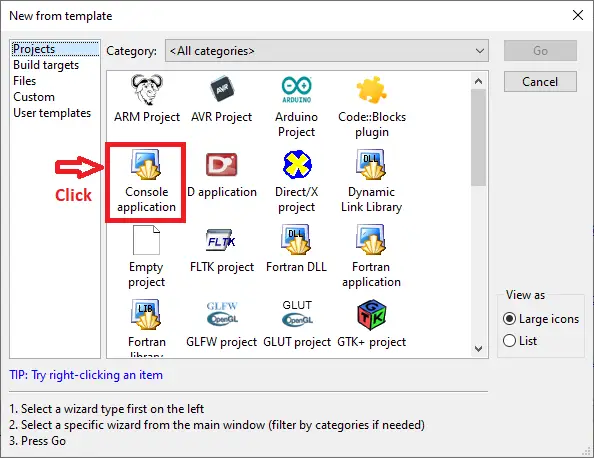
- Step 2: Choose console application.
Next, click the “console application” and after that click “next“.

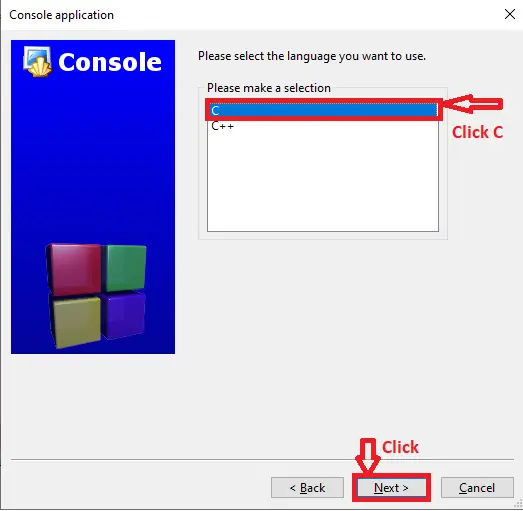
- Step 3: Choose C language.
Then , choose “C language” and click “next“.

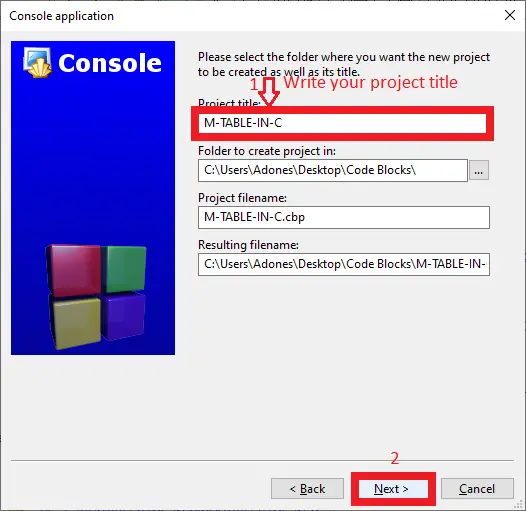
- Step 4: Name your project.
Lastly, name the project you’ve created and click “next” after that click “finish“.

- Step 5: The actual code.
Finally, we will now start adding functionality to our C Framework by adding some functional codes.
This Multiplication Table Project in C was build and run under Code::Blocks IDE.
- Function to prompt the user for a positive range, we used a do while loop. The loop iterates again if the range value is negative, asking the user to provide a positive amount. We print the multiplication table once a positive range has been entered.(Multiplication Table Project in C)
do {
    printf("Enter the range (positive integer): ");
    scanf("%d", &range);
  } while (range <= 0);
Downloadable Source Code
Conclusion
In C, we can also print a table using the do while loop. The post-test loop is the do-while loop. The statements of the do-while loop are executed first, then the condition is assessed, and if the condition is true, the do-while loop statements are executed once again.
Related Articles
Inquiries
If you have any questions or suggestions about Multiplication Table in C with Source Code, please feel free to leave a comment below.
Frequently Asked Questions
How does this C or C++ project work?
Console application written in C (compiled with gcc) or C++ (compiled with g++). Uses standard library (stdio.h, conio.h, string.h, time.h) or C++ STL (iostream, vector, string, map). File-handling via fopen/fwrite or fstream for persistence. Foundation BSIT 1st-2nd year mini-project.
What compiler do I need to run this C or C++ project?
For C: gcc (GNU Compiler Collection) or MinGW (Windows). For C++: g++. IDE options: Code::Blocks (lightweight, built-in compiler), Dev-C++ (classic Philippine BSIT favorite), Visual Studio Code with C/C++ extension, CLion (paid). To compile from terminal: gcc program.c -o program (for C) or g++ program.cpp -o program (for C++), then run with ./program (Linux/macOS) or program.exe (Windows).
How do I run this C / C++ project?
Open the .c or .cpp file in your IDE (Code::Blocks, Dev-C++, VS Code). Click Build (or press F9), then Run (or press F5). From terminal: navigate to project folder, run gcc/g++ command above, then ./program. If using file storage, make sure the data file (e.g. records.txt) is in the same folder as the executable.
Can I use this C / C++ project for a BSIT capstone or thesis?
C/C++ projects are usually accepted for 1st-2nd year mini-projects or as building blocks. For a full capstone you would typically pair them with a more interactive frontend (e.g. wrap C++ logic with a Java/Python/PHP frontend, or extend to GTK/Qt for a real GUI). Standalone console C++ capstones are accepted by some panels but rare in 2026.
Why am I getting ‘undeclared identifier’ or ‘cannot find header’ errors?
Three common C/C++ issues: (1) Missing #include directive, e.g. #include
Where can I find more C or C++ projects with source code?
Browse the C and C++ Projects hub for the full library. For Java desktop alternatives see Java Projects. For higher-level languages see Python Projects. For BSIT capstone idea lists see 150 Best Capstone Project Ideas.

Adones Evangelista
Programmer & Technical Writer at PIES IT Solution
Adones Evangelista is a programmer and writer at PIES IT Solution, author of over 900 tutorials and error-fix guides at itsourcecode.com. Specializes in JavaScript, Django, Laravel, and Python error debugging covering ValueError, TypeError, AttributeError, ModuleNotFoundError, and RuntimeError, plus C/C++ and PHP capstone projects for BSIT students.
Expertise: JavaScript · Python · Django · Laravel · Error Debugging · C/C++ · View all posts by Adones Evangelista →