
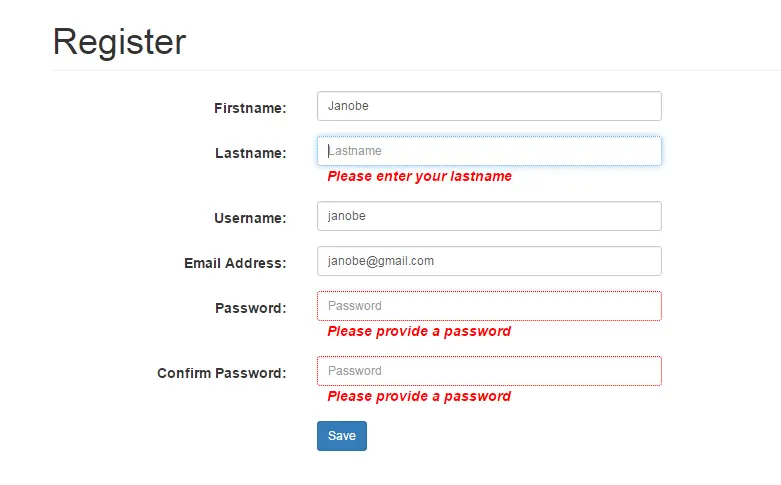
In this tutorial, I will teach you how to validate a registration form with jQuery, PHP and MySQL database.
Validating a registration form is very important because it serves as a guide to the user when they fill up the fields in the form. With the use of jQuery, it will validate the fields before submitting the form.
So, let’s begin:
How to Validate a Registration Form with jQuery, PHP & MySQL database
- Create a database in the MySQL and name it “peopledb“.
- Make a query for creatinga table in the database that you have created.
 CREATE TABLE `registrationdb`.`tblregistration` (
`ID` INT NOT NULL AUTO_INCREMENT PRIMARY KEY ,
`FULLNAME` VARCHAR( 90 ) NOT NULL ,
`ADDRESS` VARCHAR( 90 ) NOT NULL ,
`CONTACTNO` VARCHAR( 30 ) NOT NULL ,
`EMAILADD` VARCHAR( 90 ) NOT NULL ,
`PASSWORD` VARCHAR( 90 ) NOT NULL
) ENGINE = INNODB;
- Create a landing page and name it “registration.php“.
- Do the following codes for the design of a registration form.
<!DOCTYPE html>
<html>
<head>
 <link href="css/bootstrap.min.css" rel="stylesheet" type="text/css">
 <style type="text/css">
 form label.error, label.error {
 color: red;
 font-style: italic
 }
 div.error {
 display: none;
 }
 input {
 border: 1px solid black;
 }
 input:focus {
 border: 1px dotted black;
 }
 input.error {
 border: 1px dotted red;
 }
 #signupForm label.error {
 margin-left: 10px;
 width: auto;
 display: inline;
 }
 </style>
 <title></title>
</head>
<body>
 <form action="process.php" class="form-horizontal span6 container" id=
 "signupForm" method="post" name="signupForm">
 <div class="row">
 <div class="col-lg-12">
 <h1 class="page-header">Register</h1>
 </div>
 </div>
 <div class="form-group">
 <div class="col-md-8">
 <label class="col-md-4 control-label" for=
 "FNAME">Firstname:</label>
 <div class="col-md-6">
 <input class="form-control input-sm" id="FNAME" name="FNAME" placeholder="Firstname" type="text" value="">
 </div>
 </div>
 </div>
 <div class="form-group">
 <div class="col-md-8">
 <label class="col-md-4 control-label" for=
 "LNAME">Lastname:</label>
 <div class="col-md-6">
 <input class="form-control input-sm" id="LNAME" name="LNAME" placeholder="Lastname" type="text" value="">
 </div>
 </div>
 </div>
 <div class="form-group">
 <div class="col-md-8">
 <label class="col-md-4 control-label" for=
 "USERNAME">Username:</label>
 <div class="col-md-6">
 <input class="form-control input-sm" id="USERNAME" name="USERNAME" placeholder="Username" type="text" value="">
 </div>
 </div>
 </div>
 <div class="form-group">
 <div class="col-md-8">
 <label class="col-md-4 control-label" for="EMAILADD">Email
 Address:</label>
 <div class="col-md-6">
 <input class="form-control input-sm" id="EMAILADD" name="EMAILADD" placeholder="Email Address" type="text" value=
 "">
 </div>
 </div>
 </div>
 <div class="form-group">
 <div class="col-md-8">
 <label class="col-md-4 control-label" for=
 "PASS">Password:</label>
 <div class="col-md-6">
 <input class="form-control input-sm" id="PASS" name="PASS"
 placeholder="Password" type="password" value="">
 </div>
 </div>
 </div>
 <div class="form-group">
 <div class="col-md-8">
 <label class="col-md-4 control-label" for=
 "CPASS">Confirm Password:</label>
 <div class="col-md-6">
 <input class="form-control input-sm" id="CPASS" name="CPASS" placeholder="Password" type="password" value="">
 </div><label class="col-md-2 password"></label>
 </div>
 </div>
 <div class="form-group">
 <div class="col-md-8">
 <label class="col-md-4 control-label" for="idno"></label>
 <div class="col-md-8">
 <button class="btn btn-primary btn-sm" name="save" type="submit"><span class="fa fa-save fw-fa"></span>
 Save</button>
 </div>
 </div>
 </div>
 </form>
</body>
</html>- Set the following jQuery plugins.
<script type="text/javascript" src="jquery/jquery.min.js"></script>
<script type="text/javascript" src="js/jquery.validate.min.js"></script>
- Create a script for validating a registration form.
 <script>
 $(document).ready(function() {
 // validating signup form on keyup and submit
 $("#signupForm").validate({
 rules: {
 FNAME: "required",
 LNAME: "required",
 USERNAME: {
 required: true,
 minlength: 4
 },
 PASS: {
 required: true,
 minlength: 8
 },
 CPASS: {
 required: true,
 minlength: 8,
 equalTo: "#PASS"
 },
 EMAILADD: {
 required: true,
 email: true
 }
 },

 messages: {
 FNAME: "Please enter your firstname",
 LNAME: "Please enter your lastname",
 USERNAME: {
 required: "Please enter a username",
 minlength: "Your username must consist of at least 4 characters"
 },
 PASS: {
 required: "Please provide a password",
 minlength: "Your password must be at least 8 characters long"
 },
 CPASS: {
 required: "Please provide a password",
 minlength: "Your password must be at least 8 characters long",
 equalTo: "Password does not match."
 },
 EMAILADD: "Please enter a valid email address",

 }
 });

 });
</script>- Create a method for saving data in the MySQL database.
<?php
$server = "localhost";
$dbuser = "root";
$dbpass ="";
$dbname ="registrationdb";
//connection between mysql and php
$con = mysql_connect($server,$dbuser,$dbpass);
//validate your connection
if(isset($con)){
 $res = mysql_select_db($dbname);
 if (!isset($res)) {
 echo "No database found!";
 }
}else{
 echo "Unable to connect to the mysql database";
}

//set a query for inserting data in the database
$sql ="INSERT INTO `tblregistration` (`FNAME`, `LNAME`, `EMAILADD`, `USERNAME`, `PASSWORD`)
 VALUES ('".$_POST['FNAME']."','".$_POST['LNAME']."','".$_POST['EMAILADD']."','".$_POST['USERNAME']."','".$_POST['PASS']."')";
//Execute the query
$result = mysql_query($sql) or die(mysql_error());
//validate the executed query.
if ($result>0) {

 echo "<h1>Your now successfully resgistered!</h1>";
}
?>
For all students who need a programmer for their thesis system, or anyone who needs source code in any programming language, you can contact us.
Frequently Asked Questions
How does this PHP project work?
Built with vanilla PHP (no framework) and MySQL backend. Standard structure: form HTML, PHP script handlers, MySQL via PDO or mysqli, sessions for auth, Bootstrap for responsive layout. Ready to extend for BSIT capstone scope.
What PHP and MySQL versions does this project require?
Most projects in this batch run on PHP 7.4 to PHP 8.2 with MySQL 5.7+ or MariaDB 10+. A few older projects need PHP 5.6 (deprecated, use XAMPP 7.x). To run: install XAMPP / WAMP / Laragon, extract project to htdocs, import the included .sql file via phpMyAdmin, edit the connection file (usually config.php or db_connect.php) with your DB credentials, browse to the project URL in your browser.
How do I set up the database for this PHP project?
Open phpMyAdmin (http://localhost/phpmyadmin/ on XAMPP), create a new empty database with the name specified in the project’s config.php. Click the Import tab, choose the included .sql file, click Go. Then edit config.php (or includes/connection.php) with: ‘localhost’, your MySQL username (usually ‘root’), your MySQL password (usually blank for XAMPP), and the database name.
Can I use this PHP project for a BSIT capstone or thesis?
Yes, but extend it. A bare CRUD app is too narrow for full capstone scope. Add: user roles via session checks, reports/dashboards (Chart.js + AJAX), PDF exports (TCPDF library), email notifications (PHPMailer), real domain extension (analytics, audit log, multi-branch support). Pair with Chapter 1-5 documentation matching your panel’s rubric.
Why am I getting ‘connection error’ or ‘undefined function mysqli_connect’?
Three common PHP issues: (1) Connection error: Apache + MySQL services not running in XAMPP control panel, OR database name in config.php does not match what you created in phpMyAdmin. (2) ‘undefined function mysqli_connect’: MySQL extension not enabled, in php.ini uncomment extension=mysqli (then restart Apache). (3) ‘No such file or directory’: MySQL socket path wrong, use 127.0.0.1 instead of localhost in the connection string.
Where can I find more PHP projects with source code?
Browse the PHP Projects hub for the full library (300+ vanilla PHP systems). For modern PHP MVC alternatives see Laravel Projects (74 systems) or CodeIgniter Projects (32 systems). For BSIT-focused capstone idea lists see 150 Best Capstone Project Ideas.
Fatal error: Uncaught Error: Call to undefined function mysql_connect() in C:\xampp\htdocs\ubada\process.php:7 Stack trace: #0 {main} thrown in C:\xampp\htdocs\ubada\process.php on line 7
what is the problem??
help me please